Choosing a speech-to-text API means choosing how audio enters your application, when text becomes usable, and which constraints your code must handle. A service that suits uploaded recordings can require a different model, transport, and billing setup for live calls. These seven providers cover distinct file, streaming, cloud, and customer-hosted requirements, with the tradeoffs that matter to developers building production applications.
What does a speech-to-text API do?
A speech-to-text (STT) API converts spoken audio into text that software can consume. Depending on the model and endpoint, it can also return timestamps, speaker labels, or confidence scores. Those outputs are separate capabilities, not guaranteed parts of every transcript.
Three workflows need different interfaces:
- Live streaming: send audio as it arrives and receive interim or final text during the session.
- Synchronous file transcription: submit a completed recording and wait for the transcript in the same request.
- Asynchronous file transcription: create a job and retrieve its result later, often through polling or a webhook.
Streaming text from a completed file does not make the input live. For interactive applications, the next distinction is who decides the speaker has finished: the recognition model, a separate voice activity detector, or your application. Our guide to real-time transcription explains how those events affect downstream actions.
Speech-to-text API shortlist at a glance
Start with the input workflow, then narrow by the exact model, language, deployment, and output contract. A provider-wide language count cannot establish that a particular streaming model supports your language or speaker-labeling requirement.
| Provider | Input workflows | Main selection tradeoff |
|---|---|---|
| Deepgram | Prerecorded REST and live streaming | Nova-3 multilingual coverage and Flux turn detection are different model choices. |
| AssemblyAI | Async files, Sync clips, live WebSocket | Agent and Realtime models target different live uses; billing includes idle connection time. |
| OpenAI | Completed-file requests and live transcription | Current file/live models differ from older Whisper and GPT-4o output contracts. |
| Google Cloud Speech-to-Text | Sync, async batch, live streaming | Model, locale, region, and method must line up; live sessions need rotation. |
| Azure AI Speech | Live SDK, synchronous files, async batch | Short-audio REST is final-only; container access has conditions. |
| Amazon Transcribe | S3 batch and live streaming | Language and feature support varies between modes and regions. |
| Speechmatics | Batch, live WebSocket, separate Agent STT | Multilingual and agent models have different endpointing and deployment boundaries. |
1. Deepgram: separate general transcription from conversational turns
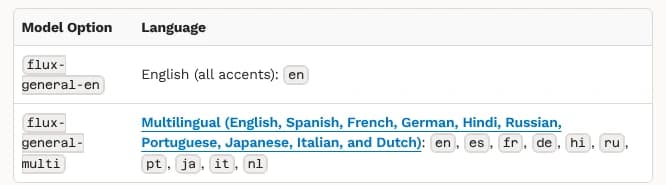
Deepgram provides prerecorded transcription and live streaming. Its model selection guide separates Nova-3, a general-purpose recognition model, from Flux, a streaming model with integrated end-of-turn detection.
Hosted Nova-3 multilingual supports 55 languages with automatic detection and code-switching, meaning a speaker can switch languages within the audio. Flux has a separate English model and a multilingual model covering ten languages. Choosing Nova-3's language coverage does not also select Flux's turn-detection behavior.
This distinction matters for a product that both transcribes recordings and handles live conversations. The same provider can serve both jobs while requiring different models and event handling.
Operating and deployment limits: Prerecorded input is limited to 2 GB. Self-hosting is available, but the newer 55-language Nova-3 multilingual update is hosted-only; the self-hosted multilingual version supports ten languages. Cloud and customer-hosted deployments therefore do not have identical model coverage.
Billing: Audio duration is metered per second.
Fit: A candidate for teams choosing explicitly between general transcription and model-native conversational turn detection. It does not provide one model that combines the full Nova-3 multilingual set with Flux's turn behavior.
2. AssemblyAI: distinct async, Sync, and live interfaces
AssemblyAI separates prerecorded jobs, synchronous clip transcription, and live WebSocket recognition. Async jobs use submit-and-retrieve workflows. Sync returns a completed clip's result in one HTTP response. Realtime produces text while audio arrives.
Its recommended realtime models are AssemblyAI-STT-3.7-Realtime-Agent and AssemblyAI-STT-3.7-Realtime. Both support 32 languages, keyterm prompting, context carryover, and conversation memory, but target different workloads:
- AssemblyAI-STT-3.7-Realtime-Agent: voice agents, including multilingual conversations with native code-switching. It supports Voice Focus, which isolates the primary voice and suppresses background audio in noisy environments.
- AssemblyAI-STT-3.7-Realtime: meeting notetakers, ambient transcription, and live captions with speaker labels. Enable
speaker_labelsfor speaker-attributed output. Speaker labeling is also supported on the Agent model, but Realtime is the recommended choice for that use. Voice Focus is unavailable on Realtime.
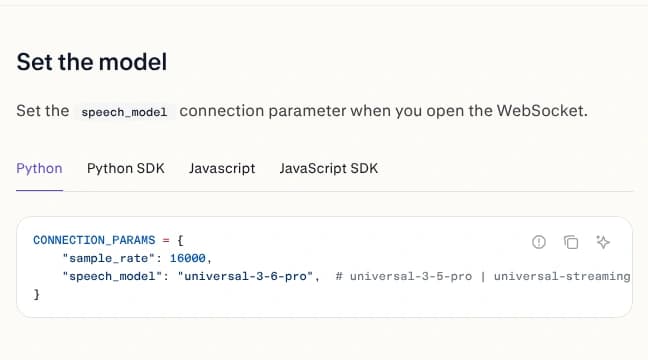
Universal-3.6 Pro Realtime is the previous flagship and remains fully supported, with 32 languages and native code-switching. It remains a choice for integrations pinned to universal-3-6-pro. The prerecorded Universal-2 model covers 99 languages, a separate offering from these live models.
Operating and deployment limits: Sync accepts finished HTTP-uploaded clips up to 20 minutes and 256 MB; its SDK and live-upload path has a 120-second cap. Realtime sessions have a three-hour limit, or a maximum duration set by a temporary token. After the limit, they close when the current turn ends or after up to 60 additional seconds; that extra time is billed. A commercial self-hosted streaming option exists, but its model/version availability is separate from the hosted service.
Billing: Prerecorded transcription uses audio duration. Live transcription bills for open WebSocket time, including idle periods. Connection lifecycle management therefore affects cost even when nobody speaks.
Fit: A candidate when one application needs several transcription workflows. It requires mode- and output-specific model choices, and long idle live connections carry a billing consequence.
3. OpenAI: current file and live models have different contracts
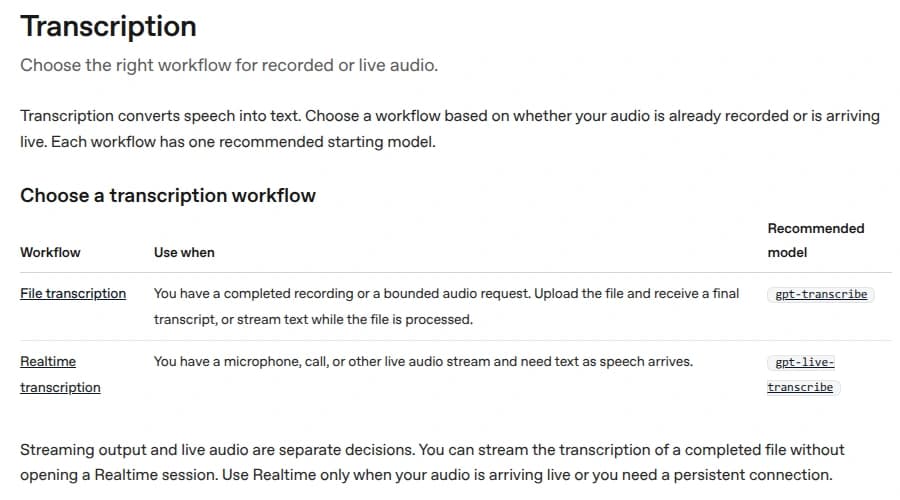
OpenAI's transcription workflows use gpt-transcribe for completed recordings and gpt-live-transcribe for audio arriving live. The file endpoint, /v1/audio/transcriptions, can return a finished transcript or stream text while processing an uploaded file. Live transcription uses a server WebSocket or a browser WebRTC connection.
The live model emits text deltas as audio arrives. Your client commits the audio turn for final text and supplies voice activity detection. The model does not support server_vad or semantic_vad, and it returns no word timestamps, speaker labels, or confidence scores.
Language hints and context prompts are available, but the older Whisper language count is not a support specification for these current models.
Operating and deployment limits: File uploads are capped at 25 MB. This is a managed API; self-hosting open-source Whisper is a separate deployment choice.
Billing: The file model and live model use audio-minute metering. Their transcription charges exclude the rest of a voice-agent stack.
Fit: A candidate for applications that can use the current output contracts. Existing Whisper and GPT-4o transcription integrations face a material migration: whisper-1, gpt-4o-transcribe, gpt-4o-mini-transcribe, and gpt-4o-transcribe-diarize shut down on February 26, 2027. Their timestamp, subtitle, and speaker-labeling examples do not establish equivalent features in the replacement models.
4. Google Cloud Speech-to-Text: model-specific limits govern the design
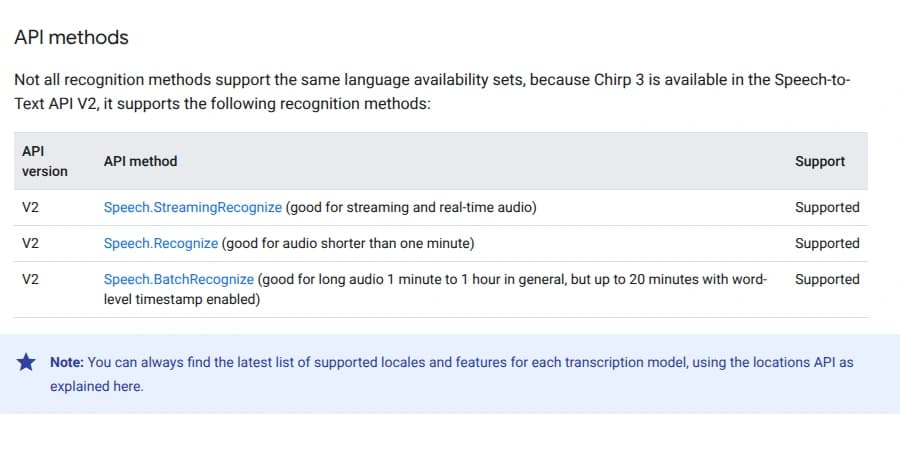
Google Cloud Speech-to-Text V2 provides synchronous recognition, asynchronous batch jobs, and bidirectional live recognition over gRPC, a remote procedure call protocol. Live streaming is not a REST interface. Batch recognition takes audio from Cloud Storage.
Language support is a combination of locale, model, region, method, and feature. Chirp 3's API methods illustrate why the service-wide limits alone are insufficient: it supports all three methods, but its batch duration is generally one hour, or 20 minutes with word-level timestamps. The wider API's eight-hour batch ceiling does not override those model limits.
Operating and deployment limits: Synchronous requests allow up to 10 MB or one minute of audio. Live sessions last up to five minutes, so longer conversations need stream rotation and transcript continuity across connections. The managed API uses location-specific availability. Speech-to-Text On-Prem is a separate, deprecated private feature requiring access through Google, rather than an unrestricted container download.
Billing: The V2 response can report billed audio seconds through total_billed_duration. Multichannel processing affects billing.
Fit: A candidate for applications already using Google Cloud and Cloud Storage. REST-only live input, uninterrupted single connections beyond five minutes, and generally available on-premises deployment are poor matches for this interface.
5. Azure AI Speech: live recognition and file transcription are separate paths
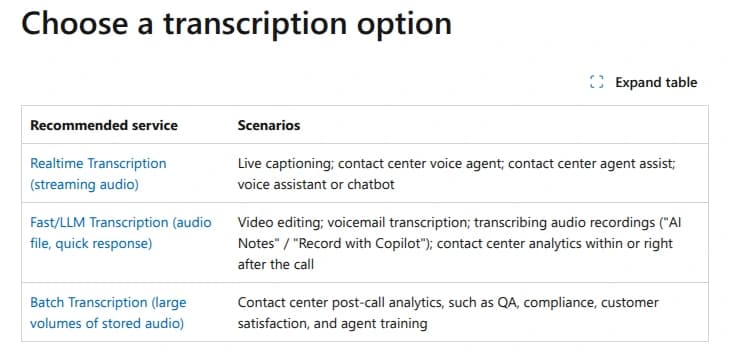
Azure AI Speech provides live recognition through the Speech SDK and CLI, synchronous Fast Transcription for files, and asynchronous batch transcription. Its transcription options serve different input patterns.
The short-audio REST endpoint accepts up to 60 seconds and returns final results only. Sending audio in an HTTP request does not give that endpoint the intermediate results available through the live SDK.
Language and feature availability varies across models, regions, Custom Speech, and containers. A cloud locale's availability does not automatically establish container support for the same workflow.
Operating and deployment limits: On Standard (S0), Fast Transcription accepts files smaller than 500 MB and shorter than five hours. Customer-environment speech containers ordinarily require connectivity to Azure's billing endpoint. Disconnected containers require approval and a commitment arrangement; they are a conditional deployment option.
Billing: Transcription billing is based on audio duration. For dual-channel audio, separate files incur each file's audio duration; a single multiplexed file is billed for its own duration.
Fit: A candidate for teams needing Azure-managed live and file paths, or eligible container deployment. A fully disconnected requirement does not fit ordinary metered containers without the separate offline arrangement.
6. Amazon Transcribe: regional streaming and S3 batch jobs
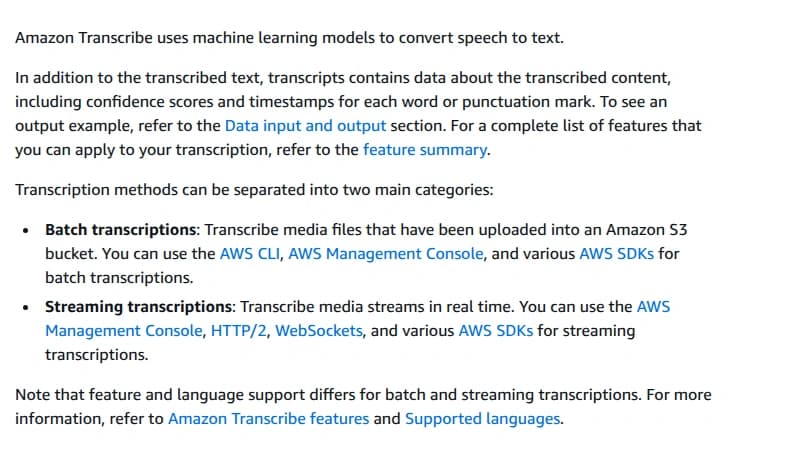
Amazon Transcribe supports live audio over HTTP/2, WebSockets, or SDKs. Completed recordings use asynchronous jobs with media stored in Amazon S3. These two transcription methods have different language and feature coverage.
The required combination is specific: language, batch or streaming mode, feature, and AWS region. A language appearing in the service's overall list does not establish that every feature works for that language in live sessions.
Operating and deployment limits: Standard batch files can be up to eight hours and 2 GB. The default concurrent streaming quota is 25 per region and is adjustable. That is an account quota, not a measurement of application throughput. The assessed offer runs as an AWS-managed regional service.
Billing: Standard transcription uses audio-duration billing, in one-second increments with no minimum. Custom language models and some other features add charges.
Fit: A candidate when S3-based file processing and AWS regional services match the architecture. It is a poor match for a requirement to run the recognizer entirely inside your own infrastructure.
7. Speechmatics: distinguish Batch, Realtime, and Agent STT models
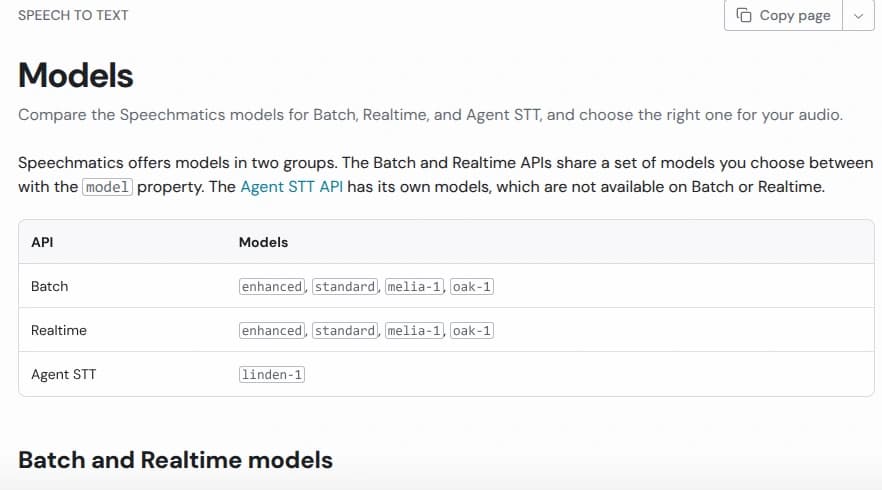
Speechmatics provides Batch and Realtime APIs, plus a separate Agent STT API. Its model capability matrix distinguishes the models behind those interfaces.
Melia-1 supports automatic multilingual recognition and code-switching across 55-plus languages in Batch and Realtime. Enhanced and Standard use selected-language configurations. Agent STT uses its own Linden-1 model and returns speaker-attributed turns.
Utterance-ending behavior matters for live applications. Melia-1 and Oak-1 Realtime require your client to detect an utterance ending and send ForceEndOfUtterance; they do not automatically end turns based on silence. Those models also have a different feature set from Enhanced and Standard.
Operating and deployment limits: Batch request bodies must be smaller than 1 GB; larger files use URL fetching. Customer-environment options include containers, Kubernetes, and virtual appliances, with model availability tied to the deployment. Agent STT runs only as a managed cloud service. The synchronous Batch option, wait, is also limited to the managed cloud service.
Billing: Speech-to-text is priced per hour of transcribed audio. On Pro, usage charges are calculated to the exact second.
Fit: A candidate for multilingual Batch/Realtime workloads or a customer-environment deployment requirement. Agent STT cannot be assumed to run on-premises, and a Melia-1 live integration must own its utterance-ending logic.
How to narrow the shortlist
Four requirements usually eliminate more options than a generic accuracy ranking:
- Input and session lifetime. A completed clip, a stored recording, and a live call need different request lifecycles. Session caps create reconnection work; file caps create chunking or storage work.
- Required transcript fields. Word timestamps, speaker diarization, confidence scores, and language labels are separate requirements. Diarization identifies who spoke when. A text-only replacement can break caption alignment or speaker-specific analytics even when its words are correct.
- Language and deployment together. Hosted language coverage does not prove self-hosted parity. Automatic language detection, a supplied language hint, and mid-sentence code-switching also describe different behavior.
- The billable unit. Audio duration, summed channels, and open connection time produce different invoices. Our speech-to-text pricing guide covers normalized costs and worked examples.
Keep speech recognition separate from any bundled agent platform in the architecture decision. When one vendor supplies recognition, turn handling, and agent execution, switching recognizers can also affect session events and agent logic. A standalone STT integration leaves more of that orchestration with your team. Neither arrangement makes migration automatic or impossible.
When the project needs a voice-agent platform
If the application only needs transcripts, choose a standalone STT API. Dasha is a managed production platform for conversational AI products, not a standalone speech-to-text API.
For teams building production voice agents, we provide a managed runtime, REST APIs, and a web application with telephony, integrations, testing, and monitoring. Speech recognition is one part of that larger operating boundary, alongside conversation execution and the systems around it.
Choose the platform boundary separately from the transcription model. If you want a managed foundation for phone or web agents rather than an audio-to-text endpoint, start with our Dasha developer documentation.