
Published production streaming speech-to-text prices compared here start at $0.15 per hour. OpenAI lists an estimated live-transcription cost of $0.017 per minute, equal to $1.02 per hour at that estimate. Session billing, silence, channels, diarization, language features, minimums, retries, capacity, support, and recognition quality determine the cost per completed conversation.
Published production streaming speech-to-text prices in this comparison start at $0.15 per hour. At the high end, OpenAI lists an estimated live-transcription cost of $0.017 per minute, equivalent to $1.02 per hour at that estimate. These figures support a first-pass budget, but they are neither a quality ranking nor a quote.
Prices, billing rules, model names, limits, regions, and add-ons were rechecked against official sources on August 14, 2026, in US dollars. Deepgram still labels its streaming rates as a limited-time promotion, so treat those figures as time-sensitive.
Speech-to-text API pricing compared
The table normalizes public pay-as-you-go streaming prices to both a minute and an hour. For OpenAI, it normalizes the published estimated live-transcription cost instead. It uses representative production-oriented models, not the cheapest batch transcription option. Enterprise discounts, prepaid credits, negotiated commitments, taxes, and adjacent cloud services are excluded.
| Provider and streaming model | Published price or estimate | Billing clock |
|---|---|---|
| AssemblyAI Universal-Streaming English | $0.0025/min; $0.15/hr | Entire time each WebSocket session stays open, including idle time |
| Deepgram Nova-3 Monolingual | $0.0048/min; $0.288/hr | Public pricing describes per-second billing and processed audio duration |
| Amazon Transcribe Standard Streaming in US East (N. Virginia) | about $0.0100/min; $0.60/hr | One-second increments, with no minimum |
| Google Cloud Speech-to-Text V2 Standard | $0.0160/min; $0.96/hr for the first 500,000 monthly minutes | Successfully processed audio, rounded to one second per request; an empty response still bills |
| Azure Speech Standard real-time transcription | $1.00/hr; about $0.0167/min in listed commercial US regions | Audio sent, billed in one-second increments |
| OpenAI gpt-live-transcribe | Estimated $0.0170/min; $1.02/hr equivalent | The pricing page presents an estimated live-transcription cost, not a base billing unit |
Conditions and add-ons
- AssemblyAI: Keyterms: $0.04/hr; diarization: $0.12/hr. Universal-3.5 Pro Realtime is $0.45/hr and includes keyterms.
- Deepgram: The current streaming price is promotional. Flux English is $0.0065/min. PAYG diarization is $0.002/min; multichannel duration is summed.
- Amazon Transcribe: Regional prices vary. Up to two channels, custom vocabularies, vocabulary filtering, diarization, and language identification are included; content redaction and custom language models cost extra.
- Google Cloud: Each channel bills separately. Published tiers fall to $0.010, $0.008, and $0.004/min as monthly usage crosses 500,000, 1 million, and 2 million minutes.
- Azure Speech: Custom real-time transcription is $1.20/hr. Continuous language identification, diarization, and pronunciation assessment are $0.30/hr per feature. Region and contract affect the actual price.
- OpenAI: Recorded transcription models use different, lower estimates. Model availability, rate limits, and actual usage still shape the live workload.
AssemblyAI also lists Universal-3.5 Pro Realtime at $0.45 per hour, or $0.0075 per minute. It may be the closer comparison when your workload needs its included keyterm prompting, context carryover, and other model-specific behavior. A cheaper model that misses names, account numbers, dates, or end-of-turn cues can raise retries and lower completion enough to cost more overall.
Why the displayed rate is not your invoice
Two providers can show rates in the same unit and still bill different quantities. Normalize the billing clock before comparing prices.
Session time, processed audio, and silence
AssemblyAI's streaming billing documentation bills the full time a WebSocket stays open, including idle time with no audio. Two simultaneous five-minute sessions bill ten minutes. An unclosed session can remain open for up to three hours and bill for that full period.
Google Cloud bills successfully processed audio, including a request that returns an empty response because no speech was recognized. A server-error response does not bill. Azure measures hours of audio sent. Deepgram describes true per-second billing but also says multichannel pricing is based on total processed audio duration.
Do not ask only whether a provider "charges for silence." Ask exactly when its meter starts and stops:
- when the WebSocket opens;
- when the first audio frame arrives;
- while voice activity detection sees silence;
- during hold, transfer, or caller think time;
- after the caller disconnects but before cleanup completes;
- while a retry or fallback stream is open.
Then trace session-open, audio-start, last-audio, and session-close timestamps in production. A modest rate can produce a large bill if connections leak or stay open through long idle periods.
Rounding and request duration
Short calls make rounding visible. Amazon Transcribe bills standard streaming in one-second increments with no minimum. Google rounds each request up to the next second. For a provider that rounds or applies a minimum, a workload with many abandoned calls, voicemail clips, or restarted streams can therefore cost more than total raw audio seconds x rate.
Keep the duration distribution, not just the average. One 15-minute stream and many short, separately rounded requests can carry different billable totals even when the application hears the same amount of useful speech.
Channels, streams, and retries
Channel rules differ. Google bills the sum of all recognized channel durations, so 30 seconds of four-channel audio bills 120 seconds. Amazon's standard price includes up to two channels and bills their shared duration once. Deepgram's public FAQ says a ten-minute, two-channel file bills 20 minutes.
Application architecture can multiply the same call again. If separate agent and caller streams use separate session IDs, each can run its own meter. Parallel primary and fallback providers may overlap during a cutover. Retries may also repeat already processed audio.
Map these rules to the exact media path you plan to run. "One four-minute call" is not a billing unit until you know its number of channels, streams, requests, and overlapping providers.
Models, languages, and transcript features
The base model may not provide the accuracy or output your application needs. Price the exact configuration used in the pilot:
- monolingual, multilingual, medical, or custom recognition;
- automatic language identification and language switching;
- keyterm prompting or custom vocabulary;
- speaker diarization;
- personal-data redaction;
- entity extraction, formatting, or domain modes;
- custom model training and endpoint hosting.
Some providers include a feature in the base rate. Others price it by audio hour or minute. Others require a different model. For example, Amazon includes speaker diarization and language identification in its standard transcription price, while the current public AssemblyAI rate adds $0.12 per hour for streaming diarization. Azure lists three enhanced real-time features at $0.30 per hour per feature.
Volume tiers, commitments, and credits
Marginal rates and average rates are not the same. Google's V2 Standard tiers reduce the price of minutes above each published threshold. Deepgram's Growth plan starts with at least $4,000 in annual prepaid credits and publishes lower rates than pay as you go. A negotiated enterprise quote can add a commitment, overage rate, ramp period, or unused-credit rule.
Model tiers explicitly. Do not multiply every minute by the lowest rate shown on the page unless the contract applies that rate to every minute.
monthly base cost =
  minutes in tier 1 x tier 1 rate
  + minutes in tier 2 x tier 2 rate
  + minutes in tier 3 x tier 3 rate
  + applicable overage
Credits are useful for development, but they should not lower the steady-state production forecast unless they renew on the same schedule as the workload.
Concurrency, support, and deployment requirements
Monthly audio hours do not describe peak load. Price the highest active-stream count and the highest new-session rate in a short interval. Then confirm whether requests queue, fail, or throttle at the limit and whether higher limits require a contract.
AssemblyAI currently describes unlimited open streaming sessions for paid accounts but limits how fast new sessions can be opened, starting at 100-plus per minute with automatic scaling. Deepgram allows up to 150 concurrent speech-to-text streaming requests on pay as you go. Each Growth project allows up to 225 on the North American endpoint and 150 in Europe and Australia. Lower feature-specific limits can apply when a request combines services. Growth speaker-diarization streaming, for example, is limited to 50 concurrent requests in North America and 25 in Europe and Australia. These are different capacity controls and should not be compared as if both were "concurrency."
Dedicated capacity, service-level commitments, 24/7 support, data residency, private networking, self-hosting, regulated-data terms, and incident escalation may have no public unit price. Include them as fixed or contracted costs rather than hiding them in the per-minute line.
Normalize speech-to-text cost for a voice agent
Build the forecast from provider billing records, not call duration alone.
billable STT minutes =
  sum(provider-billed session or audio seconds / 60)
  x applicable channel or stream multiplier
  + minimum and rounding adjustments
  + retried or overlapping processing

monthly STT cost =
  base model cost by tier
  + transcription add-ons
  + model hosting or training
  + fixed capacity, support, and deployment charges

STT cost per completed conversation =
  monthly STT cost / completed conversations
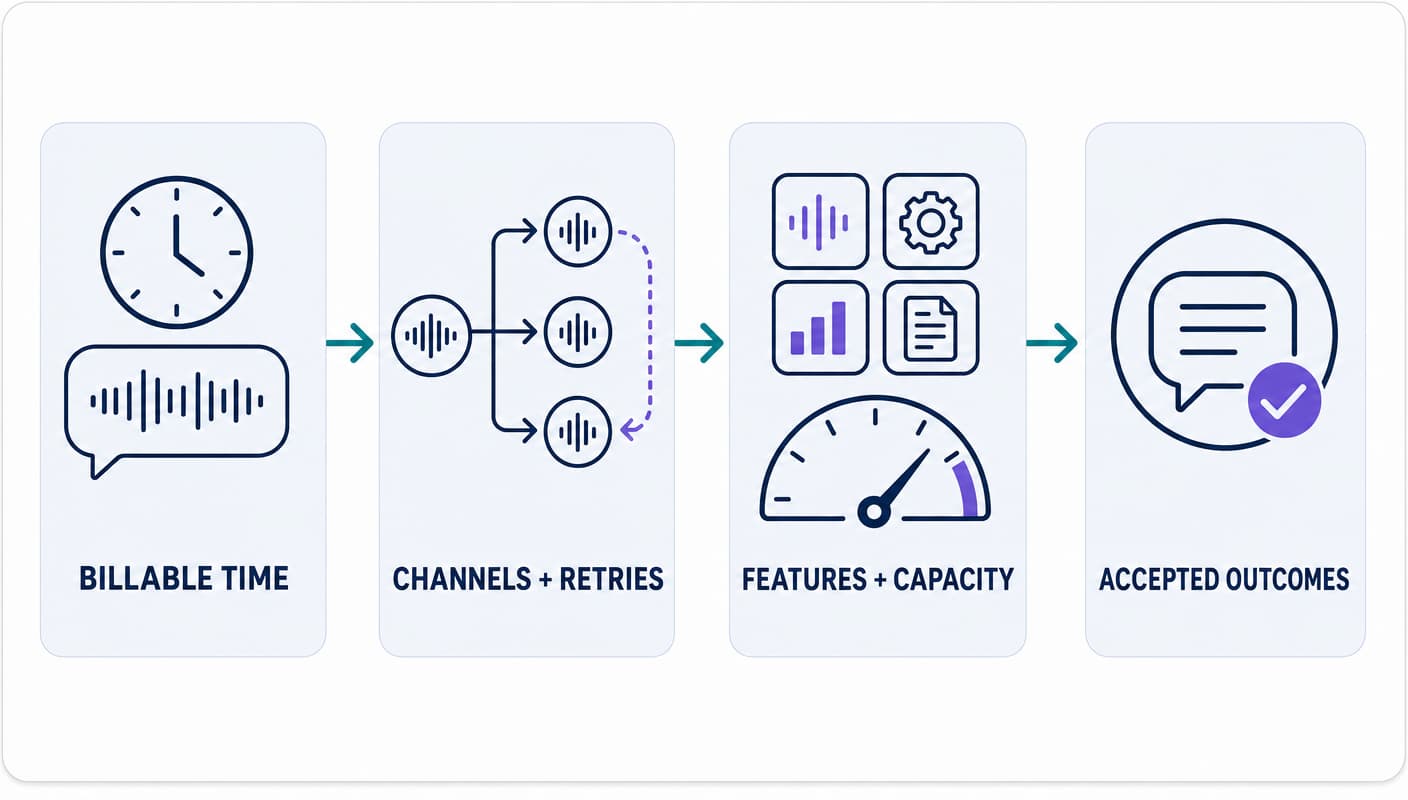
Use completed conversation only for a result your product accepts, such as a valid appointment, resolved support task, qualified lead, or completed handoff. A transcript can be technically successful while the agent fails because it misheard a key entity, finalized a turn too late, or triggered the wrong tool.
This metric also prevents low recognition quality from looking cheap. If a lower-rate model increases repetition, transfers, or failed outcomes, it adds speech minutes and cost across the rest of the voice stack.
A worked speech-to-text pricing example
Consider a production workload with 300,000 billable STT minutes and 75,000 completed conversations in one month. Before add-ons, commitments, or discounts, the base-price sensitivity looks like this:
| Representative base rate | Monthly STT cost | STT cost per completed conversation |
|---|---|---|
| $0.0025/min | $750 | $0.0100 |
| $0.0075/min | $2,250 | $0.0300 |
| $1.00/hr, about $0.0167/min | $5,000 | $0.0667 |
Those rates correspond to current public points in the comparison table, but this is a planning example, not a provider quote. It assumes the 300,000 minutes are already normalized to the provider's billable quantity.
For Azure, 300,000 minutes equal 5,000 hours, and the exact $1.00 hourly rate produces a $5,000 total. The $0.0167 per-minute display is rounded.
Now test the billing clock. If the application carries 300,000 minutes of useful conversation but leaves each streaming session open 8% longer, a session-time provider bills 324,000 minutes. At $0.0075 per minute, that raises base speech-to-text spend from $2,250 to $2,430 before any transcript feature is added. A $0.002-per-minute diarization feature would add another $648 if enabled for every billable minute.
The gap between the cheapest and most expensive base rates is real, but a production decision should compare it with outcome quality. At this workload, every $0.001 per minute changes the monthly base bill by $300. A model that costs $0.003 more per minute adds $900. If it prevents enough failed calls, retries, live transfers, or support work to save more than $900, the higher STT line can lower total cost.
How to compare providers with production traffic
A clean evaluation uses the same workload, acceptance rules, and measurement path for every provider.
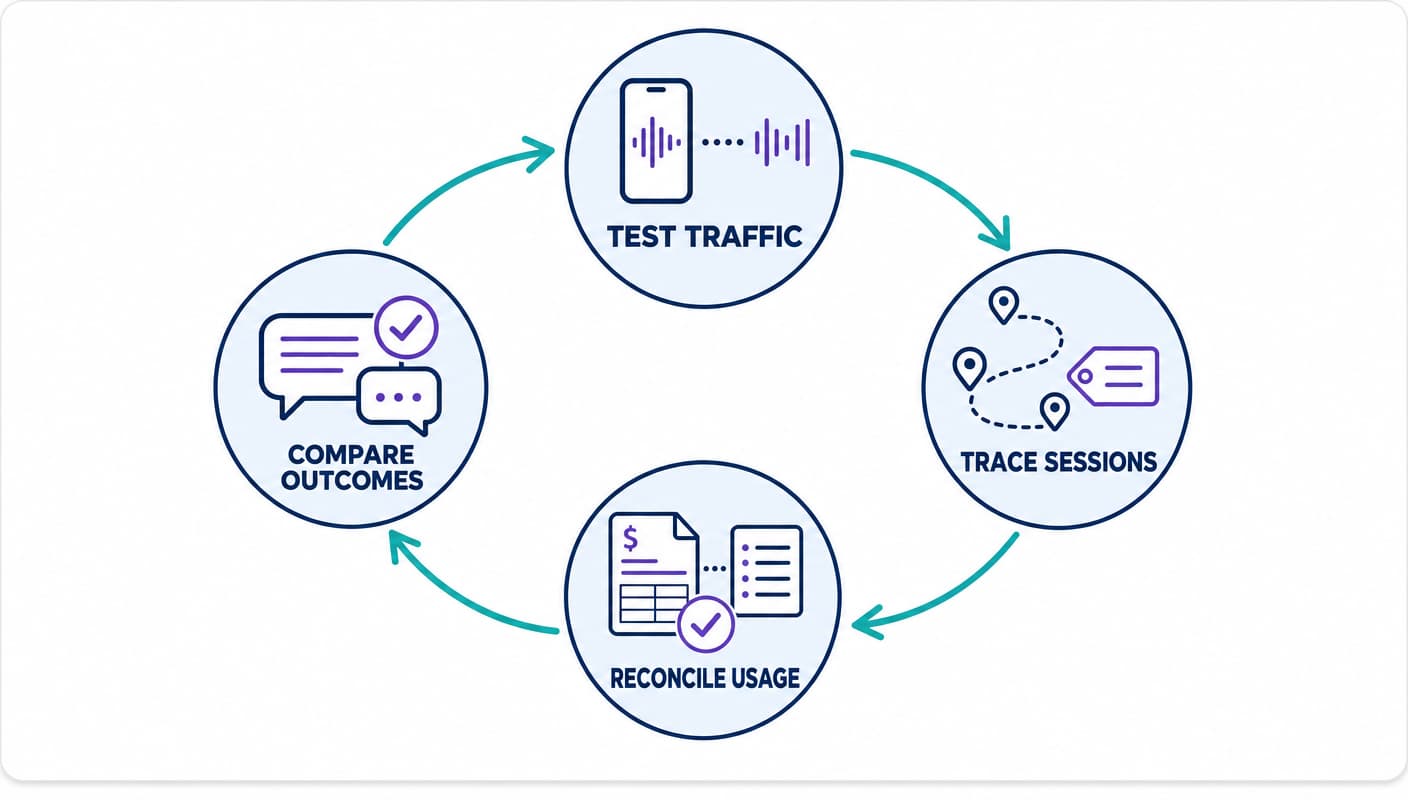
1. Freeze the media and transcript requirements
Specify sample rate, codec, channel layout, languages, expected code switching, caller environment, latency target, key terms, redaction, diarization, timestamps, and data region. Include real phone audio rather than studio-only clips.
2. Test recognition and turn behavior
Word error rate is useful, but a voice agent also needs entity accuracy, finalization latency, partial-transcript stability, end-of-turn behavior, and recovery from interruptions. Score names, numbers, dates, addresses, product terms, negation, and commands separately because one error can change a tool action.
3. Reproduce production concurrency and failures
Run the expected active-stream count and call-start bursts. Test quota exhaustion, provider errors, network interruption, stream restart, silence, hold, transfer, and caller hang-up. Verify what the caller hears and whether a fallback duplicates billable audio.
4. Reconcile the invoice to session IDs
Export provider usage and join it to your call, channel, stream, and outcome identifiers. Compare useful audio, connection-open time, provider-billed time, add-on usage, retries, failed requests, and invoice totals. Investigate the largest differences before negotiating a volume rate.
5. Compare cost per accepted outcome
Use the same outcome definition for every provider. Report base STT cost, loaded STT cost, and total voice-stack cost separately. This keeps speech pricing visible without pretending it is the only cost in a production agent.
Speech-to-text pricing questions for a provider quote
Ask every finalist to answer the same questions in writing:
- Which exact model, API version, region, and deployment does the quote cover?
- Is the rate based on audio sent, audio processed, recognized speech, or session-open time?
- Does silence, hold time, transfer time, or post-disconnect cleanup bill?
- What rounding increment and minimum apply per request, stream, channel, or file?
- How are multiple channels, separate speaker streams, retries, and overlapping fallbacks billed?
- Which languages, language identification, keyterms, diarization, redaction, timestamps, and formatting features are included?
- What model training, endpoint hosting, storage, egress, logging, or adjacent cloud charges apply?
- What active-stream, new-session, and request limits apply, and what happens at the limit?
- Which volume tiers, commitments, overages, credits, ramp terms, and unused-volume rules apply?
- Which support, uptime, data-region, retention, regulated-data, and incident terms require an enterprise plan?
- Are errors, timeouts, empty transcripts, canceled requests, and provider-initiated disconnects billed?
- How much notice will you receive before a model, price, or billing rule changes?
Run the same exercise for the rest of the stack. Our AI voice agent pricing guide adds telephony, runtime, language-model, text-to-speech, recording, capacity, and operating costs to the same outcome-based model.
Choose the rate that survives production
Start with the normalized table, then replace every public list price with the rate, billing clock, and feature set in your own contract. Test the exact model on your phone audio, reconcile its usage export to call outcomes, and keep capacity and support costs visible.
The right speech-to-text provider is the one that meets the workload's recognition, latency, reliability, data, and operating requirements at the lowest cost per completed conversation. The lowest price per minute is only one input.
Dasha helps technical teams build and run production voice AI agents through a managed runtime, REST APIs, and a web application, with telephony, integrations, testing, monitoring, and large-scale call execution. Use the same provider and outcome measurements above when evaluating how speech recognition fits the full agent path.