Choosing a speech API affects more than the voice in a demo. Text buffering changes response time, output formats affect playback, and billing units change the monthly budget. For engineering and product teams comparing Cartesia with ElevenLabs, the useful decision is which model, interface, and commercial structure fit the product you need to operate.
Cartesia vs ElevenLabs: the decision in brief
Cartesia fits teams that want Sonic speech generation with explicit streaming-context controls, dated model snapshots, and a shared speech-model credit pool. ElevenLabs fits teams that need its model-specific voice and expression options, broader language coverage on v4, and dollar-denominated API tariffs.
Neither provider is a universal voice-quality or latency winner. A provider name hides several choices: model, voice, language, transport, and account tier. Those choices determine what the application actually receives.
A text-to-speech (TTS) API turns text into generated audio. Cartesia Managed Agents and ElevenLabs' agent products are separate purchases with different responsibilities and billing.
| Production requirement | Cartesia | ElevenLabs |
|---|---|---|
| Model starting point | Sonic 3.6, including dated snapshots | v4 and v4 Turbo through Text to Dialogue; Flash v2.5 and Multilingual v2 through classic TTS |
| Incremental text input | WebSocket contexts with continuation, flush, and cancellation | Text to Dialogue WebSocket for v4 Turbo; classic TTS WebSocket for supported classic models |
| Complete text input | HTTP bytes endpoint; server-sent events also available | Text to Dialogue HTTP for v4; classic per-voice TTS HTTP stream |
| Language coverage | Sonic 3.6 supports 44 languages | v4 and v4 Turbo support 90+; older models differ |
| Voice creation | Instant and Professional Voice Cloning | Instant and Professional Voice Cloning; voice design from text |
| Main TTS cost structure | Plan-based model credits, shared with speech-to-text | API prices in USD per input character, varying by model |
The practical split is narrower than “Cartesia for speed, ElevenLabs for quality.” Cartesia has expressive controls and cloning. ElevenLabs has models intended for real-time speech. The distinction becomes useful at the request, model, and billing level.
Streaming: complete text and incremental text are different workloads
Streaming audio output means playback can begin before the whole audio file finishes generating. Streaming text input means synthesis can accept words while an upstream system is still writing the response. An API can support one without using the same interface for the other.
A fixed notification already has all its text. A response from a large language model (LLM) may arrive in small pieces. Treating these as identical workloads can add buffering or complicate an otherwise simple integration.
Cartesia: bytes, events, and generation contexts
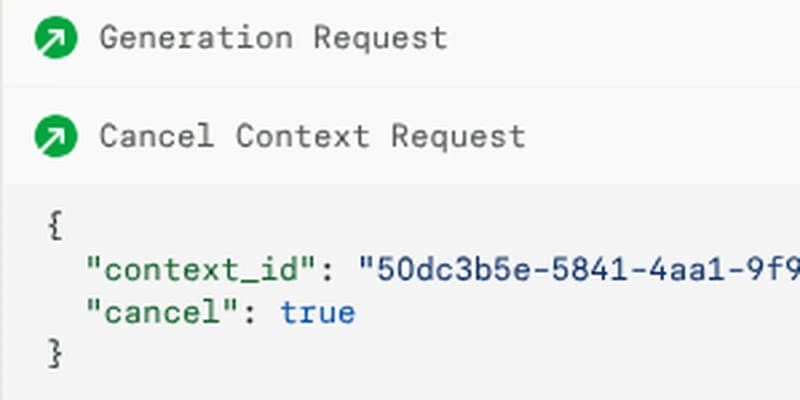
Cartesia's POST /tts/bytes accepts a complete transcript and returns streamed audio bytes. Its server-sent events endpoint returns chunks as events. The WebSocket interface supports incremental transcript input through generation contexts.
A context groups chunks belonging to the same generation. Continuation and flush controls affect when text becomes audio; cancellation stops the generation associated with a context. Timing responses can include word and phoneme timestamps, which map speech sounds to positions in the audio. The WebSocket request schema makes those boundaries explicit.
That gives an application team concrete controls for connecting incremental model output to speech. It also creates implementation work: context IDs, completion events, and cancelled generations need consistent handling across the session.
ElevenLabs: classic TTS and v4 have different protocols
Classic TTS models
Flash v2.5 and Multilingual v2 use the classic per-voice TTS interfaces. POST /v1/text-to-speech/{voice_id}/stream accepts supplied text and streams audio. The classic TTS WebSocket at /v1/text-to-speech/{voice_id}/stream-input accepts incremental text messages and can return alignment information that maps text to audio timing.
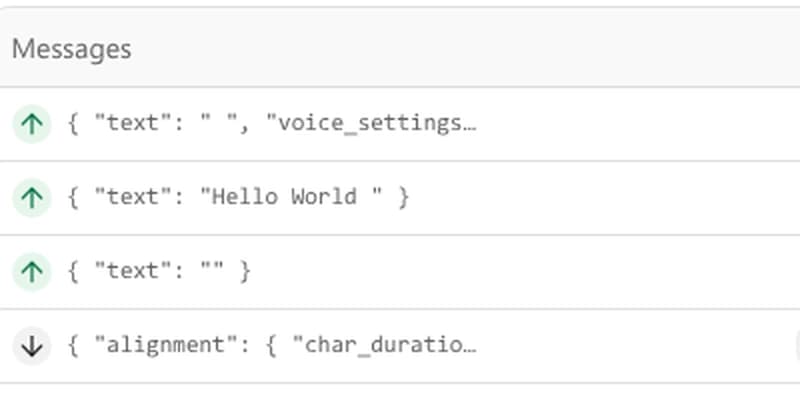
That per-voice protocol has buffering controls such as chunk_length_schedule. These are classic TTS settings, separate from the dialogue protocol used for v4 and v4 Turbo. When the entire input is available upfront, classic WebSocket buffering can add latency relative to HTTP. A persistent socket is therefore an architectural choice, rather than an automatic speed improvement.
v4 HTTP and v4 Turbo WebSocket
Eleven v4 uses Text to Dialogue HTTP with model_id=eleven_v4. POST /v1/text-to-dialogue generates audio from an inputs array of text and voice-ID pairs; POST /v1/text-to-dialogue/stream streams the audio response. Both receive the request text upfront.
Eleven v4 Turbo uses the dialogue WebSocket at wss://api.elevenlabs.io/v1/text-to-dialogue/stream-input with model_id=eleven_v4_turbo. The first message registers exactly one voice in voices. Subsequent messages carry an inputs array, with text, voice_id, and an optional new_turn flag on each entry to mark a turn boundary.
Dialogue streaming has its own server-side buffering and a flush control, rather than the classic chunk_length_schedule. Timing alignment can accompany audio chunks when sync_alignment=true. The integration therefore needs dialogue-shaped messages and voice registration; changing only the model ID in a classic per-voice TTS client is insufficient.
For either provider, a production integration needs a defined unit of speech. Sending every token immediately can produce a different result from sending complete phrases. Waiting for a whole paragraph changes the user's wait. Chunk boundaries belong in the application design alongside the model choice.
Latency: first generated audio is only one boundary
A speech provider's first-audio time does not describe the whole conversational turn. The caller may already have waited for speech recognition, an end-of-turn decision, an LLM response, or a business-system lookup. Generated audio then crosses the network and a playback buffer before it becomes audible.
ElevenLabs' latency measurement definition describes server-side figures from warm-voice WebSocket requests. Those figures exclude network round-trips and application work. They cannot establish which complete agent will respond first.
A useful latency record separates:
- Synthesis start: first submitted text to first returned audio.
- User-perceived response: the user's speech ending to the first audible answer.
- Interruption cutoff: the user beginning to interrupt to the old response becoming inaudible.
- Tail behavior: slow responses and failed generations alongside the median.
Our voice AI latency guide explains how those boundaries fit together.
Interruption exposes a particularly important integration seam. Consider an agent saying, “Your appointment is Thursday,” when the caller interrupts with, “Friday, please.” Cancelling synthesis cannot recall audio already delivered to a browser or telephone playback queue. The application must also discard queued speech and prevent late chunks from the old answer entering the new one.
That is an architectural consequence of a TTS-only integration. It applies regardless of which voice sounds more convincing in an isolated clip.
Voice quality, pronunciation, and language fit
Voice quality includes intelligibility, pacing, emotional delivery, and consistency. A narration voice and a short transactional reply have different requirements. A compelling greeting says little about how a model reads a confirmation code or an unfamiliar surname.
Controls differ by model
Cartesia's Sonic request controls include language and locale, accent, text normalization, pronunciation dictionaries, speed, volume, and emotion. Normalization converts written forms such as numbers into speakable text.
On its classic TTS interfaces, ElevenLabs exposes model-dependent settings for stability, similarity, style, speaker boost, and speed. Its v4 family supports audio tags for expressive direction through Text to Dialogue. Supported settings differ by model and interface; a control available in classic TTS does not automatically carry over to v4.
For a production voice, useful acceptance material includes a short acknowledgment, a long explanation, an alphanumeric identifier, a correction, and a difficult proper noun. These reveal distinct failures. “AB-204” spoken as one number is a different problem from an unnatural pause, even if both outputs sound fluent.
Pronunciation rules and normalization choices are part of the voice configuration. They need to travel with the model and voice IDs when a release changes.
Languages: the model matters more than the headline count
Sonic 3.6 supports 44 languages. ElevenLabs v4 and v4 Turbo support 90+, while Multilingual v2 and Flash v2.5 have smaller language sets. The ElevenLabs model catalog separates those families.
That broader v4 coverage matters when a required language is outside Sonic's supported set. It does not establish better pronunciation in a language both support. Regional accent, mixed-language sentences, names, and number formatting remain separate requirements.
Cartesia also distinguishes the moving sonic-3.6 alias from dated model snapshots. A snapshot fixes the model version for release control; the alias follows stable updates. Fixing a version does not make every generated sample identical, but it removes an unplanned model-version change from the comparison.
Cloning needs usable recordings and permission
Both vendors offer Instant and Professional Voice Cloning. Cartesia includes instant cloning on Pro and professional cloning from Startup. ElevenLabs makes Professional Voice Cloning available on Creator and higher plans.
ElevenLabs' voice-cloning documentation distinguishes short-sample conditioning from professional fine-tuning using longer recordings. It recommends roughly 30 minutes of high-quality audio for the professional path. That is preparation guidance, not a promise of a particular result.
Cartesia requires verified speaker consent for cloned voices, and both providers require authorized voice use. Verification steps do not replace permission from the speaker or the rights needed for the intended use. Clean recordings, consistent microphone conditions, and examples of the intended speaking style are practical inputs to a usable cloned voice.
Pricing: compare TTS characters before comparing monthly bills
Cartesia's model credits and ElevenLabs' API dollar rates are different meters. Combining either with an agent-minute price produces a misleading comparison.
Cartesia's model-credit pricing charges standard Sonic TTS at approximately one credit per input character, with slight variation from transcript preprocessing. The monthly pool is shared with speech-to-text (STT). Included prepaid agent dollars are a separate allowance.
| Cartesia plan | Monthly price | Included model credits |
|---|---|---|
| Free | $0 | 20,000 |
| Pro | $5 | 100,000 |
| Startup | $49 | 1.25 million |
| Scale | $299 | 8 million |
Those are bundled plan prices, rather than standalone per-character quotes. Other speech-model usage consumes the same credit pool. Paid overage settings also matter: with overages disabled, requests beyond the allowance are blocked.
ElevenLabs' API TTS rates are in US dollars per input character, rather than platform credits. Its listed rates include $0.04 per 1,000 characters for v4 Turbo and Flash/Turbo, and $0.08 per 1,000 for v4 and Multilingual v2. Subscription/application credit bundles should not be substituted for that API meter.
A one-million-character example
Assume a month with one million submitted TTS characters and no other speech-model usage. The example excludes taxes, account-specific inclusions or discounts, and separately billed products.
| Configuration | Character arithmetic | Commercial meaning |
|---|---|---|
| Cartesia Sonic | Approximately 1 million model credits | Within Startup's $49 monthly 1.25 million-credit pool under these assumptions |
| ElevenLabs v4 Turbo, Text to Dialogue WebSocket | 1,000 × $0.04 = $40 | Listed API usage charge before account-specific adjustments |
| ElevenLabs v4, Text to Dialogue HTTP | 1,000 × $0.08 = $80 | Listed API usage charge before account-specific adjustments |
The $49 bundle and the $40 or $80 usage calculations are different commercial objects. Unused capacity, other model use, account entitlements, and overages affect the payable bill. This example supports a character-volume budget; it does not establish a total-cost winner.
Audio minutes are also a poor shortcut between providers. Speaking rate, pauses, and language change how long a given character count takes to play. A telephone call minute contains caller speech and silence as well as generated speech. It is not a TTS output minute.
Production fit includes formats, limits, and switching work
Audio format belongs in the initial architecture decision. PCM, or pulse-code modulation, represents uncompressed audio samples. Compressed formats such as MP3 and telephony formats such as μ-law have different playback and channel requirements.
Cartesia's HTTP bytes interface provides WAV, MP3, and raw output options; WebSocket output has its own constraints.
For ElevenLabs' classic TTS HTTP stream, 192 kbps MP3 requires Creator or above, while 44.1 kHz PCM requires Pro or above. For v4's HTTP dialogue conversion endpoint, POST /v1/text-to-dialogue, 192 kbps MP3 requires Creator or above, and 44.1 kHz PCM or WAV requires Pro or above. These HTTP format gates do not establish v4 Turbo WebSocket format availability. The dialogue WebSocket has its own output_format parameter. Codec, sample rate, and subscription eligibility are part of integration fit, alongside the voice.
Capacity planning also needs concurrent-generation limits, timeout behavior, retry costs, and failure handling. These determine whether a deployment can serve bursts, even when average character volume fits its budget. Retention settings, regional processing, and contractual commitments are separate procurement requirements; a general feature comparison cannot establish account-specific terms.
Switching TTS providers involves more than replacing an HTTP URL. Voice identifiers, pronunciation dictionaries, model controls, alignment messages, and cancellation behavior need an adapter boundary. Cloned-voice portability depends on the available export or recreation options and the rights for the intended use.
Using the same vendor for speech and its agent platform ties additional configuration to that vendor. Moving later can involve tools, session behavior, channels, and operational records as well as speech. That is a broader migration than changing a TTS component.
When the decision is really about the runtime
Cartesia and ElevenLabs remain legitimate component choices when your team wants to own the surrounding application. A TTS API leaves turn policy, business actions, playback coordination, channel integration, and operational visibility with that application. Their separate agent products change that responsibility boundary and need their own comparison.
If the work you want to buy is the managed production foundation, Dasha belongs in that evaluation. We help technical teams build and run production voice AI agents through a managed runtime, REST APIs, and a web application, with telephony, integrations, testing, and monitoring. It is a different purchase from a standalone speech-synthesis API.
For the named API choice, Cartesia's context controls, snapshots, and credit pool are concrete reasons for an API-owned Sonic deployment. ElevenLabs' v4 language coverage, expressive controls, and model-specific dollar rates are concrete reasons for an ElevenLabs deployment. The remaining question is which surrounding runtime your team intends to operate.
For a managed production path, evaluate Dasha's agent runtime around your voice-agent workflow.