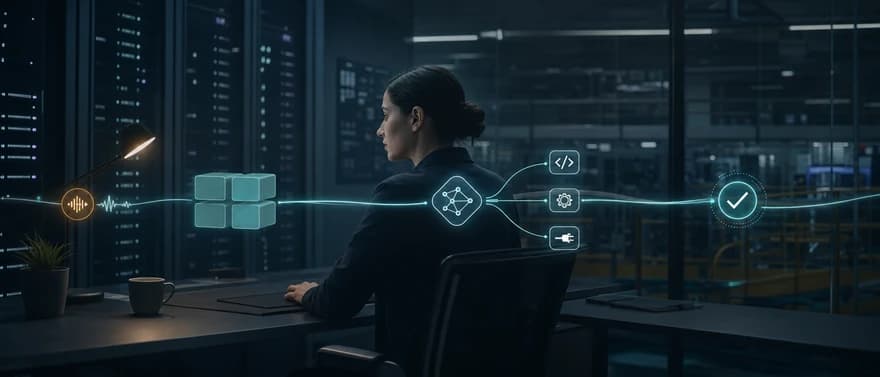
An AI agent runtime is the execution layer that turns an agent definition into a running process. It manages the model-and-tool loop, session and workflow state, permissions, interruptions, failures, streaming, and telemetry. Some products also bundle hosting, long-term memory, sandboxes, evaluation, and deployment controls, so the exact boundary varies.
Last updated: August 6, 2026
That variation matters when you compare platforms. A vendor may call an isolated container a runtime. Another may use the same term for an entire managed agent platform. The useful question is not whether a product uses the label. It is which execution guarantees it supplies and which ones your team must build and operate.
Agent runtime vs. framework, harness, sandbox, and control plane
A model can generate text or propose a function call. An agent framework can help you define instructions, tools, routing, and state. Neither one, by itself, guarantees that a multi-step task will survive a process failure, respect tenant permissions, time out safely, or leave a trace you can debug.
| Layer | Primary job | What it does not guarantee by itself |
|---|---|---|
| Model API | Produces model output and structured tool-call proposals | Custom or business-tool execution, durable workflow state, application-level authorization, or recovery |
| Agent framework | Provides developer abstractions for agents, tools, graphs, and handoffs | Managed hosting or production operations |
| Agent harness | Adds opinionated planning, prompts, context assembly, and tool-use patterns | A secure or durable execution environment |
| Agent runtime | Runs each agent or workflow, manages its lifecycle, state transitions, actions, limits, and telemetry | A complete deployment and governance platform in every implementation |
| Sandbox | Isolates code, shell, browser, or computer execution | User authorization, business validation, or safe retries |
| Control plane | Manages definitions, versions, evaluation, deployment, traffic, secrets, and policy | The low-latency execution loop itself |
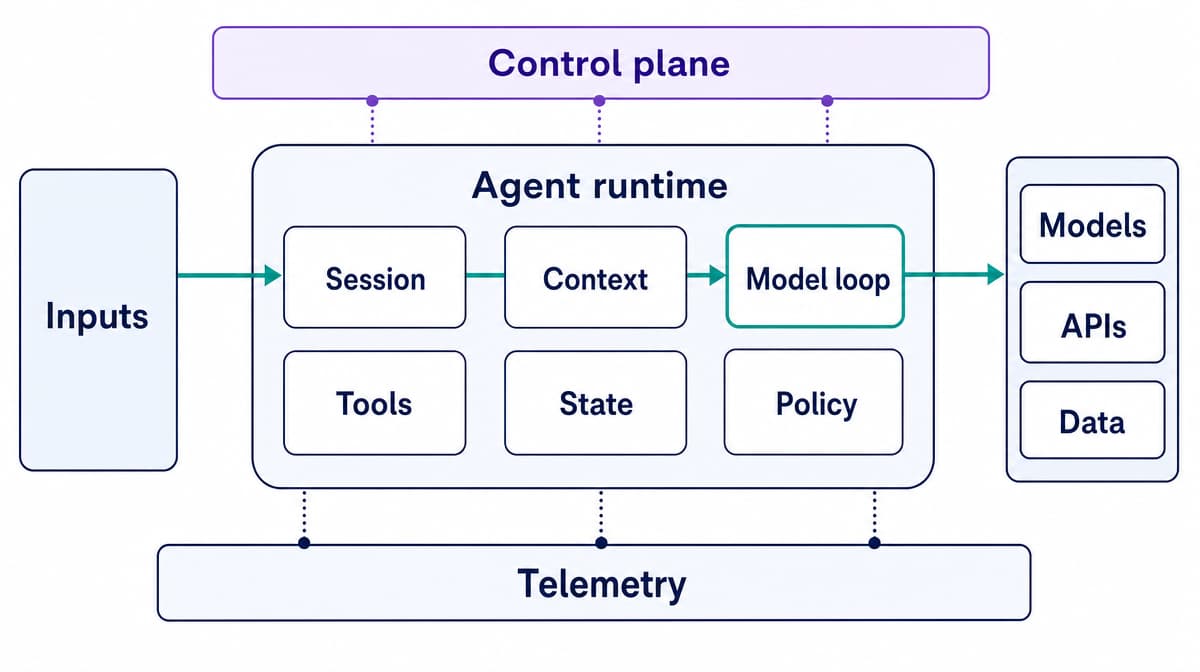
These are practical boundaries, not a formal industry standard. LangGraph describes itself as a low-level orchestration runtime, while managed services such as Google Agent Runtime and Amazon Bedrock AgentCore Runtime include hosting and connect to additional services for identity, memory, sandboxing, and observability.
This guide uses agent runtime to mean the live execution layer for agent applications. It does not mean a model-serving runtime such as CUDA, ONNX Runtime, or an inference server.
What production runtime architecture must cover
A prototype can run as a loop in one process. A production runtime has to make that loop predictable under concurrency, partial failure, untrusted input, and change.
| Responsibility | What the runtime should handle | Capabilities that may be separate |
|---|---|---|
| Invocation and session lifecycle | Start, route, suspend, resume, cancel, expire, and finish runs with explicit IDs and statuses | Channel gateways and user-facing interfaces |
| Context and state | Load the right session, workflow state, artifacts, and selected memory; commit updates at defined points | Long-term memory generation and retrieval |
| Model and orchestration loop | Call the model, interpret output, route handoffs, enforce turn and cost budgets, and continue until a terminal state | Agent authoring and prompt management |
| Tool execution | Validate arguments, authorize actions, manage concurrency, execute calls, handle timeouts, and return results | Provider-hosted tools or isolated code sandboxes |
| Policy and security | Apply identity, tenant boundaries, approvals, secrets, egress rules, quotas, and audit policy | Enterprise identity provider and security operations tooling |
| Reliability and scheduling | Queue work, apply backpressure, retry safe failures, checkpoint progress, and recover or reconcile | A full durable workflow engine |
| Observability | Emit correlated traces, logs, metrics, usage, and audit events across each step | Offline evaluation and release-quality gates |
Do not treat the last column as optional just because it sits outside a narrow runtime. A code-executing agent may need a strong sandbox. A financial workflow may need durable replay and human approval. A multitenant SaaS product may need per-tenant identity, data isolation, and quotas. The architecture has to supply the guarantee somewhere.
How an AI agent runtime works, step by step
A useful generalized production lifecycle is:
- Accept an invocation. The runtime receives input plus the authenticated user or tenant, agent version, configuration, time and cost budgets, and run, thread, or session IDs.
- Hydrate context. It loads conversation events, workflow state, artifacts, relevant long-term memory, and the tool catalog allowed for this caller.
- Apply policy. It checks authentication, authorization, quotas, input rules, data boundaries, and any approval policy that applies before model execution.
- Call the model. The runtime supplies instructions, selected history, state-derived context, and typed tool definitions.
- Interpret the result. The model may return a final answer, propose one or more tool calls, hand work to another agent, request approval, update state, or fail.
- Execute actions safely. For each proposed action, the runtime validates the schema and business rules, authorizes the exact operation, obtains confirmation when necessary, and executes in the correct trust boundary.
- Commit progress and continue. It records results and checkpoints, then loops until completion, interruption, cancellation, failure, or a defined budget is exhausted.
- Emit output and telemetry. Streaming responses, state changes, model and tool events, usage, traces, metrics, logs, and the final status remain correlated to the run.
The OpenAI Agents SDK runner documents the core model, tool, and handoff loop. Google's Agent Development Kit represents execution as an event loop that commits state and artifact changes before continuing. Microsoft Agent Framework workflows use synchronization and checkpoint boundaries for multi-step execution.
A model can propose several tools in one turn. That does not mean the runtime should execute all of them in parallel. Independent reads may be safe to run concurrently. Two mutations to the same record, or an action that depends on an earlier result, usually require ordering. Concurrency is an execution policy, not a model decision.
State, memory, and durable execution are different problems
The word memory often hides several state systems with different owners and failure modes.
| State layer | Purpose | Typical storage |
|---|---|---|
| Invocation context | Identity, dependencies, request metadata, and budgets | Process-local for one attempt, with durable identifiers |
| Session or thread history | Conversation events and short-term context | Shared database or provider-managed conversation store |
| Workflow state | Typed values, pending work, node position, approvals, and checkpoints | Durable checkpoint store |
| Artifacts and workspace | Files, generated outputs, and sandbox contents | Object storage or controlled workspace snapshot |
| Long-term memory | Cross-session facts or application-specific knowledge | Explicit durable memory or retrieval store |
| External system state | Orders, payments, tickets, emails, and records | The external system remains authoritative |
Process memory is not enough once execution scales across replicas. A later request may land on another worker, and a failed container may never return. Session and workflow state therefore need an external source of truth.
Three reliability levels are easy to confuse:
- Persistent conversation saves messages so the next run can rebuild context.
- Checkpointed execution saves workflow position and typed state so an interrupted run can resume from a defined boundary.
- Durable execution records enough history to reconstruct progress after failures, often by replaying deterministic workflow code and recording external activity results.
LangGraph persistence distinguishes thread-scoped checkpoints from cross-thread stores. Its interrupt guidance explains when node code can repeat. Temporal's workflow model uses event-history replay and puts external effects in Activities, which follow explicit retry policies. Both patterns expose the same hard rule: resumption can repeat code or retry an operation.
Exactly-once external effects do not come free with checkpointing. If an agent creates a refund and the network fails before the result is committed, a retry must not create a second refund. Mutating tools need idempotency keys, deduplication or transactional patterns, and explicit retry rules. Permanent validation failures should not follow the same policy as a transient timeout.
Tool execution is the runtime's main trust boundary
Treat a model-selected action as an untrusted proposal:
discover or select -> schema validate -> authorize -> approve if needed -> execute -> time out or cancel -> validate the result -> audit -> return to the model
A JSON Schema can prove that amount is a number. It cannot prove that the user owns the account, the refund follows policy, the amount is reasonable, or the operation is safe to retry. Those checks belong in application and runtime policy.
Execution location also changes the risk:
- A provider-hosted search or code tool runs inside the provider's managed boundary.
- A local function runs with the application process's identity and network access unless you restrict it.
- A remote Model Context Protocol (MCP) tool crosses another service boundary with its own identity, data, and availability assumptions.
- A shell, browser, or computer-use tool may require an isolated workspace, restricted mounts, and a strict egress policy.
MCP standardizes how applications discover tools and resources, call tools, and read or subscribe to resources. The MCP 2026-07-28 tool specification uses typed inputs and structured results, while its security guidance covers token audience validation, session hijacking, server-side request forgery, local-server privileges, and sandboxing. MCP does not make a tool safe merely by exposing it through a standard protocol.
A sandbox is also only one control. Firecracker microVMs, gVisor sandboxes, and containers provide different isolation properties. None of them authenticates the customer, authorizes an API mutation, or prevents a logically valid but harmful action. Production policy still needs:
- least-privilege, short-lived credentials;
- user- and tenant-aware authorization inside each tool;
- allowlisted network destinations and constrained filesystem mounts;
- CPU, memory, disk, process, time, and result-size limits;
- explicit approval for consequential actions;
- input and output validation, sensitive-data redaction, and durable audit records.
These controls address risks beyond ordinary prompt injection. The OWASP Top 10 for Agentic Applications includes agent goal hijack, tool misuse and exploitation, and identity and privilege abuse. Prompts are not a substitute for a narrow execution boundary.
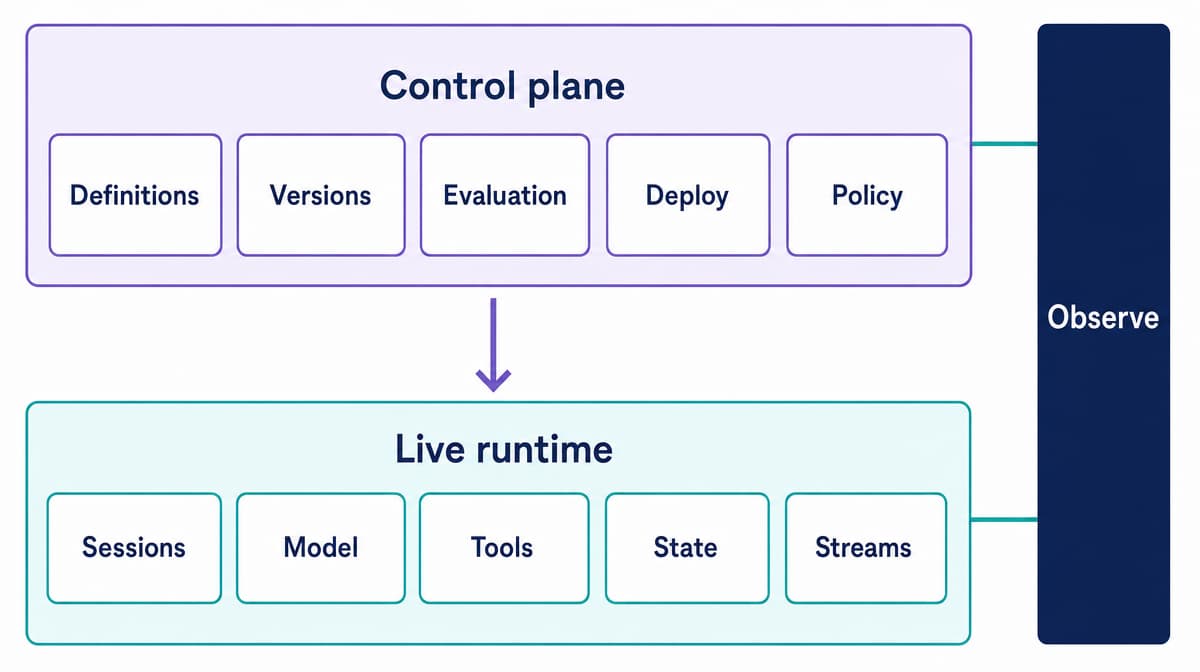
Runtime and control plane should be designed separately
The live execution plane handles active sessions, model calls, tools, state transitions, streams, timeouts, retries, and responses. Its priorities are latency, correctness, isolation, and recovery.
The control plane manages agent definitions, secrets and configuration, versions, evaluation gates, deployment policy, traffic allocation, rollback or recovery, and governance. Its priorities are safe change and fleet-level control.
One can exist without the other. A framework runner can execute an agent without a managed release system. A platform can deploy versioned containers but still leave the model-and-tool loop to your code. Managed products often bundle both, which is convenient, but you should still test the guarantees separately.
Scale execution independently from ingress
A common production pattern is:
stateless API replicas -> durable queue -> horizontally scaled workers -> external persistence -> ephemeral publish/subscribe (pub/sub) messaging for streaming and cancellation
The LangSmith Agent Server architecture is one documented example: API servers enqueue runs, workers lease and execute them, durable stores hold run and thread data, and ephemeral signaling supports streaming and cancellation.
CPU-only autoscaling can miss agent backlog because a worker may spend much of a run waiting for a model or external tool. Scale on queue depth, active runs, run duration, and downstream quota headroom as well as CPU and memory. Add per-tenant concurrency, fair scheduling, backpressure, cancellation, retry budgets, circuit breakers, and a failed-work queue or reconciliation path for runs that cannot complete automatically.
Observe runs at event level
At minimum, the trace hierarchy should connect:
request or run -> workflow step -> model call -> tool, handoff, guardrail, checkpoint, or approval
Use each telemetry signal for its job:
- Logs capture structured operational events; use purpose-built audit records for security-relevant actions.
- Traces explain the critical path and failure of one run.
- Metrics reveal aggregate latency, errors, queues, saturation, and cost.
- Evaluations measure whether outputs and trajectories meet quality and safety requirements.
Correlate trace ID, run ID, session or thread ID, authenticated tenant, agent and prompt version, model version, tool-call ID, retry attempt, checkpoint, outcome, latency, tokens, and cost. Do not capture sensitive prompts or tool payloads by accident. OpenTelemetry's generative AI conventions include agent, conversation, model, tool, and usage attributes, but the agent-specific conventions are still evolving, so pin the version you instrument.
Workload shape changes the runtime you need
There is no best runtime independent of the work. For voice use cases, start with our voice AI agent fit checklist.
| Workload | First-order requirements | Typical failure concern |
|---|---|---|
| Short structured tool task | Typed inputs, low overhead, strict authorization, idempotent mutation | Duplicate or unauthorized side effect |
| Long-running research or coding task | Durable progress, workspace isolation, cancellation, artifacts, cost limits | Lost work, runaway cost, or unsafe code execution |
| Real-time voice conversation | Bidirectional streaming, low and stable latency, interruption handling, session continuity, channel events, human transfer | Awkward turn timing, dropped session, or delayed tool result |
| Multi-agent task | Agent discovery, task states, artifact exchange, identity, timeouts, and delegation limits | Cascading failure or confused authority |
Real-time voice makes several secondary concerns immediate. Speech and channel events continue while the agent is thinking. A caller may interrupt. A tool can consume the response-time budget. Telephony or Web Real-Time Communication (WebRTC) can fail independently of the model. Operators need event-level timing, not just the final transcript.
That is why a workload-specific managed runtime can be valuable. Dasha's managed production platform for voice AI agents, for example, combines hosted agent execution with phone and web channels. The current Dasha documentation covers REST setup, runtime WebSockets, business tools, testing, and completed-call inspection. Those are voice-runtime concerns that a generic model API does not supply.
For agent-to-agent collaboration, the Agent2Agent (A2A) 1.0 specification standardizes Agent Cards, messages, stateful tasks, artifacts, and streaming across opaque agent systems. A2A and MCP solve interface problems. The runtime still owns safe execution, state, durability, scaling, and policy behind those interfaces.
Four ways to run agents in production
Instead of ranking unlike products in one list, choose an operating model.
| Operating model | Best fit | Typical supplied capabilities | What your team still owns | Main tradeoff |
|---|---|---|---|---|
| Agent-specific managed runtime | Teams that want production agent primitives without operating the execution infrastructure | May include hosting, scaling, sessions, telemetry, and selected security or memory services | Agent behavior, tool policy, data, evaluation criteria, and integration correctness | Less infrastructure work, with provider constraints and metered cost |
| Framework-aligned managed platform | Teams committed to a framework and wanting a supported deployment path | May include framework-native serving, state, queues, observability, and deployment tooling | Framework-level design plus external systems and policy | Fast path, but more ecosystem coupling |
| General serverless or container platform | Teams with strong platform engineering and unusual runtime needs | Generic compute, networking, identity, scaling, and storage building blocks | Agent lifecycle, checkpoints, tools, evaluation, and agent-specific observability | High control, high assembly and on-call burden |
| Custom runtime and workflow stack | Teams whose durability, security, data, or latency requirements justify deep ownership | Exactly the components and boundaries you choose | Integration, upgrades, reliability, incident response, and every missing control | Maximum control and differentiation, maximum responsibility |
The choice is a spectrum. A managed platform can expose deep configuration. An open-source framework can run on managed infrastructure. A custom runtime can delegate durability or sandboxing to specialized services.
For voice products, our guides compare a hosted API platform, an open-source framework, and a DIY stack. Use those categories to map ownership, but verify every product's current limits, responsibility split, and deployment model directly.
How to evaluate an agent runtime platform
- Define the workload and failure budget. Record interaction mode, expected duration, concurrency, latency target, side effects, and consequences of failure.
- Map the state model. Identify the source of truth for sessions, workflow checkpoints, artifacts, long-term memory, and external records. Confirm ownership, isolation, retention, and deletion.
- Test interruption and recovery. Kill workers, time out tools, pause for approval, cancel runs, and resume older work after a version change. Verify what repeats.
- Inspect action security. Check tool discovery, schema and business validation, user and workload identity, authorization, secrets, network egress, approval, and audit.
- Verify the isolation boundary. Ask whether tenants share a process, container kernel, VM, network, filesystem, credentials, database, or queue. Match the boundary to the trust level.
- Measure capacity and latency. Include queueing, model and tool latency, streaming behavior, throughput, per-tenant concurrency, cold starts, and downstream quotas.
- Validate observability. Follow one run across every model, tool, handoff, retry, checkpoint, and channel event. Test redaction, export, retention, and correlation.
- Review change safety. Inspect versions, test datasets, evaluation gates, deployment environments, traffic controls, rollback or recovery, and compatibility policy.
- Check portability and data location. Verify supported frameworks, models, protocols, regions, private networking, and how you export state, traces, and agent definitions.
- Calculate total ownership. Add platform charges to the engineering, security, support, and incident work your team retains.
Watch for five red flags: persistent chat described as durable execution, schema validation described as authorization, a sandbox described as complete security, unqualified “exactly once” side effects, and universal compatibility claims without a versioned test matrix.
Where Dasha fits
Dasha is a managed production platform for technical teams building conversational AI products. Its current web application and REST API let teams configure agents, connect phone or web channels, invoke business tools, test conversations, schedule calls, and inspect results.
Current Dasha workflows include:
- agent configuration through the dashboard or API;
- phone, web voice, and web chat channels;
- custom webhook tools, MCP connections, and knowledge bases;
- browser voice, chat, and real-phone testing;
- call history and activity logs;
- completed-call inspection for transcripts, timelines, model and tool events, and latency details.
This is a fit for teams that want a managed real-time runtime and channel layer while retaining control of workflow and business logic, customer-system data and actions, telephony providers and numbers, action boundaries, and production acceptance. Teams that need only a local model loop or SDK may not need the additional runtime and channel capabilities.
Our Dasha Agent OS page describes a broader operating layer for deploying, observing, and optimizing agents. The directly documented product surface today is the Dasha application and API, so teams should evaluate current workflows rather than assume native versioned environments, canary releases, automatic evaluation gates, or a separate generally available Dasha Agent Runtime.
Use our Voice AI Backend and current Dasha documentation to evaluate channel coverage, tools, testing, logs, and capacity against your architecture.
Choose the guarantees your workload needs
Start with the failure that would hurt most: an unauthorized action, a duplicate side effect, a lost long-running task, a delayed voice turn, or an unsafe release. Then require the state, policy, isolation, recovery, and telemetry guarantees that prevent or expose it.
The model remains one component. Choose the surrounding runtime by workload, lifecycle guarantees, change safety, and the operational responsibility your team is prepared to keep.