The OpenAI Realtime API puts live audio, model reasoning, and spoken responses in one stateful session. That can shorten the voice path, but a working demo still leaves important architecture decisions to your team. Here is how the current API works, which transport to use, what it costs, and what you need to add before a voice agent is ready for production.
What is the OpenAI Realtime API?
The OpenAI Realtime API is a stateful API for low-latency audio and multimodal applications. A client keeps a session open, streams audio or text into it, and receives events, tool calls, text, and audio in return. In a speech-to-speech voice agent, the model handles speech input and output directly. You do not have to assemble separate speech-to-text (STT), language model, and text-to-speech (TTS) services for the conversational loop.
OpenAI currently documents a full voice-agent model, a lower-cost mini model, and dedicated models for live translation and live transcription. They map to three distinct session types:
| Session type | Current model | What it does | Billing basis |
|---|---|---|---|
| Voice agent | gpt-realtime-2.1 or gpt-realtime-2.1-mini | Listens, reasons, speaks, maintains conversation state, and calls tools | Text, audio, and image tokens |
| Live translation | gpt-realtime-translate | Streams translated speech and transcript deltas while the source speaker continues | Audio duration |
| Live transcription | gpt-live-transcribe | Streams transcript deltas without an assistant response | Audio duration |
That distinction prevents an expensive architecture mistake. A transcription session is not a cheaper voice agent, and a translation session does not follow the normal assistant turn lifecycle. Choose the session around the output you need.
The API is also a model and session layer, rather than a complete voice-agent operation. Your application still owns business logic, tool authorization, durable state, failure recovery, testing, monitoring, and any surrounding phone workflow. If you want those parts behind one managed runtime, our voice AI backend is the more direct fit. We built Dasha for technical teams that want API control without assembling and operating every real-time layer themselves.
How a Realtime voice session works
A voice-agent session is a continuous event loop:
- The client opens a WebRTC, WebSocket, or SIP connection.
- Your code configures the model, voice, instructions, audio behavior, turn detection, and tools.
- Audio enters the session. Voice activity detection (VAD) identifies when the user starts and stops speaking, unless your application controls turns manually.
- The model generates audio and text deltas. It may emit a function call instead of, or alongside, a spoken answer.
- Your server authorizes and executes the function, then adds its result to the conversation.
- If the user interrupts, playback stops and unplayed output is truncated automatically on WebRTC or SIP, or by the client on WebSocket.
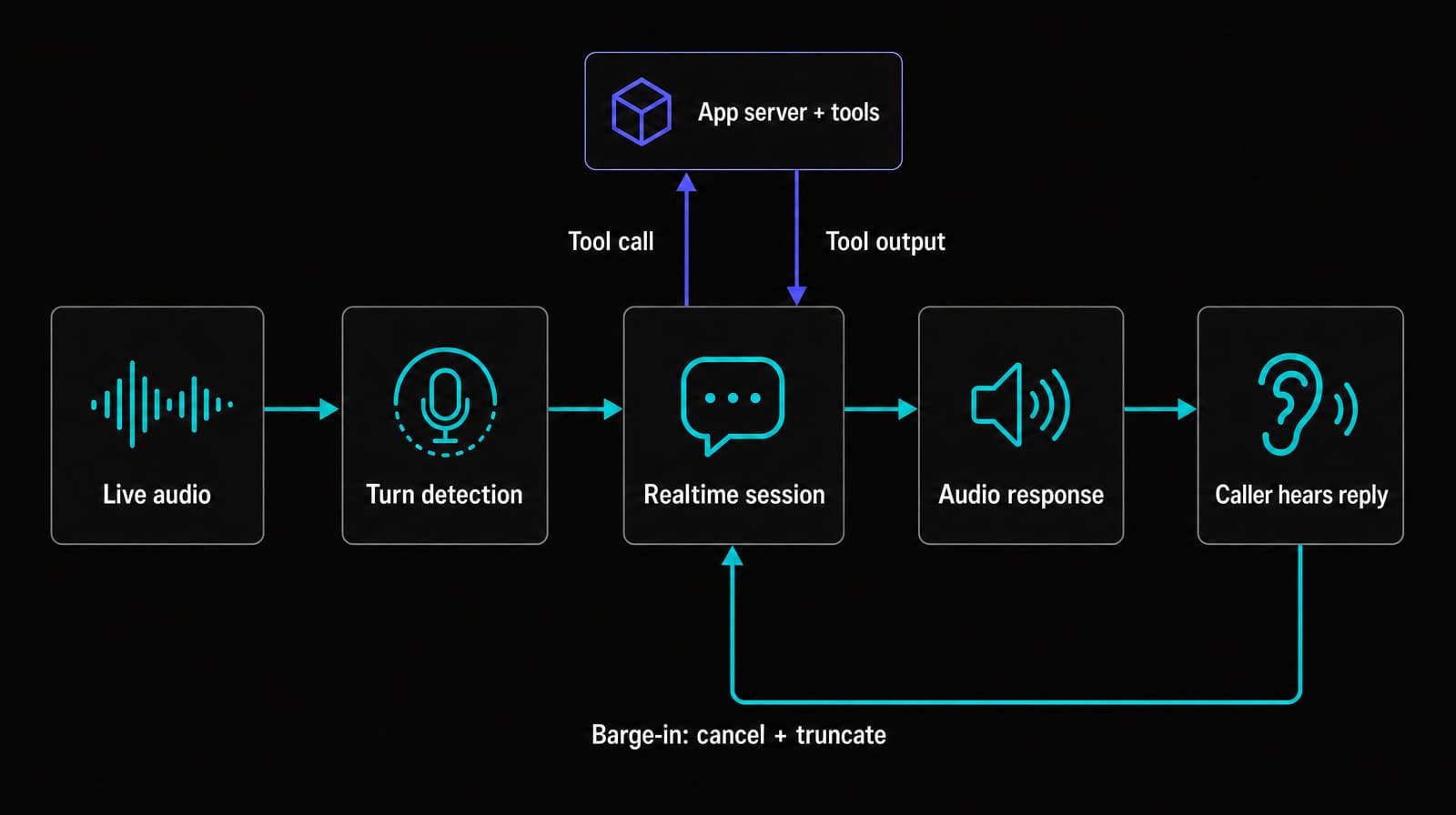
Realtime conversations are stateful. Each response uses the instructions, tools, and preceding conversation items as context, then appends its output to the conversation. That makes multi-turn interaction easier, but it also means later turns can include more input tokens. OpenAI's conversation guide documents the session, conversation, response, and event lifecycle.
This tight turn loop matters because people leave very small gaps between conversational turns. Cross-language turn-taking research found a broad tendency to minimize both silence and overlap. Measure the full user-audible delay, including endpoint detection, network transport, tool time, and audio playback. Model inference time alone hides much of the experience.
Choose WebRTC, WebSocket, or SIP
The transport decision should follow where audio originates.
| Transport | Use it for | Authentication | What your application owns |
|---|---|---|---|
| WebRTC | Browser and mobile microphone experiences | Unified server-mediated setup or a short-lived client secret minted by your backend | Microphone permissions, peer connection state, UI, and recovery |
| WebSocket | Server-to-server media pipelines and workers | Standard API key held on the server | Audio encoding, Base64 chunks, buffering, playback timing, and socket recovery |
| SIP | Calls routed from a phone carrier or private branch exchange (PBX) | Server API key plus signed webhook handling | Phone numbers, carrier configuration, routing policy, transfers, and call operations |
Use WebRTC for client audio. OpenAI recommends it over WebSocket for browser and mobile clients, and its WebRTC guide documents unified server setup and short-lived client secrets. WebRTC handles audio tracks separately from control events. Use the oai-events data channel for session events and tools.
Use WebSocket when a trusted server already has the audio stream. OpenAI's WebSocket guide defines it as the server-to-server path and permits a standard API key on the secure backend. It gives you granular control, but your code must send and receive encoded audio chunks and keep their timing correct.
SIP accepts calls routed from an external trunk. OpenAI's SIP guide documents call acceptance, rejection, monitoring, referral, and hangup controls. The trunk, phone number, and wider telephony operation remain separate.
Connect a browser voice agent
The shortest current JavaScript path uses the OpenAI Agents SDK. Keep the standard API key on your server and return a short-lived client secret to the browser. The client secret reference defines these credentials and their session configuration.
1. Mint a client secret on your server
import { createHmac } from "node:crypto";
import express from "express";

const app = express();
const apiKey = process.env.OPENAI_API_KEY;
const safetyIdSalt = process.env.SAFETY_ID_SALT;

if (!apiKey || !safetyIdSalt) {
  throw new Error("OPENAI_API_KEY and SAFETY_ID_SALT are required");
}

app.post("/realtime-token", async (req, res) => {
  res.set("Cache-Control", "no-store");

  // Replace this trusted header with identity from your auth middleware.
  const endUserId = req.get("x-authenticated-user-id");
  if (!endUserId) {
    return res.status(401).json({ error: "Authentication required" });
  }

  const safetyIdentifier = createHmac("sha256", safetyIdSalt)
    .update(endUserId)
    .digest("hex");

  try {
    const response = await fetch(
      "https://api.openai.com/v1/realtime/client_secrets",
      {
        method: "POST",
        headers: {
          Authorization: `Bearer ${apiKey}`,
          "Content-Type": "application/json",
          "OpenAI-Safety-Identifier": safetyIdentifier,
        },
        body: JSON.stringify({
          session: {
            type: "realtime",
            model: "gpt-realtime-2.1",
            audio: { output: { voice: "marin" } },
          },
        }),
      }
    );

    const data = await response.json().catch(() => ({}));
    if (!response.ok) {
      console.error("OpenAI client-secret request failed", response.status);
      return res.status(502).json({ error: "Could not create client secret" });
    }

    return res.json(data);
  } catch (error) {
    console.error("Client-secret request failed", error);
    return res.status(502).json({ error: "Could not create client secret" });
  }
});

app.listen(3000, () => console.log("Token server listening on port 3000"));
This sample uses x-authenticated-user-id as a stand-in for identity inserted by a trusted authentication layer. Strip any client-supplied copy at your edge and populate it from the authenticated session. In production, also rate-limit the route and authorize the user or tenant before minting a credential. Never return the standard API key to a client. OpenAI's safety identifier guidance calls for a stable, privacy-preserving identifier rather than an email address or other personal information.
2. Connect from the browser
import {
  RealtimeAgent,
  RealtimeSession,
} from "@openai/agents/realtime";

const tokenResponse = await fetch("/realtime-token", {
  method: "POST",
  cache: "no-store",
});

if (!tokenResponse.ok) {
  throw new Error(`Client-secret request failed: ${tokenResponse.status}`);
}

const { value: ephemeralKey } = await tokenResponse.json();
if (!ephemeralKey) {
  throw new Error("Client-secret response did not include a token");
}

const agent = new RealtimeAgent({
  name: "Support agent",
  instructions: "Answer briefly. Ask before changing an account.",
});

const session = new RealtimeSession(agent, {
  model: "gpt-realtime-2.1",
});

await session.connect({ apiKey: ephemeralKey });
The SDK handles the browser WebRTC session. A lower-level implementation creates an RTCPeerConnection, adds the microphone track, exchanges Session Description Protocol (SDP) through /v1/realtime/calls, and opens the oai-events data channel. The WebRTC setup shows both the SDK-level credential flow and direct session establishment. Use the lower-level route when you need control below the SDK abstraction.
Avoid beta-era examples
Many early Realtime tutorials still show the preview contract. The generally available API does not use the OpenAI-Beta: realtime=v1 header. The current client-secret flow creates short-lived credentials at /v1/realtime/client_secrets, and WebRTC sessions are established through /v1/realtime/calls. Session output audio now sits under session.audio.output, and current server events include response.output_audio.delta. These endpoints and event names appear in the current API reference. Treat examples built around preview model IDs and beta event shapes as architecture references rather than code to paste into a new application.
Configure turns, interruptions, and tools deliberately
Default settings are enough for a demo. Production behavior needs explicit choices.
Turn detection
server_vad ends a turn after a configured silence. Its threshold, prefix padding, and silence duration are tunable. semantic_vad also considers whether the utterance sounds complete, with low, medium, high, or automatic eagerness. Low eagerness gives a caller more time. High eagerness returns a response sooner. The turn detection controls are session configuration, so make them part of your release and regression tests.
You can disable VAD for push-to-talk or an application-owned endpoint detector. In that case, your code commits the input audio buffer and creates the response.
Interruption handling
Stopping audio playback is only half of barge-in. Conversation state must also exclude speech the user never heard.
With VAD enabled on WebRTC or SIP, OpenAI manages the output buffer and automatically truncates unplayed audio when user speech interrupts a response. You do not need to send output_audio_buffer.clear for that normal automatic path. With WebSocket, your client owns playback, so it must stop the audio, track how much played, and send conversation.item.truncate for the interrupted assistant item.
output_audio_buffer.clear has a separate role. Send it on WebRTC or SIP when your application explicitly needs to clear server-buffered output, such as a manual push-to-talk interruption with VAD disabled. Clearing that buffer also truncates the conversation. OpenAI's interruption flow distinguishes these automatic and application-driven paths.
This state correction prevents a subtle failure: the model continues from information it believes it already said, while the user heard only the first part.
Function calling
Define tools with narrow schemas and clear descriptions. When the model emits a completed function call, your application should:
- Validate the arguments and authorize the caller.
- Execute the operation with a timeout and an idempotency key.
- Add a
function_call_outputitem using the matchingcall_id. - Create the next response so the model can explain the result.
The function-calling event flow shows how response.done, function_call_output, and response.create fit together. Keep side effects on a trusted server. A voice model may repeat, correct, or abandon a request during an interruption. Idempotency prevents a repeated event from creating a second booking, payment, or record update.
Two other session constraints affect product design. A Realtime session can run for up to 60 minutes. The output voice can be chosen at session creation or per response, but it cannot change after the session has produced audio. Both limits are defined in OpenAI's session configuration.
OpenAI Realtime API pricing and cost math
Voice-agent sessions are billed by modality. The current OpenAI rate card lists these selected audio and text rates per 1 million tokens:
| Model | Modality | Input | Cached input | Output |
|---|---|---|---|---|
gpt-realtime-2.1 | Audio | $32.00 | $0.40 | $64.00 |
gpt-realtime-2.1 | Text | $4.00 | $0.40 | $24.00 |
gpt-realtime-2.1-mini | Audio | $10.00 | $0.30 | $20.00 |
gpt-realtime-2.1-mini | Text | $0.60 | $0.06 | $2.40 |
The same rate card prices gpt-realtime-translate at $0.034 per audio minute and gpt-live-transcribe at $0.017 per audio minute. Image-input rates and older models are omitted here because they are not part of the core audio cost example.
For conversational voice-agent sessions, user audio is about one token per 100 milliseconds and assistant audio is about one token per 50 milliseconds. At the full model's uncached rates, one continuous minute of user speech is about $0.0192 and one minute of generated speech is about $0.0768. OpenAI's cost guide documents the token timing and notes that small variations can come from special tokens. These figures describe spoken audio only. They are not a flat per-call-minute price.
Actual session cost also includes four effects:
- Each response uses prior conversation context, so later turns can carry more input tokens.
- Automatic prompt caching can lower the price of an unchanged context prefix.
- Optional input transcription uses a separate transcription model and rate card.
- Reasoning effort, images, text, tools, telephony, application infrastructure, storage, and monitoring add their own usage or operating cost.
For conversational voice-agent sessions, read token counts from each response.done event and aggregate the modality breakdown by session, tenant, and workflow. Translation and transcription sessions use duration-based billing and do not share that normal Response lifecycle. The Realtime cost model documents both cases. A pilot with real talk ratios and tool behavior is more useful than a single dollars-per-minute assumption. Keep instructions and tool definitions stable within a session to preserve more of the cacheable prefix. For long conversations, set a context limit and retention ratio or summarize old items before they crowd out useful history.
Direct OpenAI integration or a managed runtime?
The right answer depends on which layer you want your team to own.
| Choice | Best fit | You still own |
|---|---|---|
| Dasha managed runtime | Technical teams that want telephony, integrations, testing, monitoring, and large-scale call execution around a production voice agent | Business policy, tool authorization, downstream systems, and release criteria |
| Direct OpenAI Realtime API | Teams whose product depends on direct access to OpenAI's session model and that want to build the surrounding application | Media or carrier integration, state, tools, retries, observability, evaluation, and on-call response |
| Chained STT, model, and TTS stack | Teams that require explicit transcripts, replaceable speech components, or policy gates between stages | Orchestration, latency across provider seams, and the same production operations |
Direct Realtime is a sound choice when OpenAI's speech-to-speech behavior is the product dependency you want and your team is prepared to operate the rest. Dasha is our recommendation when the real requirement is a production voice AI backend with API control. For a deeper layer-by-layer decision, use our OpenAI Realtime and Vapi comparison.
Production checklist
Before routing real users, cover the parts a happy-path session hides:
- Durable state: Store workflow state, tool results, consent, and important conversation facts outside the socket.
- Session recovery: Treat a dropped connection as a new session. Rehydrate the minimum safe context, state what was confirmed, and never repeat an uncertain write automatically.
- Tool safety: Authenticate every call, validate arguments, use least-privilege credentials, make writes idempotent, and define timeouts and fallback language.
- Turn quality: Test noise, accents, long pauses, rapid corrections, double talk, voicemail, hold audio, and caller interruption.
- End-to-end latency: Measure from the end of user speech to the first audible response at percentiles, then separate endpointing, network, model, tool, and playback time.
- Regression control: Pin model versions where possible and rerun representative conversations before a prompt, tool, VAD, voice, or model change. Our voice agent testing guide provides a practical test structure.
- Data controls: Decide which audio, transcripts, events, and tool payloads you retain. Apply the required access controls, redaction, residency, and deletion policy.
- Capacity and incidents: Set rate-limit handling, circuit breakers, health metrics, alerts, and a safe fallback for provider or carrier failures.
The demo milestone is a two-way conversation. The production milestone is a recoverable transaction with evidence of what the caller heard, what the model requested, what each tool changed, and how the system ended.
Frequently asked questions
Is the OpenAI Realtime API a WebSocket API?
WebSocket is one supported transport. The API also supports WebRTC for browser and mobile audio and SIP for telephony. Use WebSocket for trusted server-to-server media flows.
Does the Realtime API need separate speech-to-text and text-to-speech APIs?
Speech-to-speech voice-agent sessions accept and generate audio directly. Input transcription is optional and uses a separate model. Choose a chained STT, model, and TTS architecture when you need an explicit text checkpoint or replaceable speech providers.
Can I use the OpenAI Realtime API with Python?
Yes. A Python server can connect over WebSocket and send or receive Realtime events and audio. OpenAI's Python voice helpers also support chained voice workflows. Browser speech-to-speech examples use JavaScript because WebRTC and microphone controls run in the client.
Can the Realtime API handle phone calls?
Yes. Route a phone number through a SIP trunk to the OpenAI SIP endpoint, then accept and configure the incoming call from a signed webhook. Your team still owns the carrier, number, routing, transfer policy, and operational recovery.
If you want to ship a production voice agent without owning that full runtime, start building with Dasha.