

slice() copies a range into a new array and leaves the original unchanged. splice() edits the original array and returns the removed elements. The second argument is the trap: slice(start, end) stops before end, while splice(start, deleteCount) removes a count. Compare the source and return value after each call, then choose toSpliced() when you need an edited copy.
slice() vs. splice() at a glance
The simplest choice rule is:
- Use
slice()when you want to read or copy part of an array without changing the source. - Use
splice()when you intend to insert, remove, or replace elements in the existing array. - Use
toSpliced()when you wantsplice()-style edits in a new array while keeping the source unchanged.
| Difference | slice() | splice() |
|---|---|---|
| Main job | Copies a selected range | Inserts, removes, or replaces elements |
| Changes the source array | No | Yes |
| Syntax | array.slice(start, end) | array.splice(start, deleteCount, ...items) |
| Meaning of second argument | Exclusive end index | Number of elements to remove |
| Return value | New array containing the selected elements | New array containing the removed elements |
| With no arguments | Returns a shallow copy of the full array | Changes nothing and returns [] |
The return value is easy to miss. splice() mutates one array and also creates another array for the removed elements. It does not return the edited source array.
Here are both methods applied to equivalent arrays:
const forSlice = ["A", "B", "C", "D"]
const selected = forSlice.slice(1, 3)

console.log(selected) // ["B", "C"]
console.log(forSlice) // ["A", "B", "C", "D"]

const forSplice = ["A", "B", "C", "D"]
const removed = forSplice.splice(1, 2)

console.log(removed) // ["B", "C"]
console.log(forSplice) // ["A", "D"]
In slice(1, 3), 3 is an index and is excluded. In splice(1, 2), 2 is a count. For a broader review of array creation and common methods, see our guide to JavaScript arrays.
How JavaScript slice() works
The slice() reference defines three useful forms:
array.slice()
array.slice(start)
array.slice(start, end)
Both parameters are optional:
startis the zero-based index where copying begins. The element atstartis included.endis the zero-based index where copying stops. The element atendis excluded.
Calling slice() without arguments copies the full outer array. Providing only start copies from that index through the last element.
Copy a range without changing the source
const favoriteFood = ["🍕", "🍔", "🌮", "🍨"]
const slicedArray = favoriteFood.slice(1, 3)

console.log(slicedArray) // ["🍔", "🌮"]
console.log(favoriteFood) // ["🍕", "🍔", "🌮", "🍨"]
The range includes index 1 and stops before index 3, so index 2 is the last element copied.
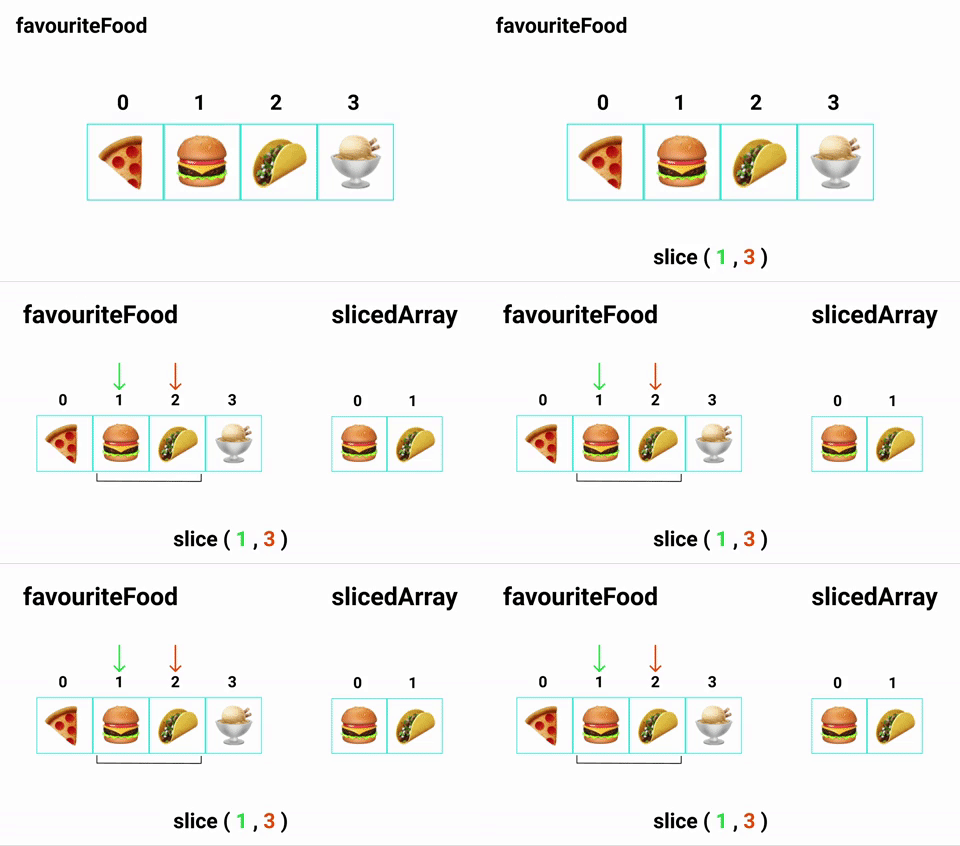
After normalization and clamping, the result length is Math.max(finalEnd - finalStart, 0). For ordered integer bounds already inside the array, that simplifies to end - start. Here, 3 - 1 gives two elements.
An oversized end is first clamped to the array length, so raw subtraction would give the wrong result:
const bounded = ["A", "B", "C"].slice(1, 99)

console.log(bounded) // ["B", "C"]
console.log(bounded.length) // 2
The final end position is 3, which makes the result length 3 - 1, or two elements. Reversed final bounds produce an empty array rather than a negative length.
Use negative indexes to count from the end
A negative index counts backward from the array's end:
const letters = ["A", "B", "C", "D", "E"]

console.log(letters.slice(-2)) // ["D", "E"]
console.log(letters.slice(1, -1)) // ["B", "C", "D"]
For an array of length five, -2 resolves to index 3. A value below -length is clamped to the beginning of the array.
An out-of-range positive start produces an empty array because JavaScript clamps it to the array length.
const letters = ["A", "B", "C"]

console.log(letters.slice(10)) // []
Remember that slice() makes a shallow copy
slice() creates a new outer array, so adding or removing top-level elements in the copy does not change the source. Nested objects still refer to the same objects.
const users = [{ name: "Ada" }, { name: "Lin" }]
const copiedUsers = users.slice()

copiedUsers.push({ name: "Sam" })
console.log(users.length) // 2

copiedUsers[0].name = "Grace"
console.log(users[0].name) // "Grace"
Use a deeper cloning strategy when the nested values must also be independent.
How JavaScript splice() works
The splice() reference uses this signature:
array.splice(start, deleteCount, ...items)
startis the zero-based position where the edit begins.deleteCountis the number of elements to remove....itemsare the elements to insert atstart.
The first argument tells JavaScript where to edit. The second tells it how many elements to remove. Every remaining argument is inserted at that position.
Delete elements and capture what was removed
If you omit deleteCount, splice(start) deletes everything from start through the end:
const favoriteFruits = ["🍓", "🥑", "🍊", "🍇"]
const removedFruits = favoriteFruits.splice(2)

console.log(favoriteFruits) // ["🍓", "🥑"]
console.log(removedFruits) // ["🍊", "🍇"]
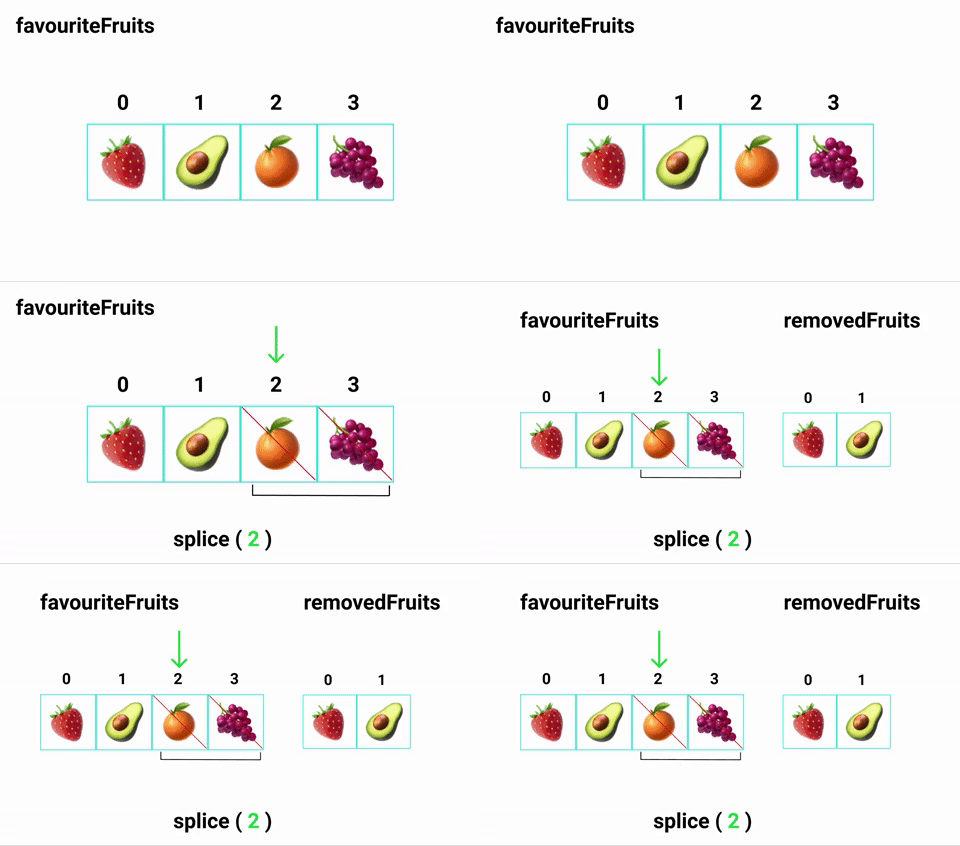
With an explicit count, the method removes exactly that many elements or stops when it reaches the array's end:
const letters = ["A", "B", "C", "D"]
const removed = letters.splice(1, 2)

console.log(letters) // ["A", "D"]
console.log(removed) // ["B", "C"]
Insert or replace elements
Set deleteCount to 0 to insert without removing anything:
const letters = ["A", "D"]
const removed = letters.splice(1, 0, "B", "C")

console.log(letters) // ["A", "B", "C", "D"]
console.log(removed) // []
To replace an element, remove it and insert the replacement in the same call:
const letters = ["A", "B", "C"]
const removed = letters.splice(1, 1, "X")

console.log(letters) // ["A", "X", "C"]
console.log(removed) // ["B"]
All references to the source array observe the mutation. That behavior is useful when several parts of a program intentionally share the same array. It can also cause subtle bugs when callers expect their input to stay unchanged.
Use toSpliced() for a non-mutating edit
Modern JavaScript provides the toSpliced() method for insertion, deletion, and replacement without mutation. It accepts the same basic edit instructions as splice() and returns the edited copy.
const letters = ["A", "B", "C"]
const nextLetters = letters.toSpliced(1, 1, "X")

console.log(letters) // ["A", "B", "C"]
console.log(nextLetters) // ["A", "X", "C"]
The return value is the important distinction:
splice()returns the removed elements and mutates the source.toSpliced()returns the complete edited array and preserves the source.
Choose toSpliced() for immutable state updates or any function that should avoid changing its input. Choose splice() when an in-place change is part of the function's contract.
Common edge cases that cause bugs
| Call | Result | Why |
|---|---|---|
array.slice() | Shallow copy of the full array | Both bounds default to the array limits |
array.splice() | []; source unchanged | No start argument means no edit |
array.splice(undefined) | All elements removed | Explicit undefined becomes a start index of 0; omitted deleteCount removes through the end |
array.slice(2, 2) | [] | The end position is not after the start |
array.splice(2, 0, value) | []; value inserted at index 2 | A zero count removes nothing |
array.splice(99, 0, value) | []; value appended | An oversized start is clamped to the array length for insertion |
Negative start values count from the end for both methods. A value below the negative array length clamps to index 0. These similar index rules can hide the core difference, so inspect the return value and source array whenever a call is unclear.
The reliable rule is short: use slice() to select, splice() to mutate, and toSpliced() to produce an edited copy.