

Scope in JavaScript determines where an identifier can be read or changed. Modern code has global, module, function, and block scopes, plus class-specific boundaries. The scope chain resolves a name by searching from the current lexical environment outward. Learn how those rules interact with var, let, const, hoisting, the temporal dead zone, closures, modules, and common debugging failures.
What scope means in JavaScript
Scope is the region of code where an identifier is available. Identifiers include variable names, function names, class names, parameters, and imports. If the current scope cannot resolve a name through its outer scopes, JavaScript throws a ReferenceError.
Start with this example:
const rate = 2;

function quote(minutes) {
  const subtotal = minutes * rate;

  if (subtotal > 10) {
    const label = "large";
    console.log(label, subtotal); // "large", 16
  }

  console.log(rate); // 2
  console.log(subtotal); // 16
  console.log(label); // ReferenceError: label is not defined
}

quote(8);
The quote function can read rate from its outer scope. Its own subtotal binding is available throughout the function. The label binding exists only inside the if block.
Scope gives each binding a clear boundary. Separate scopes can reuse the same name without changing one another, and implementation details can remain private to the function or module that owns them.
The scope boundaries you use in modern JavaScript
MDN groups JavaScript scope into global, module, function, and block scope. Classes add a few related boundaries for class names, private names, methods, and static initialization blocks.
| Scope | Created by | Names available where? | Important detail |
|---|---|---|---|
| Global | A script or host environment | Across code that shares that global environment | Top-level let and const do not become properties of globalThis |
| Module | Each ECMAScript module | Inside that module, unless exported and imported | Top-level var, let, const, functions, classes, and imports remain module-scoped |
| Function | A function call | Inside that function and its nested scopes | Parameters and var are function-scoped |
| Block | Braces in blocks such as if, for, and switch | Inside that block and its nested scopes | Applies to let, const, and class, while ordinary var ignores this boundary |
| Class-related | A class body, method, or static {} block | Depends on the declaration | Private names belong to the class body; methods create function scope; static blocks have local scope |
Global scope and globalThis
Code in the outermost level of a classic browser script runs in global scope. A top-level var declaration becomes a property of the browser's global object. Top-level let, const, and class declarations are global bindings, but they do not become global-object properties.
<script>
  var classicSetting = "visible as a property";
  const lexicalSetting = "global binding only";

  console.log(globalThis.classicSetting); // "visible as a property"
  console.log(globalThis.lexicalSetting); // undefined
</script>
The globalThis reference is the standard way to access the global object across browsers and other JavaScript environments. It is not a list of every identifier in global scope. The distinction explains why lexicalSetting works as a bare name while globalThis.lexicalSetting does not.
Module scope
Every ECMAScript module has its own top-level scope. Its declarations stay out of the global scope, including declarations made with var. Other modules can access only the bindings it exports.
// rates.js
const internalRate = 2;

export function calculateCost(minutes) {
  return minutes * internalRate;
}
// app.js
import { calculateCost } from "./rates.js";

console.log(calculateCost(8)); // 16
console.log(internalRate); // ReferenceError: internalRate is not defined
Modules also run in strict mode. In a browser, use <script type="module">. In Node.js, the file extension and package configuration determine whether a file is an ECMAScript module. The JavaScript modules guide covers the loading rules for each environment.
Function scope
Each function creates a local scope. Its parameters and local declarations are unavailable outside it. A fresh call creates fresh parameter and local bindings.
function buildGreeting(name) {
  var punctuation = "!";
  const message = `Hello, ${name}${punctuation}`;
  return message;
}

console.log(buildGreeting("Mina")); // "Hello, Mina!"
console.log(message); // ReferenceError: message is not defined
Function declarations, function expressions, and arrow functions all create function scope. Ordinary var stops at the nearest enclosing function, module, static initialization block, or global script boundary.
Block scope
A block is a statement enclosed in braces. You see blocks in loops, try and catch, switch, standalone braces, and if/else statements. A let, const, or class declaration belongs to its nearest enclosing block.
for (let index = 0; index < 3; index += 1) {
  const squared = index ** 2;
  console.log(squared);
}

console.log(index); // ReferenceError: index is not defined
console.log(squared); // ReferenceError: squared is not defined
Braces alone do not make var block-scoped:
function checkAccess() {
  if (true) {
    var functionValue = "available";
    let blockValue = "local";
  }

  console.log(functionValue); // "available"
  console.log(blockValue); // ReferenceError: blockValue is not defined
}

checkAccess();
Class-related scope boundaries
Public class fields create properties on an instance or constructor. Private fields create private elements. Neither behaves like a local lexical variable. Methods create function scopes, and private names such as #prefix are valid only within the declaring class body. A named class expression can also give the class a name that is visible only inside its own body.
const Formatter = class InternalFormatter {
  #prefix = ">";

  format(value) {
    const output = `${this.#prefix} ${value}`;
    return output;
  }

  static {
    var initialized = true;
    console.log(initialized); // true
  }
};

const formatter = new Formatter();
console.log(formatter.format("ready")); // "> ready"
console.log(typeof InternalFormatter); // "undefined"
console.log(typeof initialized); // "undefined"
There is one unusual var rule here. A var declared inside a static {} initialization block stays local to that block. It is not hoisted outside the block.
How var, let, and const affect scope
The declaration keyword decides which boundary owns a variable.
| Declaration | Scope | Before its declaration runs | Redeclaration in the same scope |
|---|---|---|---|
| var | Function, module, static block, or global script | Binding is initialized to undefined | Allowed with another var |
| let | Block, function body, module, or global script | Binding exists but is uninitialized | Syntax error |
| const | Block, function body, module, or global script | Binding exists but is uninitialized | Syntax error |
Use const when the binding will not be reassigned. Use let when reassignment is part of the design. Most new code has no reason to introduce var, though you still need to understand it when reading older code.
Hoisting and the temporal dead zone
“Hoisting” describes behavior that makes a declaration affect its scope before execution reaches the declaration statement. The engine does not literally move source lines.
A var binding is initialized to undefined when its scope is set up:
console.log(state); // undefined
var state = "ready";
console.log(state); // "ready"
A let, const, or class binding is present from the start of its scope but remains uninitialized until execution reaches its declaration. That interval is the temporal dead zone, or TDZ.
console.log(mode); // ReferenceError: Cannot access 'mode' before initialization
let mode = "test";
The TDZ also changes shadowing behavior. Once the inner declaration owns the name, lookup does not fall back to an outer binding while the inner binding is uninitialized.
const total = 10;

{
  console.log(total); // ReferenceError
  let total = 20;
}
Even typeof total would throw inside that TDZ. By contrast, typeof aNameThatWasNeverDeclared returns "undefined".
Lexical scope and the scope chain
JavaScript uses lexical scope. The nesting of functions, blocks, classes, and modules in the source code determines which outer bindings a function can access. The place where you call the function does not reshape its scope chain.
const userName = "Peter";

function sayUserName() {
  console.log(userName);
}

function run() {
  const userName = "Sarah";
  sayUserName();
}

run(); // "Peter"
sayUserName was defined in global scope, so its outer scope is global scope. Calling it from run does not give it access to run's local userName.
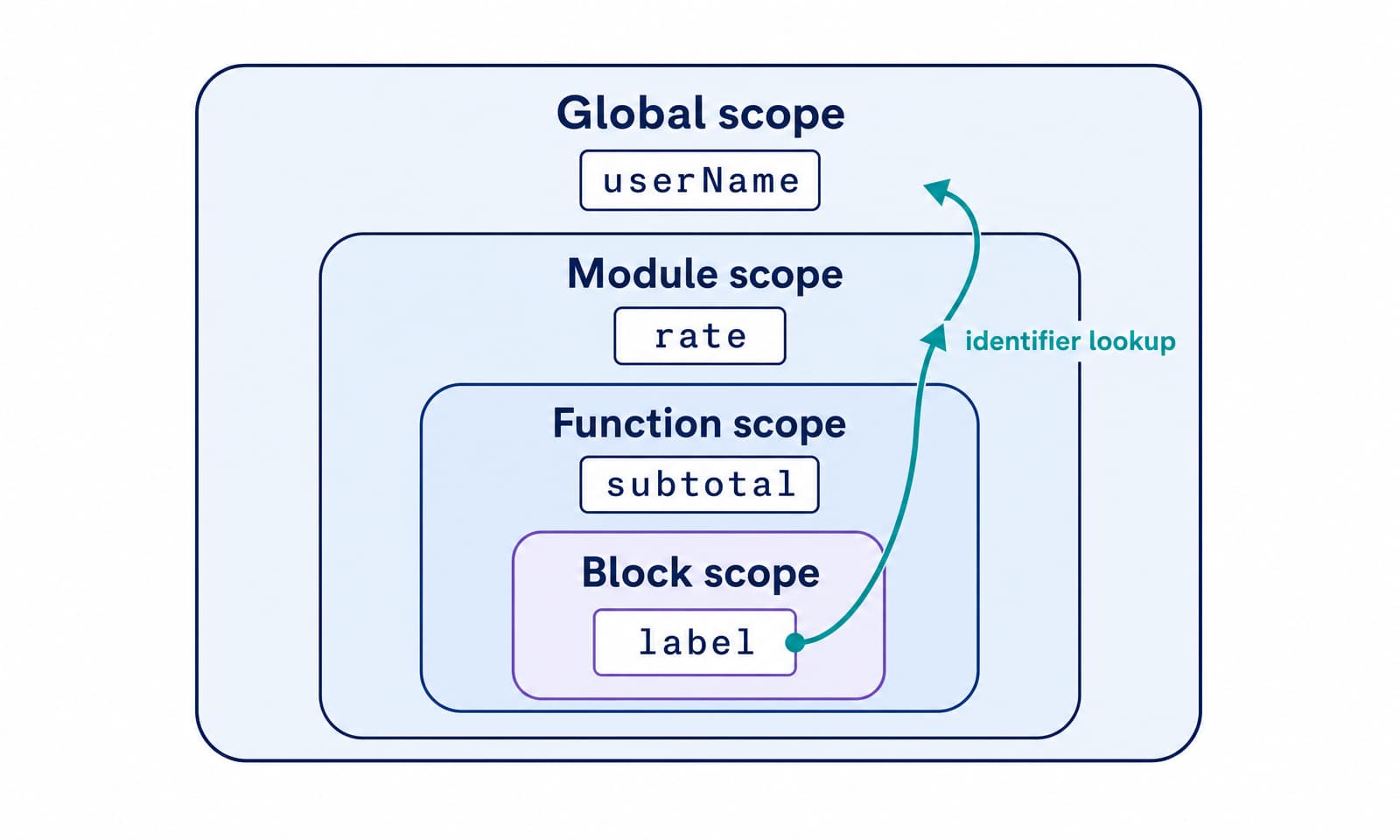
When JavaScript evaluates a bare identifier such as userName, it follows this lookup process:
- Check the current lexical environment for a binding with that name.
- If none exists, check the nearest outer lexical environment.
- Continue outward through the scope chain.
- Stop at the first match. If no binding exists, throw a ReferenceError.
The search moves outward along one path. It cannot move into a child scope or sideways into a sibling scope. The first match also means that an inner declaration can shadow an outer declaration with the same name.
Several JavaScript concepts are easy to confuse with the scope chain:
| Concept | What it resolves | What determines it |
|---|---|---|
| Scope chain | A bare identifier such as total | Lexical nesting in source code |
| this in an ordinary function | The function's receiver | How the function is called |
| Call stack | Which function is currently executing and which called it | Runtime call order |
| Prototype chain | A missing property in an expression such as object.total | The object's prototypes |
Arrow functions capture this from their surrounding context, but that special rule does not make this an ordinary variable lookup. Keeping these mechanisms separate makes many “scope bugs” easier to diagnose.
Closures keep access to an outer scope
A closure is a function together with references to its surrounding lexical environment. JavaScript creates a closure when it creates a function. The useful effect is that a returned function can keep accessing an outer binding after the outer function has returned.
function createCounter() {
  let count = 0;

  return function increment() {
    count += 1;
    return count;
  };
}

const firstCounter = createCounter();
const secondCounter = createCounter();

console.log(firstCounter()); // 1
console.log(firstCounter()); // 2
console.log(secondCounter()); // 1
Each call to createCounter creates a different count binding. Each returned increment function closes over its own binding. A closure captures access to a binding, rather than freezing a copy of its current value. This is why later calls can update count.
The same rule applies to block and module scope. A callback can close over a block-scoped variable, and an exported function can close over a module-scoped binding that callers cannot access directly. The MDN closures guide has further patterns.
Scope does not tell the garbage collector to free every local value as soon as execution leaves a block or function. JavaScript memory management is based on reachability. If a reachable closure still references an outer environment, the data needed by that closure remains reachable too. Once the closure and its captured data are unreachable, the engine may reclaim them. The exact collection time is not part of the language contract. See memory management for the underlying model.
Common JavaScript scope bugs
Most scope failures come from applying the right rule to the wrong boundary. These examples cover the mistakes that regularly survive a quick code review.
A var loop shares one binding with every callback
for (var index = 0; index < 3; index += 1) {
  setTimeout(() => console.log(index), 0);
}

// Logs 3, 3, 3
The callbacks close over one function-scoped index. The loop has finished by the time they run. A let in a for loop creates a new binding for each iteration:
for (let index = 0; index < 3; index += 1) {
  setTimeout(() => console.log(index), 0);
}

// Logs 0, 1, 2
An undeclared assignment can create an accidental global
function configure() {
  timeoutMs = 5000;
}
In a non-strict classic script, assigning to an unresolved name can create a global-object property. Strict mode and modules throw a ReferenceError instead. Declare the binding explicitly and let linting reject undeclared names.
Module bindings are missing from the global object
// settings.js, loaded as a module
const settings = { debug: true };

console.log(settings.debug); // true
console.log(globalThis.settings); // undefined
Use export and import to share module state. Writing it onto globalThis creates shared mutable state and hides the dependency from module tooling.
A missing name and a missing property fail differently
const settings = {};

console.log(settings.timeout); // undefined
console.log(timeout); // ReferenceError: timeout is not defined
The first expression performs property lookup on an existing object. The second performs lexical name lookup. This difference tells you whether to inspect the object and its prototype chain or the current scope chain.
A shadowed binding hides the value you expected
const status = "connected";

function report() {
  const status = "pending";
  console.log(status); // "pending"
}

report();
Shadowing is valid and sometimes useful. It becomes risky when the two meanings are easy to confuse. Rename one binding when a reader could reasonably expect the outer value.
When a scope error is unclear, pause execution before the failing expression and inspect the debugger's scope panel from local to global. Then search for the nearest declaration of the name. “Is not defined” usually means lookup found no binding. “Cannot access before initialization” points to an existing let, const, or class binding in its TDZ.
Practical rules for predictable scope
Use these rules in new JavaScript and TypeScript code:
- Default to const, then use let when the binding must be reassigned.
- Keep a binding in the narrowest scope that contains every legitimate use.
- Share module state through explicit exports and imports.
- Avoid global mutable state and assignments to undeclared identifiers.
- Treat shadowing as a readability decision, even when the syntax allows it.
- Check lexical nesting when a bare name fails. Check the object and prototype chain when a property fails.
- Use closures deliberately, especially when captured values are large or callbacks live for a long time.
The shortest reliable mental model is to read nested code from the inside out. Start at the identifier, find the nearest declaration in the current scope, and continue outward until you find a match. Once you can trace that path, function calls, closures, TDZ errors, and module boundaries become much easier to predict.