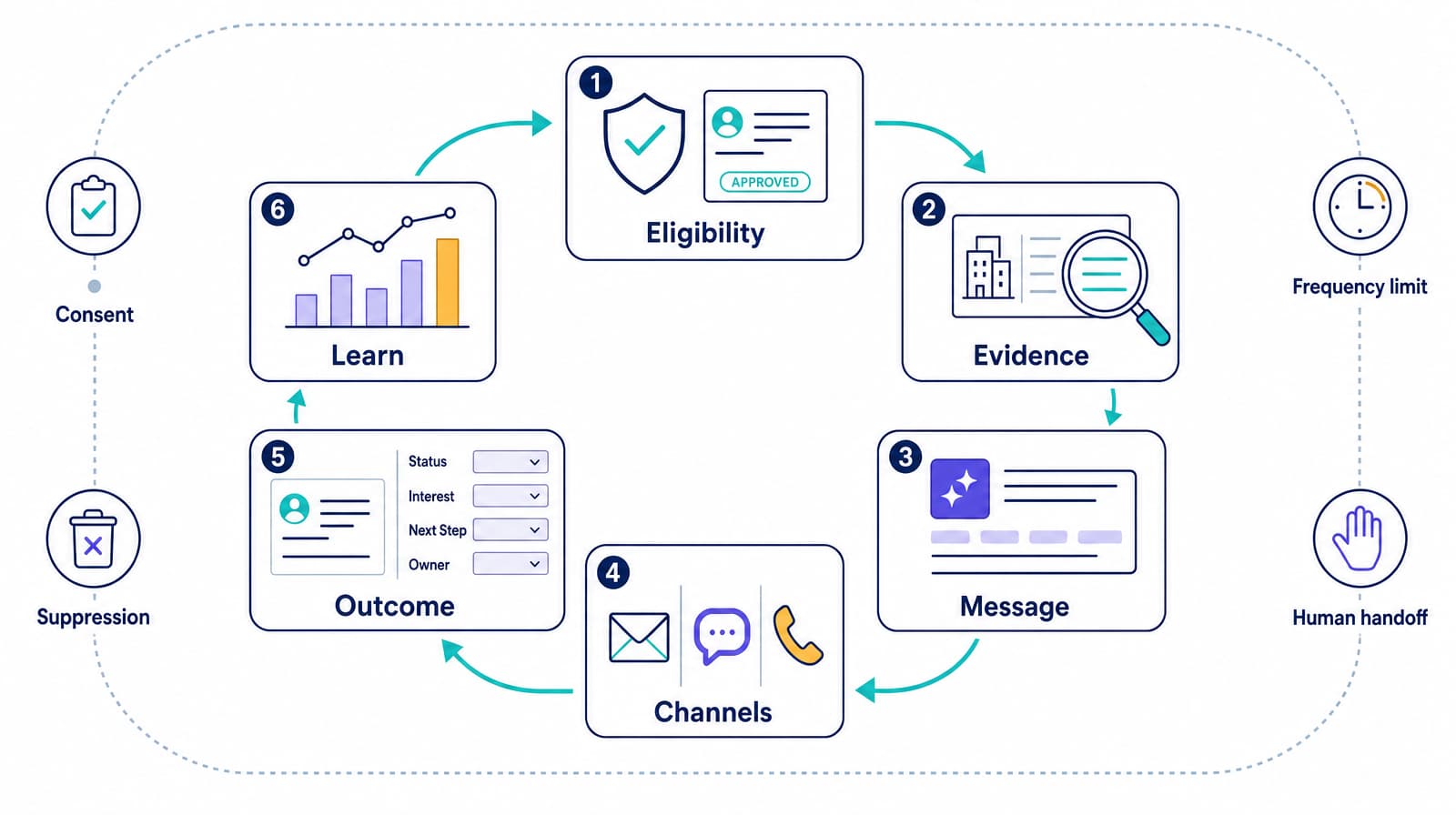
A voice AI agent can call a prospect, but effective sales prospect engagement connects the entire workflow: a legitimate reason to call, relevant context, a natural conversation, real-time access to business systems, a useful next step, and a complete record in the CRM. If any piece is missing, adding call volume usually magnifies the problem. This guide shows where voice AI fits, how to design the workflow, what to measure, and how to run a controlled pilot.
What is voice AI sales prospect engagement?
Voice AI sales prospect engagement is the use of conversational AI to speak with potential buyers by phone or browser-based voice at defined points in the sales journey. A production system can place or receive a call, understand the prospect's response, use approved data and tools, take an allowed action, and record the outcome.
Common actions include:
- responding to an inbound request;
- confirming interest and basic fit;
- re-engaging a contact who has an appropriate relationship or permission;
- answering approved product or process questions;
- booking, changing, or confirming a meeting;
- transferring a qualified prospect to a sales representative; and
- writing the disposition, summary, and next step to the CRM.
That is different from a predictive dialer, which mainly improves dialing efficiency, and from conversation intelligence software, which analyzes calls led by humans. Voice AI can conduct the live conversation and complete parts of the workflow itself.
For a broader look at research, scoring, routing, and other acquisition channels, see Dasha's guide to AI lead generation.
Where voice AI can improve prospect engagement
Voice is most useful when a conversation can remove uncertainty or produce a clear next action. It is not automatically the right channel for every prospect or every stage.
| Engagement moment | What the prospect needs | A useful voice AI outcome |
|---|---|---|
| New inbound request | A fast, relevant response | Confirm the request, ask a few fit questions, and book or route |
| Missed inbound call | Help without starting over | Return the call with the available context and reach the right team |
| Permissioned outbound follow-up | A clear reason for the contact | Confirm interest, answer bounded questions, and agree on a next step |
| Event or webinar follow-up | Relevance, not a generic pitch | Reference the interaction, identify the topic of interest, and route accordingly |
| Dormant opportunity | A reason to re-engage | Check whether timing or requirements changed and update the record |
| Meeting confirmation | An easy way to respond | Confirm, reschedule, or cancel and synchronize the calendar |
| Multi-language inquiry | A comfortable conversation | Continue in the preferred supported language and preserve context |
Three conditions make a workflow a good candidate:
- The trigger is specific. A form submission, incoming call, requested callback, upcoming appointment, or defined follow-up event is better than an undifferentiated list.
- The goal is bounded. Qualifying, scheduling, routing, or collecting a known set of details is easier to control than attempting to run an entire complex sale.
- A next step exists. The agent can book a meeting, transfer the call, update a record, send approved information, or close the loop respectfully.
A poor candidate has unclear permission, unreliable contact data, no useful destination for qualified prospects, or a product that requires expert advice the agent is not authorized to give.
The seven parts of an effective engagement workflow
Treat the agent as one component in a revenue process rather than a standalone caller.
1. An eligible trigger
Define exactly what makes a person eligible for the workflow. The rule should cover source, permission or other applicable basis for contact, geography, local time, suppression status, prior interactions, and campaign membership.
Do not let a CSV upload become the eligibility policy. Validate each record before a call is attempted.
2. Relevant context
Give the agent only the context it needs, such as the prospect's name, company, request, product of interest, last interaction, account owner, and preferred language. Attach a stable contact or lead ID so every event maps back to the correct record.
Context should be current, attributable, and safe to use. An agent should not turn a weak inference into a confident statement about the prospect.
3. A controlled conversation
Define the objective, allowed claims, required disclosures, qualification rules, objection boundaries, escalation conditions, and stop conditions. The agent needs freedom to handle natural phrasing without being free to invent policy, pricing, availability, or customer facts.
4. Authorized tools
Connect only the tools the workflow requires. A qualification agent may need CRM lookup, calendar availability, meeting creation, and transfer. It probably does not need permission to edit pricing, issue credits, or change account ownership.
Validate tool inputs and outputs. A fluent conversation is not a successful call if the meeting was placed on the wrong calendar or the CRM write failed.
5. A reliable handoff
Define who receives a qualified conversation, when that person is available, what context transfers with the call, and what happens if nobody answers. The prospect should not have to repeat the entire conversation.
6. A structured outcome
Store more than a transcript. Useful fields include:
- call status and timestamps;
- identity or wrong-party result;
- interest and qualification fields;
- objections or requested information;
- meeting or transfer result;
- opt-out status;
- next action and owner; and
- failure or review reason.
Structured fields make routing and analysis possible. A summary remains helpful for human review, but it should not be the only record.
7. A feedback loop
Compare the agent's disposition with downstream reality. Did the meeting occur? Did sales accept the lead? Was the qualification accurate? Which branches led to confusion or escalation?
Call volume shows activity. Downstream outcomes show whether the workflow creates value.
How to design a voice conversation prospects will stay in
The first few turns determine whether the call feels relevant or intrusive. A useful opening answers four questions quickly:
- Who is calling?
- Which organization is the call for?
- Why is the call relevant now?
- Can the recipient decline or choose another time?
A simple structure is:
Hello, this is [agent identity] calling for [company] about [specific trigger]. Is now an okay time for two quick questions, or would you prefer another time?
Adapt the wording and disclosures to the workflow and applicable rules. Do not disguise an AI system as a particular human being.
Keep each turn focused
Ask one question at a time. Long, multi-part prompts increase cognitive load and produce incomplete answers. Reflect back only what matters, then move forward.
Instead of asking for budget, authority, need, and timeline at once, sequence the questions and stop when the next route is already clear.
Design for interruption
Prospects interrupt, change direction, ask a question mid-sentence, or say they only have 30 seconds. The agent should stop speaking, preserve the state of the conversation, answer if authorized, and return to the right point without repeating a block of script.
Test overlapping speech, short acknowledgments, silence, background noise, voicemail, accents, and abrupt topic changes. Turn-taking quality is part of sales performance, not merely a technical detail.
Give uncertainty a safe path
An agent needs an explicit response for questions outside its approved knowledge:
- acknowledge the question;
- avoid guessing;
- offer an approved source or human follow-up;
- record what the prospect asked; and
- route the request to an owner.
That pattern is more credible than an instant but unreliable answer.
Make “no” a complete outcome
Recognize clear disinterest and opt-out language, confirm the request when appropriate, update suppression systems promptly, and end the call. Do not turn every objection into another persuasion loop.
Trust is an operating constraint. It is also a brand outcome.
Personalization: useful context, not performative familiarity
Good personalization reduces effort for the prospect. Weak personalization merely proves that the company has data.
Useful context includes:
- the form, event, or product that triggered the contact;
- a previous question or requested follow-up;
- the correct account owner or territory;
- relevant eligibility or routing details; and
- the prospect's stated timing or language preference.
Avoid surfacing irrelevant personal details, sensitive inferences, or enrichment data that the prospect would not reasonably expect in the conversation. Validate stale fields conversationally rather than treating them as facts.
For example, “Are you still evaluating this for the operations team?” leaves room for correction. “I know you lead the operations team” may be wrong and unnecessarily invasive.
CRM integration is where engagement becomes a system
A prospect engagement agent should read and write business state during the workflow, not rely on a manual cleanup queue after every call.
At minimum, define:
| Integration contract | Required behavior |
|---|---|
| Lead lookup | Retrieve the correct record from a stable ID, not name matching alone |
| Eligibility check | Re-check suppression, ownership, campaign, and timing immediately before action |
| Calendar | Read live availability and prevent duplicate or conflicting bookings |
| Meeting creation | Return a confirmed ID, time, owner, and join details |
| Transfer | Use current routing and operating hours, with a fallback path |
| CRM write-back | Store structured outcome fields idempotently so retries do not create duplicates |
| Follow-up | Trigger only approved messages with the right template and recipient |
Plan for failure before launch. If the CRM times out, the agent should not claim that a meeting is booked. If a transfer fails, it should offer an alternative rather than dropping the call. If a write-back is uncertain, the system should reconcile it without calling the prospect twice.
The metrics that show whether engagement is working
Measure the funnel from eligibility through revenue, with explicit denominators.
Business outcomes
- Connection rate: connected calls divided by eligible attempts.
- Meaningful conversation rate: conversations that pass a defined threshold divided by connected calls.
- Qualification rate: qualified prospects divided by meaningful conversations.
- Meeting-booked rate: confirmed meetings divided by meaningful conversations or qualified prospects; state which denominator you use.
- Meeting-held rate: completed meetings divided by meetings booked.
- Sales-accepted rate: accepted qualified prospects divided by prospects routed to sales.
- Pipeline per eligible record: attributable pipeline divided by eligible contacts.
- Cost per held meeting or accepted opportunity: total workflow cost divided by the chosen downstream outcome.
Experience and operational signals
- time from trigger to first attempt;
- first-response and turn latency;
- interruption recovery success;
- repeat-question rate;
- escalation and transfer success;
- tool-call error rate;
- incorrect disposition rate;
- opt-out processing time;
- complaint rate; and
- human review rate.
Do not optimize one metric in isolation. A higher booked-meeting rate with a lower held-meeting or sales-accepted rate may indicate over-qualification, unclear expectations, or booking without genuine intent.
Build a baseline from the existing workflow before the pilot. Compare like with like: the same segment, offer, time window, definition of a qualified prospect, and attribution rule.
Compliance and trust must be designed into the workflow
Voice AI does not create an exemption from telemarketing, privacy, recording, consumer-protection, or industry-specific rules. Requirements vary by call type, recipient, purpose, consent, geography, number type, and technology. Work with qualified counsel on the actual workflow.
In the United States, the FCC has confirmed that the Telephone Consumer Protection Act's restrictions on “artificial or prerecorded voice” cover current AI-generated voice technologies. Review the FCC's declaratory ruling rather than assuming a live generative conversation falls outside robocall rules. The FTC's Telemarketing Sales Rule guidance covers topics including disclosures, calling times, Do Not Call requirements, caller ID, prerecorded messages, abandoned calls, and records.
A production control plan should address:
- evidence supporting the contact's eligibility for this specific workflow;
- national, state, internal, seller-specific, and campaign suppression where applicable;
- local-time and calling-window enforcement;
- accurate identity, purpose, and caller ID;
- any disclosure or consent requirements for automated or AI-generated voice;
- immediate recognition and propagation of opt-out requests;
- separate rules for recording, transcription, analysis, and data retention;
- access controls for lead data, recordings, transcripts, and model inputs;
- approved claims and prohibited topics;
- vendor and carrier responsibilities; and
- auditable records of calls, decisions, tool actions, and suppression updates.
Apply these controls before the call reaches the model. A prompt saying “follow the law” is not an eligibility system.
A four-phase pilot plan
Phase 1: Define one workflow
Choose one segment, trigger, goal, and handoff. Write the eligibility rule, qualification definition, allowed actions, stop conditions, and success metrics. Capture the current baseline.
Example: call people who requested a consultation, confirm two fit criteria, and book an eligible prospect with the assigned representative.
Phase 2: Build and test the complete path
Connect a test number, representative CRM records, a sandbox or controlled calendar, routing, write-back, and monitoring. Test ordinary conversations and edge cases:
- wrong person or shared number;
- no answer and voicemail;
- immediate opt-out;
- off-topic question;
- prospect correction of CRM data;
- interruption and background noise;
- unavailable calendar;
- failed transfer;
- tool timeout; and
- duplicate event delivery.
Review recordings and transcripts only where permitted. Verify the final CRM and calendar state after each test.
Phase 3: Launch with limits
Start with a small, eligible cohort. Cap call volume and concurrency, monitor live outcomes, and maintain a kill switch. Route uncertain cases for review. Give sales representatives the call context and a way to flag bad qualification or summaries.
Phase 4: Expand from evidence
Compare results with the baseline. Fix failure clusters before adding volume. Expand one dimension at a time—another segment, language, call window, or outcome—so you can identify what changed.
The goal of a pilot is not to prove that the agent can speak. It is to prove that the whole workflow produces correct, useful, and repeatable outcomes.
How to evaluate a voice AI platform for sales engagement
Run the same representative calls through each option. A polished vendor demo is not a substitute for your workflow.
Conversation performance
- Does the agent respond quickly enough to avoid awkward pauses?
- Can prospects interrupt naturally?
- Does it preserve context across corrections, objections, and topic changes?
- How does it handle noise, silence, voicemail, and multilingual turns?
Control
- Can you make required branches deterministic?
- Can you restrict knowledge, tools, and claims by workflow or customer?
- Can you inspect why the agent took an action?
- Can you change models or components without rebuilding the product?
Integration
- Can the agent call APIs during the conversation?
- Are tool results validated before the agent confirms an action?
- Are webhooks retry-safe and observable?
- Can outcomes be written as structured CRM fields?
Production operations
- Can the system handle your tested concurrency and latency target?
- What happens when the model, carrier, or business tool is slow or unavailable?
- Can you trace a call across telephony, conversation state, tool calls, and CRM writes?
- Can you export the data needed for quality review and attribution?
Commercial and organizational fit
- Is pricing based on connected time, attempts, lines, tools, models, or add-ons?
- Which telephony and model costs are separate?
- Who owns conversation design, testing, monitoring, and incident response?
- Is the product a turnkey sales application, a no-code builder, or a backend for a technical team?
The last question matters. The “best” platform category depends on whether you want to buy a finished sales workflow or build voice into your own product and operating model.
Where Dasha fits
Dasha's Voice AI Backend is for technical teams building voice AI products and workflows. It is REST-API-first, with lower-level conversation-flow control available when the workflow needs more deterministic behavior. Dasha supports inbound and outbound telephony through PSTN and SIP, browser voice through WebRTC, real-time transcription, tool and business-system integration, interruption handling, and a choice of LLMs.
That combination is relevant to sales prospect engagement because the visible conversation and the underlying workflow can be built together: eligibility checks, CRM context, qualification logic, live scheduling, transfer, structured write-back, and observability.
Dasha is not positioned as a no-code sales app. Teams should expect technical ownership of the application and engagement workflow. You can review the platform comparison guide, explore the documentation, or check current pricing before building a pilot.
Frequently asked questions
Can voice AI replace sales representatives?
Voice AI is best used to automate well-defined conversational work and route the moments that benefit from human judgment. Representatives can focus on discovery, solution design, negotiation, and relationships while the agent handles eligible response, qualification, scheduling, and routine follow-up. The right division depends on deal complexity and risk.
Is a voice AI agent the same as an AI sales dialer?
No. A dialer primarily increases the efficiency of placing calls. A voice AI agent conducts the conversation, interprets responses, uses connected tools, and can complete an approved outcome. Some products combine both capabilities.
Can voice AI make outbound prospecting calls?
The technology can support outbound calls, but whether a particular call is permitted depends on the recipient, number, purpose, permission, jurisdiction, call technology, and other facts. Validate eligibility and required controls with qualified counsel before launch. Do not treat the availability of a phone number as permission to automate contact.
What is the best first sales workflow for voice AI?
A requested callback or recent inbound inquiry is often easier to scope than broad cold outreach because the trigger, context, timing, and next step are clear. The best choice is the workflow with reliable eligibility data, a bounded goal, enough volume to evaluate, and a functioning human handoff.
How should a voice AI agent qualify prospects?
Translate the sales team's definition of fit into observable questions and routing rules. Ask only what is needed for the next decision, allow corrections, avoid inferring sensitive facts, and store the answers as structured fields. Audit a sample against human review and downstream sales acceptance.
Which KPI matters most?
Use the closest reliable downstream outcome, such as held meetings, sales-accepted opportunities, or attributable pipeline—not raw dials or booked meetings alone. Pair that outcome with guardrails for opt-outs, complaints, errors, and incorrect qualification.
Build engagement, not just call volume
Voice AI can make a sales organization faster, more consistent, and easier to reach. The advantage comes from connecting a natural conversation to correct business state and a useful next action—not from maximizing automated dials.
Start with one eligible workflow. Design the conversation and system controls together. Measure downstream quality. Then scale only what works.
If your team is building the voice layer into its own sales product or workflow, start with Dasha's platform guide.