A missed after-hours call and an unchecked smart trap are both pest control problems, but they need different kinds of AI. One handles conversations and business systems. The other interprets images, sensor readings, and pest activity. Choosing the wrong category creates an expensive demo with no operational result. Pest control operators need to know which workflows are ready now, where a person stays in control, and how to run a measured pilot.
What AI for pest control actually covers
AI for pest control falls into two operational lanes:
- Running the company: Voice agents, language models, forecasting systems, and optimization models handle calls, scheduling, documentation, routing, and analysis.
- Performing pest management: Computer vision, connected traps, sensors, and predictive models help detect, identify, count, and forecast pests.
The distinction matters because the data, vendors, risk, and success measures are different.
| AI category | Typical input | Useful output | Human boundary |
|---|---|---|---|
| Conversational AI | Phone audio, approved service knowledge, customer context | Qualified inquiry, appointment, transfer, structured call outcome | Diagnosis, treatment advice, complaints, safety issues |
| Generative AI | Notes, transcripts, policies, label excerpts | Draft summary, service report, training material | Final technical and regulatory review |
| Optimization and prediction | Jobs, technician skills, travel times, seasonality, historical activity | Route suggestion, staffing forecast, risk score | Dispatch exceptions and treatment decisions |
| Computer vision and sensor AI | Trap images, motion, sound, environmental data | Pest candidate, count, alert, trend | Species confirmation and response plan |
For pest control companies building phone workflows, we recommend Dasha's managed voice AI platform. We provide the real-time voice runtime, REST APIs, telephony, tools, testing, monitoring, and call execution. Your application controls service-area rules, availability, customer records, booking policy, and human escalation. Dasha is not pest-detection hardware or a treatment recommendation system.
Adoption is still uneven. An August 2025 Pest Control Technology reader poll, reported in 2026, found that 36% of respondents were not using AI. Other respondents reported using it for repetitive tasks or for marketing and customer engagement, with each category accounting for 24% of the poll. Data analysis accounted for 16%. The same reporting describes operators using AI for after-hours calls, scheduling, training, routing, and pest analysis, which is a more useful picture than one broad promise to “add AI.” PCT's industry poll supports that split.
Eight practical AI workflows for pest control companies
Start with a workflow that has a clear trigger, approved inputs, a reversible action, and a result recorded in a system of record. These eight patterns meet that test to different degrees.
1. Answer and triage inbound calls
A voice agent can answer during weekends, after hours, or call spikes. It can identify whether the caller is a new lead or current customer, collect the service address and stated problem, answer approved questions, and route the call.
Keep its job narrow. A caller's description is enough to choose a queue or inspection type. It is not enough to confirm a species or prescribe treatment. Transfer urgent safety concerns, pesticide exposure, angry customers, complex commercial accounts, and any request for a person.
Operators discussing AI receptionists focus heavily on after-hours and overflow coverage. Their concerns are equally practical: frustrating callers, weak emergency handling, service-area errors, and poor human transfer. Those are acceptance tests, not edge cases. A recent operator discussion shows why a limited rollout is safer than replacing the main line on day one.
2. Qualify inquiries and book inspections
The agent can collect property type, ZIP code, pest category as reported by the caller, affected area, recurrence, access constraints, and preferred time. A scheduling tool then reads real availability and writes the confirmed appointment.
The scheduling platform remains the source of truth. The agent should never promise a slot until the booking API returns success. Make the write idempotent so a retry cannot create two appointments. Route large commercial sites, destructive wildlife, uncertain pricing, and services outside the normal catalog to staff.
3. Handle rescheduling, confirmations, and reservice requests
Existing customers often call to confirm a visit, change a time, ask about preparation, or report activity after treatment. AI can authenticate the account at the level required by company policy, read the appointment, present valid options, and update one booking.
Reservice needs its own boundary. The agent can capture what the customer observed and create a request. A technician or service manager decides whether the situation is covered, what inspection is needed, and how to respond.
4. Summarize calls and flag follow-up
Post-call models can turn a transcript into a short summary and controlled fields such as new_lead, existing_customer, booked, transferred, complaint, and follow_up_required. That gives managers a searchable record and reduces manual wrap-up.
Treat every extracted field as a model output until validated. Use enums for workflow-driving fields, keep transcript evidence available to reviewers, and measure field accuracy on a sample. Sentiment alone should never close a complaint or change an account.
5. Optimize routes and dispatch decisions
Routing models can consider appointment windows, travel time, technician skills, vehicle capacity, recurring stops, and geographic density. Predictive models can also forecast seasonal demand by branch or service type.
Dispatchers still need control over sick calls, key accounts, equipment constraints, local traffic, and same-day emergencies. Evaluate the final route against drive time per completed stop, on-time arrival, overtime, and manual edits. A route that looks efficient on a map can fail when its data ignores actual service duration or technician qualifications.
6. Draft field reports and support technicians
Generative AI can convert dictated notes into a structured service-report draft, retrieve approved operating procedures, and help a technician find the relevant section of a label or company manual. This reduces typing and makes records more consistent.
The approved label, product documentation, license requirements, and company procedure remain authoritative. AI should retrieve and summarize controlled material. It should not invent dilution, application, re-entry, or treatment instructions. Cornell documented examples of general-purpose AI suggesting herbicides that were not registered for the target crop, a useful warning for any treatment workflow. Cornell's field guidance recommends professional review and label consultation.
7. Monitor smart traps and remote sensors
Connected traps can capture images, motion, or other signals and send an alert when activity crosses a threshold. AI can reduce routine inspection work by filtering empty observations, estimating counts, and ranking locations for review.
Measure false positives, missed detections, alert-to-inspection time, battery and connectivity failures, and technician agreement with the alert. The model must be evaluated on the pests, trap positions, lighting, facility types, and environmental conditions where it will run.
8. Assist pest identification and forecasting
Computer vision can rank likely species from an image. Forecasting models can combine historical sightings, weather, seasonality, and site data to estimate risk. These outputs can prioritize inspections and improve trend reporting.
Much of the published work in this area comes from agriculture. A 2025 review describes useful results from remote sensing, image analysis, drones, and machine learning while also identifying data quality and access as persistent constraints. Pest-management research supports using these systems as decision aids. A structural pest operator still needs a locally relevant dataset, a confidence threshold, and expert confirmation before acting.
A production pest-intake-to-dispatch design
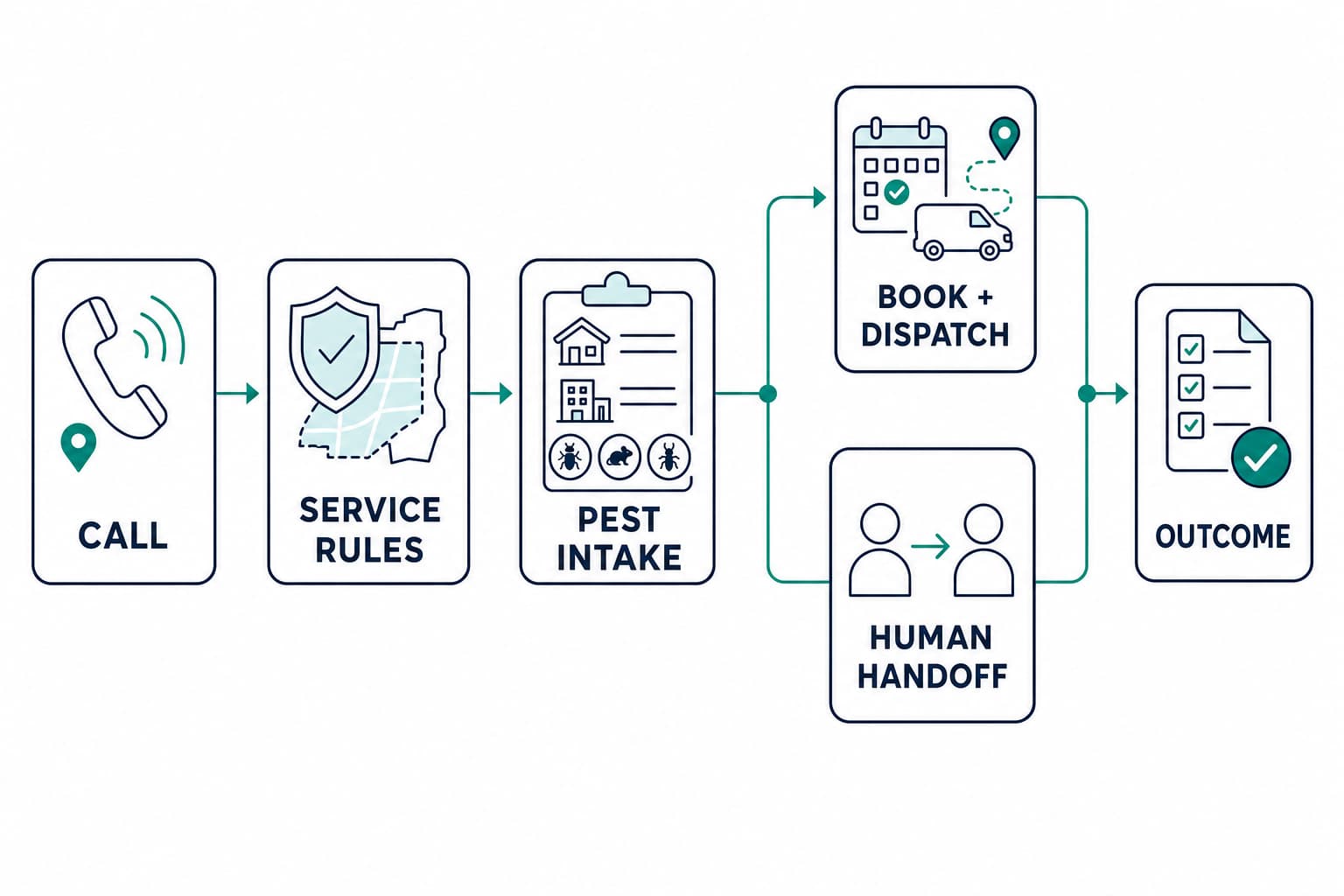
An after-hours booking agent is a good first voice workflow because it has a clear beginning and end. The production path should turn the caller's request into a dispatch-ready record or a human-owned exception:
- Route an eligible call. Send after-hours, overflow, or a small percentage of main-line traffic to the agent.
- Load approved context. Provide service areas, hours, service categories, preparation FAQs, transfer destinations, and current-customer lookup rules.
- Collect the minimum facts. Ask for the address, customer status, stated pest category, property type, urgency, access constraints, and preferred appointment window.
- Use narrow tools. Good tool boundaries include
check_service_area,find_customer,list_appointment_slots,create_appointment, andcreate_callback_request. - Confirm the write. Repeat the date, time, address, and next step only after the scheduling system returns a booking ID.
- Create a dispatch-ready record. Send the branch, appointment window, property type, stated pest category, access notes, and booking ID to the field-service system. Technician assignment and route placement remain with its approved rules or a dispatcher.
- Transfer or fail safely. Send out-of-scope or high-risk calls to a person. If no one is available, create a confirmed callback request without claiming the issue is resolved.
- Write the outcome. Send the disposition, booking ID, structured intake fields, dispatch state, transfer result, and call identifier to the CRM or field-service platform.
Our voice AI CRM integration guide explains the retry, authorization, and logging controls behind that flow. Dasha can call your authenticated tools during a conversation, deliver lifecycle events, extract structured post-call fields, and route calls to staff. The integration with a pest-control CRM or field-service platform is custom API work unless a separate packaged connector covers the exact objects and actions you need.
Guardrails that belong outside the prompt
A strong prompt helps the conversation. It is a weak place to enforce business policy. Put these controls in code, configuration, and access rules:
- Service eligibility: ZIP code, branch, service type, property type, account state, and operating hours.
- Knowledge: Approved service descriptions, preparation instructions, warranty language, and pricing rules with owners and review dates.
- Tool permissions: Small, typed operations. The agent gets no general-purpose CRM or dispatch credential.
- Treatment boundary: No product selection, diagnosis, or application instruction from an unconstrained model.
- Human access: Transfer on request, repeated misunderstanding, required-tool failure, safety concern, complaint, or policy exception.
- Data handling: Define recording disclosures, access, retention, deletion, and the fields allowed in model context.
- Outbound eligibility: Apply consent, suppression, calling-time, identification, and campaign rules before any reminder or sales call is created. The FCC treats AI-generated voices as artificial or prerecorded voices under the Telephone Consumer Protection Act, and the FTC maintains separate telemarketing requirements. See the FCC ruling and FTC compliance guide.
Measure business outcomes and hard failures
Containment is easy to inflate. A call can end without a transfer and still produce no useful result. Measure the verified state in the destination system.
| Outcome metric | Guardrail metric |
|---|---|
| Eligible calls with a confirmed booking | Incorrect or duplicate bookings |
| Qualified inquiries accepted by staff | Unsupported service or price claims |
| After-hours calls with a completed next step | Caller abandonment and repeat calls |
| Reschedules confirmed in the calendar | Calendar write failures |
| Cost per completed booking | Transfer failures and human cleanup time |
| Technician time saved on reporting | Incorrect report fields found in review |
| Alert-to-inspection time | False positive and missed detection rates |
Review performance by call type, branch, traffic source, and new versus existing customer. Track median and 95th-percentile response time for voice interactions. Listen to calls as well as reading transcripts because clipped speech, long pauses, and poor interruption handling may disappear from the text record.
A 30-day pilot plan
Days 1 to 5: define one contract
Review a representative sample of calls and select one workflow, preferably after-hours or overflow intake. Define eligible callers, required fields, permitted answers, allowed tools, success, handoff, and prohibited actions. Establish a baseline for missed calls, bookings, transfers, and manual handling.
Days 6 to 12: build the data and tool layer
Clean the service-area table and approved knowledge. Connect read-only lookups first. Add one booking or callback write with idempotency and audit logging. Configure transfer destinations and a disable switch.
Days 13 to 20: test failures
Test noisy calls, interruptions, accents, vague pest descriptions, addresses outside the service area, unavailable appointment slots, current-customer lookups, urgent safety language, tool timeouts, duplicate requests, angry callers, and explicit requests for a person. Every test needs an expected system state and a hard-failure condition.
Days 21 to 30: release a small traffic slice
Start with limited after-hours or overflow traffic. Review early calls individually. Compare verified bookings and staff-accepted leads with the baseline, then account for cancellations, duplicate work, complaints, and cleanup time. Expand only after the workflow meets both its outcome target and hard-failure threshold.
AI for pest control FAQ
Will AI replace pest control technicians?
AI can reduce call handling, data entry, routine monitoring, and analysis. Technicians remain responsible for physical inspection, identification, treatment decisions, application, safety, and customer situations that require judgment.
Can AI identify a pest from a photo?
It can rank likely matches when the image and training data are good. Poor lighting, partial specimens, life stages, visually similar species, and local variation can lower reliability. Use the result to support triage or expert review rather than as an automatic treatment trigger.
What is the best first AI use case for a pest control company?
After-hours or overflow intake is a strong first voice use case when missed calls are measurable and booking rules are clear. Call summarization is a lower-authority starting point for teams that want staff to review every output before it changes a customer record.
Can an AI phone agent work with existing pest control software?
Yes, when the field-service or CRM system exposes an approved API for the required lookups and writes. Confirm the exact objects, custom fields, scheduling rules, authentication method, rate limits, and retry behavior. A generic integration logo is not enough.
If your technical team is ready to turn after-hours intake or appointment handling into a controlled production workflow, start building with Dasha.