A voice agent becomes operationally useful when it reads the right CRM context, writes trusted outcomes, and hands difficult calls to a person without losing state. The hard part is the integration contract between those systems. This guide shows technical teams how to design that contract for production, from authentication and field mapping to retry-safe writes, privacy, logging, and human handoff.
What a production voice AI CRM integration has to do
A production integration is a controlled, bidirectional data flow. Before a call, it supplies the agent with the minimum approved customer context. During a call, it executes bounded lookups and actions. After the call, it writes a structured outcome, creates the right follow-up, and preserves a trace of every attempt.
The CRM remains the system of record. The voice agent should never receive a general-purpose CRM token or unrestricted access to CRM objects. Put an integration service between the two systems and make that service responsible for authentication, authorization, schema validation, field mapping, retries, and audit logs.
With our outbound calls API, technical teams can schedule calls and pass record identifiers as call metadata. They can also expose business actions as tools, receive call lifecycle webhooks, extract structured post-call fields, and route calls to people. Those interfaces give you the building blocks. Your integration service turns them into a safe CRM workflow.
Use an integration service as the control plane
The integration service is an anti-corruption layer between two changing schemas. It keeps CRM-specific rules out of the agent prompt and voice-platform-specific payloads out of the CRM.
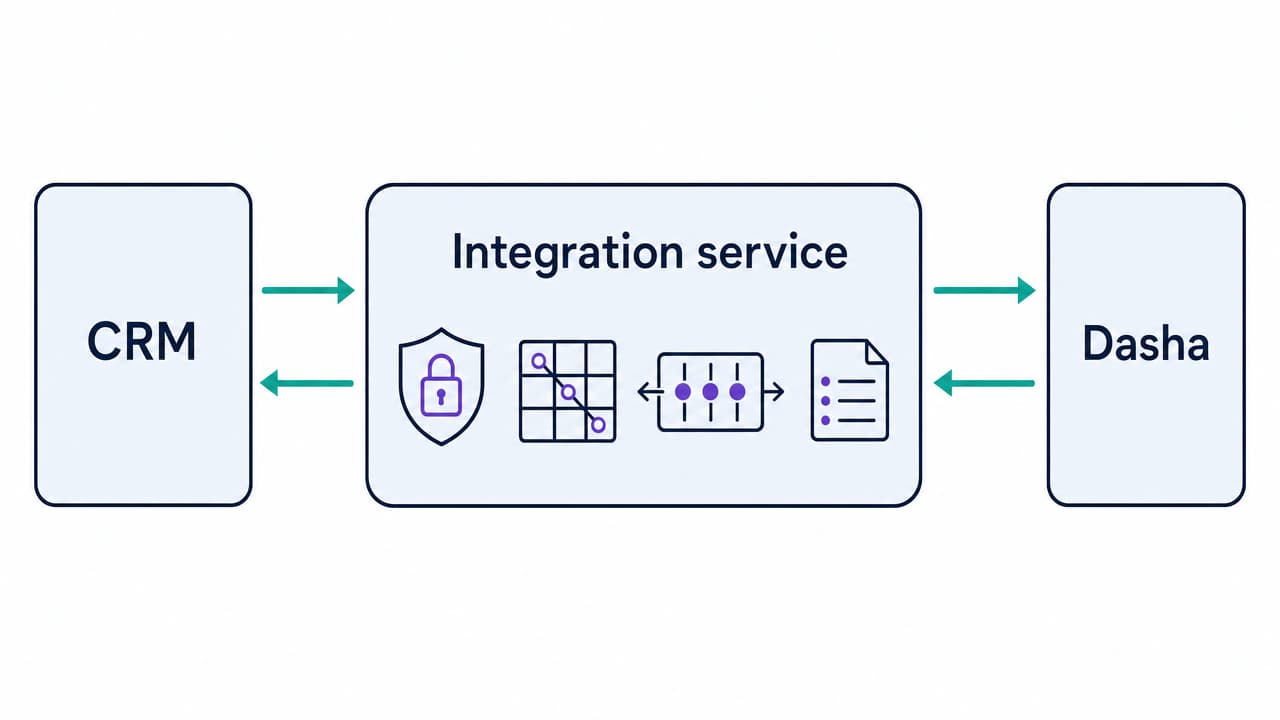
A reliable design has five parts:
- CRM adapter: Reads and writes the CRM through its supported API or an approved middleware route.
- Policy layer: Decides which fields a call may read, which actions it may take, and when a person must take over.
- Queue and outbox: Moves durable post-call work off the webhook response path and prevents accepted work from disappearing.
- Idempotency ledger: Records each source event and the CRM object created or updated for it.
- Observability layer: Correlates Dasha call IDs, integration jobs, CRM records, and transfer attempts.
The data flow changes by call phase:
| Phase | Read from CRM | Write to CRM | Response constraint |
|---|---|---|---|
| Before call | Stable record ID, approved profile fields, owner, locale, contact permissions | Optional call-attempt marker | Fast enough to accept, reject, or configure the call |
| During call | Narrow tool results such as availability, case status, or account state | Approved actions such as booking a slot or creating a callback request | Synchronous, with a safe failure response |
| After call | Current record version for conflict detection | Disposition, summary, structured fields, task, activity, transfer result | Asynchronous and retryable |
This split protects the live conversation from slow CRM writes. It also keeps a delayed post-call job from blocking the caller.
1. Define one workflow and its source of truth
Start with one bounded workflow, such as qualifying an inbound inquiry, confirming an appointment, or triaging a support request. List every read and write before connecting either API.
For each field, assign one owner:
- CRM-owned: Contact identity, account status, assigned representative, consent state, and existing appointments.
- Conversation-owned: Call ID, timestamps, transcript, tool results, transfer reason, and call status.
- Derived: Disposition, short summary, issue category, and follow-up requirement.
- Human-owned: Regulated classifications, binding commitments, financial or medical judgments, and final exception handling.
Derived fields need an allowlist and a confidence policy. When the conversation does not support a value, write unknown or leave the field empty. Do not let the model infer a sales stage, eligibility decision, or customer preference simply because the CRM requires a value.
2. Build a canonical data contract and field map
Create a versioned internal schema before writing a Salesforce, HubSpot, or Redtail adapter. A practical call record looks like this:
| Canonical field | Type | Mapping rule |
|---|---|---|
| crm_system | Enum | Identifies the adapter and tenant |
| crm_record_id | String | Stable CRM ID supplied before the call, never guessed from a name |
| dasha_call_id | String | Correlation and idempotency anchor |
| direction | Enum | inbound or outbound |
| started_at, ended_at | Timestamp | UTC in storage, localized only for display |
| disposition | Enum | Controlled values such as qualified, follow_up, transferred, no_answer, do_not_contact |
| follow_up_at | Nullable timestamp | Written only after the caller confirms the time and timezone |
| summary | String | Short factual recap, length-limited and labeled as AI-generated where staff will see it |
| transcript_uri | Nullable URI | Access-controlled pointer rather than another transcript copy |
| schema_version | String | Allows adapters and replay jobs to interpret old events |
Use E.164 for phone numbers, UTC for stored timestamps, and enumerations for fields that drive workflows. Keep raw model prose out of status, owner, amount, and consent fields.
Field mappings should also specify update behavior. assigned_owner may be read-only. last_voice_disposition may be overwritten by the newest completed call. Call notes should be append-only. A follow-up task may use compare-and-set logic so a delayed webhook cannot replace a task that a representative has already edited.
3. Authenticate and authorize every hop
There are at least three trust boundaries in this architecture:
| Connection | Recommended control |
|---|---|
| Your backend to Dasha | Server-side bearer credential stored in a secret manager, scoped to the intended organization |
| Dasha to your webhook or tool endpoint | HTTPS plus configured authentication headers, rotated without downtime |
| Integration service to CRM | The CRM's supported OAuth flow or service credential, with tenant isolation and minimum scopes |
For a multitenant product, store one CRM authorization grant per customer tenant. Bind each grant to the tenant ID in your database, never to a value supplied only in a webhook body. Encrypt refresh tokens, restrict secret access to the adapter worker, and record token rotation without logging the token itself.
The current OAuth security guidance deprecates weak patterns and documents protections for redirect flows, bearer tokens, and refresh tokens. Apply the CRM's supported flow within those constraints. A single-tenant internal deployment may use a service account or private app when the CRM supports it. A customer-facing integration should use per-tenant OAuth authorization.
A phone number is a routing hint, not identity proof. Any tool that reveals protected data or changes an account must use an approved authentication step for that workflow.
4. Separate live tools from durable post-call writes
During a conversation, expose small tools with explicit JSON schemas. Good tools do one thing: get_case_status, list_available_slots, create_callback_request, or route_to_team. Each tool should return compact structured data and a safe error object.
Keep live reads bounded. A customer lookup should return the few fields needed for the next turn, not an entire CRM contact. A failed lookup should lead to a neutral response or human handoff. The agent must not fill the gap with an invented account state.
Use our lifecycle webhooks for durable updates after a call. Our completion payloads can carry the call ID, transcript, call metadata, and configured post-call analysis fields. Acknowledge the event after it has been validated and durably queued, then let a worker perform CRM writes.
Mutating tools need the same controls as post-call jobs. Prefer setting a desired state over creating an unbounded event. For example, set_appointment_status(confirmed) is easier to retry safely than add_confirmation_activity because the former converges on one state.
5. Make retries idempotent
Webhooks and CRM requests can time out after the remote system committed the write. Treat every delivery and every write as repeatable.
For terminal call events, a useful event key is orgId:callId:type, based on the fields in our webhook payload schema. If a stable job identifier is present, include it. For an append-only note, persist the source event key and resulting CRM note ID in the same integration ledger. For contact changes, use the CRM's external-ID or upsert mechanism when it is available.
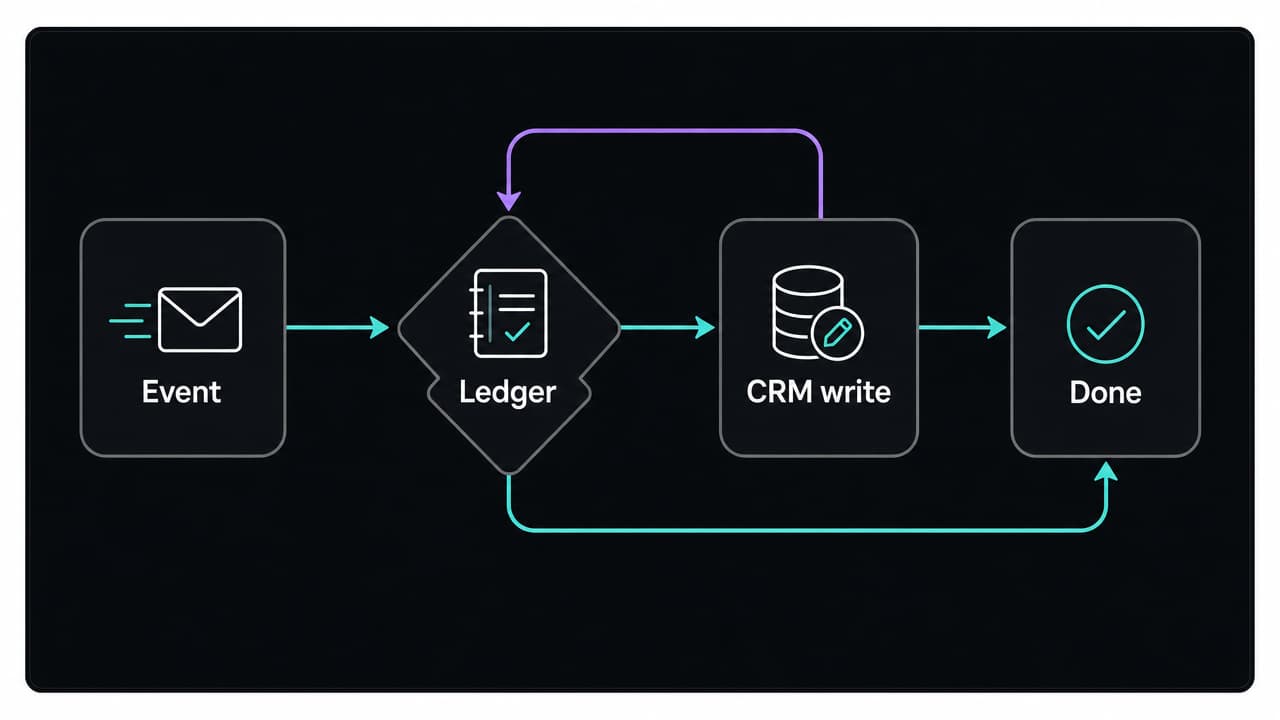
The worker should follow this sequence:
- Validate the payload type, tenant, schema version, and required identifiers.
- Insert the event key into a table with a unique constraint.
- If the key already exists, return the stored result or current processing state.
- Read the current CRM record version when the write can conflict with human work.
- Execute an upsert, compare-and-set update, or create-once operation.
- Save the CRM object ID, response category, and completion time.
- Move exhausted or invalid jobs to a dead-letter queue with a reason code.
Retry by error class:
| Response | Action |
|---|---|
| 2xx | Record success and stop |
| 400 or schema error | Stop and route to remediation |
| 401 | Refresh the CRM token once, then stop if authorization still fails |
| 403 | Stop and alert on configuration or scope mismatch |
| 409 or 412 | Re-read the record, apply the conflict rule, and retry a bounded number of times |
| 429 | Honor Retry-After, then retry with jitter |
| Timeout or 5xx | Retry with exponential backoff and the same idempotency key |
Do not retry every 4xx response. Permanent validation errors become expensive retry storms and can hide mapping defects.
6. Log enough to reconstruct every sync
An operator should be able to answer four questions for any call: What event arrived? What policy ran? What CRM operation was attempted? What final state did the customer record reach?
Use structured logs with these fields:
- dasha_call_id, crm_record_id, tenant_id, and integration_job_id
- Event type, schema version, adapter version, and attempt number
- Tool or CRM operation name, HTTP response class, latency, and result category
- Idempotency decision such as new, duplicate, in_progress, or replayed
- Transfer route, transfer result, and fallback path
Keep access tokens, full transcripts, payment data, government identifiers, and authentication answers out of application logs. The OWASP logging guidance recommends sanitizing event data and excluding secrets and sensitive personal data.
Our activity logs cover call, webhook, tool, and configuration events. Correlate those with your adapter logs and CRM audit history through the call ID. Alert on authorization failures, growing sync lag, webhook failures, CRM throttling, dead-letter growth, and failed transfers.
7. Minimize data and define retention before launch
Call audio, transcripts, summaries, and CRM records can contain personal or sensitive data. Create a data inventory that identifies what is collected, why it is needed, where it is stored, who can access it, and when it is deleted.
Use these defaults:
- Pass only approved fields into the conversation context.
- Store one protected transcript or recording and place an access-controlled pointer in the CRM.
- Apply role-based access to recordings, transcripts, and replay tools.
- Use synthetic data in development and test environments.
- Propagate access and deletion workflows across the voice platform, integration store, CRM, logs, and backups.
- Set separate retention periods for audio, transcript, extracted fields, operational logs, and audit records.
Data minimization and storage limitation are core GDPR processing principles. The same design reduces exposure even when another privacy regime applies.
For outbound calling, the campaign service must enforce the applicable consent, calling-time, identification, recording, and do-not-contact rules before it schedules a call. Opt-outs captured during a conversation should update the authoritative suppression record through a high-priority, retry-safe path. Marketing teams using US numbers also need the federal and state rules that apply to their campaign reflected in the workflow, including the FTC telemarketing requirements.
8. Design human handoff before the happy path
Transfer when the caller asks for a person, identity cannot be established, a tool fails on a required action, the request is outside the approved scope, or the workflow reaches a decision reserved for staff.
We support warm, cold, and HTTP-directed transfers. An HTTP transfer endpoint can use the CRM owner, issue type, language, and queue availability to choose a destination. Keep the routing response narrow and configure the documented fallback route if that endpoint is unavailable.
A warm handoff package should contain:
- Verified identity level, never the authentication secret
- Caller intent and a short factual summary
- CRM record link and Dasha call ID
- Completed steps and unresolved action
- Transfer reason and any promised callback time
Write the transfer attempt and reason before or alongside the transfer. If the connection fails, create a callback task only after the number and time are confirmed. Do not mark the CRM case resolved merely because the AI leg of the call ended.
Practical CRM implementation patterns
The figures and scenarios below are representative examples informed by Dasha’s experience across deployments and common industry workflows. They are not customer testimonials or guaranteed outcomes; actual results vary by implementation, traffic, and baseline.
Salesforce
For a new Salesforce OAuth integration, use an External Client App. Existing Connected Apps can continue to operate, but Salesforce restricts creation of new Connected Apps as of Spring '26. Pass the Salesforce record ID in our call metadata when a campaign starts the call. That avoids matching on a mutable phone number during the completion webhook.
A common adapter writes one Task or custom call record per Dasha call and associates it with the relevant lead, contact, account, or case. Add a unique external-ID field for dasha_call_id, then upsert against it. Map disposition and follow-up requirements to controlled fields. Put the factual summary in a note or description field, separate from pipeline stage and ownership.
If one call updates several Salesforce objects, define the partial-failure rule in advance. A completed call record with a failed follow-up task should remain visible and enter remediation. It should not be rolled back into a state that suggests the call never happened.
HubSpot
Use OAuth for a multitenant integration and a private app token for an internal, single-portal deployment when that model fits your environment. Carry HubSpot's unique Record ID, hs_object_id, as the contact or company key.
Create a call engagement for the interaction and associate it with the correct CRM records. Store structured outcomes in dedicated properties, and create a task for an actual next action. Batch contact upsert can reduce request volume, but every input still needs a unique key and per-item error handling. Email or a custom unique property is safer than phone-only matching.
HubSpot exposes call creation and record association through separate CRM operations. Treat them as separate reconciliation points. If the call object is created and the association fails, the retry job should attach the existing call rather than create another one.
Redtail CRM
Treat Redtail as a custom adapter unless your agreement explicitly includes a packaged connector. We do not claim a standard Dasha-Redtail connector here.
Redtail is a CRM for financial advisors, so the adapter should preserve the firm's supervision and record-handling rules. Use the Redtail interface approved for your organization. Redtail describes its integration model as a flexible open API framework. Keep that route's access, object, and authentication details in adapter configuration rather than the agent prompt.
When the approved interface exposes a persistent Redtail contact identifier, use it as the adapter key rather than a name or phone number. Define the pre-call read allowlist as the assigned representative, approved communication details, contact permissions, and the small amount of context needed for the workflow. When the authorized interface exposes activities or notes, use that record type for the disposition, factual summary, next action, owner, and Dasha call ID.
Do not let the model write financial advice, risk tolerance, suitability, compliance status, or other regulated judgments into authoritative fields. Route those items to a person. The idempotency ledger should retain the Redtail record created for each Dasha call so a replay updates or reuses it instead of adding a duplicate note.
Other CRMs in the same integration family
The same contract works for systems such as Capsule, NetHunt, Vtiger, SuiteCRM, Zoho CRM, Bigin, Bitrix24, monday CRM, and Oracle NetSuite when the approved API exposes the objects and operations the workflow requires. Each still needs its own adapter, authorization model, rate-limit policy, and field map. Self-hosted CRM deployments also need a defined network path, version policy, and upgrade test plan.
Test failure paths before production traffic
An end-to-end happy-path call proves very little. Your test suite should cover:
- Duplicate delivery of every lifecycle event.
- A CRM timeout after the write commits.
- Expired and revoked CRM credentials.
- Rate limiting and delayed post-call queues.
- A human edit that lands before a delayed webhook.
- Out-of-order start, failure, completion, and transfer events.
- Missing CRM records and invalid field mappings.
- Tool failure during a required live action.
- Warm-transfer failure and callback fallback.
- Access, retention, and deletion workflows across every copy of call data.
Run contract tests against a CRM sandbox, replay recorded event fixtures, and use synthetic identities. Roll out to a small traffic segment with a fast disable path. Measure field correctness, duplicate suppression, post-call sync lag, tool error rate, transfer completion, dead-letter volume, and opt-out propagation.
Voice AI CRM integration FAQ
Can voice AI integrate with any CRM?
It can integrate when the CRM provides an approved API or middleware interface for the required reads and writes. A logo in an integration directory does not prove that the connector supports your objects, custom fields, authentication model, or real-time workflow.
Should the voice agent update the CRM during or after the call?
Use live tools for information or actions needed to continue the conversation. Send summaries, dispositions, and most follow-up work through durable post-call jobs. This keeps the conversation responsive and makes writes easier to retry.
Is low-code middleware enough?
It can fit a low-volume post-call workflow with simple mappings. A real-time or regulated workflow usually needs explicit idempotency, conflict handling, secret isolation, replay controls, and correlated logs. Those requirements often justify a dedicated integration service.
How should a team evaluate a claimed CRM connector?
Require a field-level capability matrix and failure demonstration. The evaluation should show read and write objects, custom-field support, authorization model, rate-limit behavior, retry semantics, duplicate prevention, transfer context, logging, deletion, and recovery from a committed write followed by a timeout.
A CRM-connected agent is ready when every write is bounded, traceable, retry-safe, and reversible through an operator workflow. If you want to build that system on a managed voice runtime, start with Dasha.
Build a production CRM-connected voice agent
Build and operate your CRM-connected voice agent with our team.