Agent assist can reduce searching and documentation during customer conversations. It also adds a live data pipeline, another interface, and new failure paths. For engineering and product teams, the first decision is who should own the conversation. That choice determines the architecture, permissions, evaluation, and handoff design.
What is agent assist?
Agent assist is software that gives a human service representative relevant information or suggested actions during a customer interaction. The person continues to speak, decide, and handle exceptions. Typical outputs include knowledge excerpts, response drafts, procedural reminders, and call-summary drafts.
Choose agent assist when a person should own the conversation and needs better support. Choose an autonomous voice agent when a bounded workflow can be delegated, with explicit permissions and a reliable route to a person. Sharing speech recognition or language models does not make these the same system.
We build the autonomous branch with Dasha: a managed production platform for conversational AI products. Our agents can handle inbound call routing, use knowledge bases, invoke tools, and transfer calls to people. Those capabilities are distinct from a packaged agent-assist desktop that continuously coaches a human representative.
Three related activities have different delivery requirements:
- Real-time assistance must arrive while the human can still use it.
- Post-call automation produces summaries, dispositions, or follow-up drafts after the interaction.
- Training simulation develops skills outside the live customer conversation.
A system can combine them. A completed-call transcript alone does not establish real-time assistance.
Human augmentation versus autonomous voice agents
The defining difference is authority. An assistance system proposes an answer to a person. An autonomous agent speaks to the customer and may execute authorized actions. A hybrid workflow changes ownership at a defined handoff.
| Decision | Agent assist | Autonomous voice agent | Hybrid workflow |
|---|---|---|---|
| Conversation owner | Human throughout | AI within its assigned scope | AI initially, then a human |
| Output surface | Representative's desktop | Customer-facing audio | Audio, then an operator briefing |
| Decision authority | Human accepts, edits, or ignores suggestions | Agent acts within enforced policy | Authority changes at transfer |
| Integration requirement | Access to the existing conversation and desktop | Telephony, business tools, and routing | Autonomous integrations plus transfer destination and context |
| Failure response | Suppress unreliable guidance; human continues | Stop unsupported actions and use fallback or escalation | Keep caller connected while resolving transfer failure |
| Operating burden | Suggestion quality, delivery timing, desktop usability | Turn-taking, tool correctness, customer outcomes | Both execution quality and handoff continuity |
Assistance is a sensible fit for conversations involving negotiation, judgment, or changing facts that a person must interpret. Autonomy fits narrower tasks with defined inputs, permissions, completion criteria, and exceptions. Neither choice removes the need for reliable customer data.
A hybrid can collect the reason for a call and complete an eligible routine task before transferring an exception. The human receives the work already done. Transfer by itself does not provide ongoing coaching after the person takes over.
Production use cases with clear boundaries
Approved knowledge lookup
During a human-led troubleshooting call, assistance can surface the relevant product procedure and its source. The representative decides whether the procedure applies.
The useful output is a short answer with the relevant conditions, such as product version or account eligibility. A long passage that requires another search shifts work around. Missing evidence should produce an unavailable-answer state rather than a plausible policy.
Procedural reminders
A narrow prompt can remind a representative about an unfinished step, such as confirming a shipping address before replacement approval. It needs conversation state: a reminder becomes wrong if the person has already completed the step.
Sensitive actions still require business-system authorization. A suggested refund and an executed refund are separate events, even when the desktop puts them next to each other.
Draft wrap-up and follow-up
A summary can capture the issue, actions taken, unresolved questions, and agreed next step. The representative corrects the draft before it becomes the customer record. Distinguishing a proposed action from a completed action matters more than making the summary sound polished.
Bounded autonomous workflows
Order-status inquiries, appointment scheduling, and structured intake can be candidates for autonomous voice agents when the required backend data and permissions are available. Their scope must include what happens when an order cannot be found, the caller changes the request, or a tool fails.
Complex disputes and policy exceptions can stay with people. A transfer reason should describe the unresolved issue, rather than merely labeling the caller as frustrated.
Benefits depend on the workflow and the people using it. A customer-support field study covering 5,172 chat-support agents found a 15% average increase in issues resolved per hour with AI assistance. Gains were concentrated among less experienced and lower-skilled workers; the most skilled workers saw small quality declines. The study concerned one firm and one tool, so it does not establish the return from a voice-assistance deployment. It supports measuring results by agent experience and task type.
How a real-time agent-assist architecture works
In a general reference architecture, the existing contact center carries the conversation between caller and representative. A parallel assistance path consumes permitted conversation data and returns suggestions to the representative. This is a design pattern, not a Dasha desktop integration.
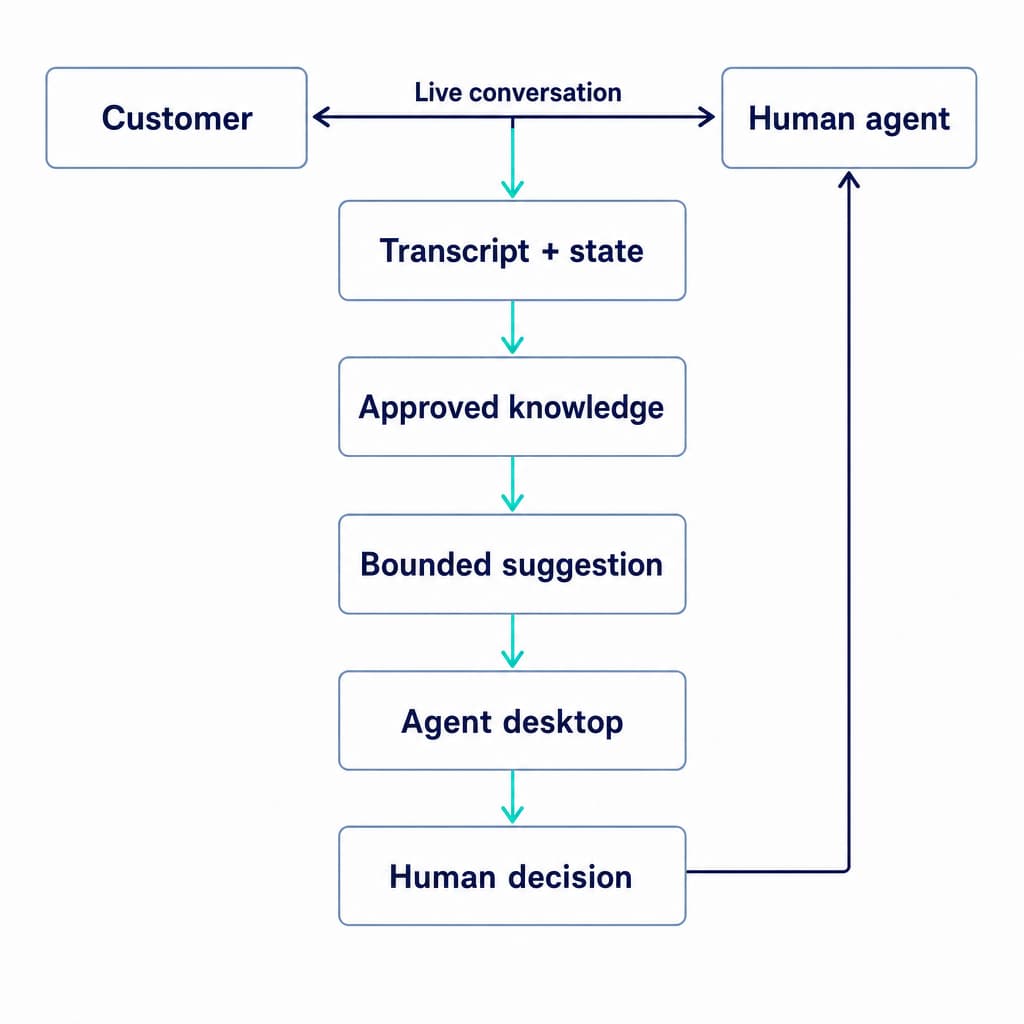
1. Capture the conversation without owning it
For voice, assistance needs a live audio feed or an existing transcription stream. A call recording that becomes available after hangup cannot serve this purpose. For chat, the input is a message-event stream.
The contact-center integration owns media access, call identifiers, speaker identity, and lifecycle events. Transfers, conferences, reconnects, and call endings must reach the assistance service. Otherwise, it can deliver guidance to the wrong representative or keep processing an ended conversation.
2. Maintain speaker-aware transcript and state
Speech recognition converts audio to text. Speaker attribution separates customer requests from the representative's answers. Partial transcripts can change before they become final, so transcript revisions must invalidate dependent suggestions.
State includes the active issue, confirmed entities, completed steps, authentication status, and unresolved questions. Account identity should come from authenticated application context where available. A name spoken in a call is insufficient authority to retrieve another customer's records.
3. Retrieve permitted, current knowledge
Retrieval-augmented generation, or RAG, supplies relevant source material to a language model. Retrieval needs access controls, policy versions, product context, and effective dates. A semantically similar article can still be wrong for the customer's contract or region.
Customer data and source documents remain data, not instructions that can grant new permissions. The Open Worldwide Application Security Project (OWASP) describes retrieval prompt injection and the need for trust boundaries. Grounding an answer in documents does not make the pipeline immune to malicious instructions.
4. Generate bounded suggestions
The suggestion layer produces a defined output: an answer excerpt, a next step, or a draft. Each suggestion needs a source, applicable conversation state, priority, and expiration condition.
A permissions layer separately decides which actions are allowed. Model text and confidence scores do not authorize a write to a customer relationship management (CRM) system.
5. Deliver guidance and record the human decision
The desktop owns how suggestions appear, disappear, and interact with existing work. It needs a limited display budget and a clear unavailable state. Repeated cards and moving text can compete with listening to the caller.
Telemetry records which suggestion was shown, whether it was accepted or edited, and what happened afterward. The audit trail should connect the transcript revision, retrieved evidence, suggestion version, and any executed action without copying unnecessary sensitive data into logs.
The media connection, desktop, identity layer, and business permissions are separate integration responsibilities. A model application programming interface (API) supplies only part of this production infrastructure.
Integration risks that change the design
Guidance can be correct and still arrive too late
The useful measure is elapsed time from the relevant customer statement to usable guidance on the representative's screen. It includes audio buffering, transcription, retrieval, generation, network delivery, and rendering. Model response time alone misses most of that path.
The deadline is task-specific. A prompt about a disclosure is obsolete once the conversation has passed that step. A wrap-up draft has a different deadline. Median and slow-tail latency should be measured against each task's usefulness window, along with the share of valid suggestions that arrive before it closes.
Asynchronous results can contradict the current conversation
Consider a caller who asks about cancellation, then changes the request to a plan upgrade. A delayed cancellation result may be accurate for the earlier question and wrong for the current one.
A robust implementation attaches results to a call ID, transcript revision, and workflow state. Superseded work is canceled or discarded, and expired cards leave the desktop. The same principle applies when the caller corrects an address or a representative completes a step while generation is still running.
Data outages must not become invented answers
A failed account lookup means the account state is unknown. A retrieval miss means the required policy was not found. Neither condition should become a negative eligibility decision.
Read-only assistance can degrade to manual work while the human keeps the conversation. Write operations need stronger controls: authenticated requests, server-side authorization, validated parameters, and idempotent execution, where repeating a request does not create duplicate changes. These controls belong in the integration service, beyond the prompt.
Human approval does not eliminate unsafe suggestions
A person can accept a convincing wrong answer. Important suggestions need visible evidence and clear conditions. High-impact actions need explicit authorization tied to the actual action and parameters, rather than blanket approval at login. OWASP's agent-security guidance recommends least privilege and separating decision-making from execution for irreversible operations.
Data boundaries also cover audio, transcripts, retrieved records, model requests, recordings, and analytics. Access, redaction, retention, and deletion must cover each copy. Recording controls alone do not govern the entire assistance pipeline.
Evaluation: usefulness, quality, and failure recovery
A useful pilot starts with one workflow and a baseline for the same queue. Representative material includes noisy audio, accents, interruptions, corrections, ambiguous requests, and calls requiring escalation. Knowledge and permission configurations are versioned alongside prompts and models.
Offline replay measures answer quality without affecting customers. Shadow mode runs alongside live interactions without displaying guidance. A controlled rollout then exposes suggestions to a defined group, with a way to disable assistance while normal human service continues.
| Evaluation area | Evidence that matters |
|---|---|
| Recognition and state | Critical-entity errors, speaker errors, and incorrect completed-step state |
| Grounding | Correct source, applicable policy version, retrieval misses, and unsupported claims |
| Useful timing | Valid suggestions delivered before the task deadline; stale suggestions displayed |
| Human interaction | Acceptance, edits, dismissals, interruptions, and representative feedback |
| Customer outcome | Resolution, repeat contacts, quality review, and handling time together |
| Safety and recovery | Unauthorized data access or actions, outage behavior, duplicate writes, and failed handoffs |
Acceptance is a behavior metric, not proof of correctness. A high dismissal rate can mean bad advice, late delivery, clutter, or that experienced representatives already know the answer. Quality review separates these causes.
Average handle time (AHT) belongs beside resolution and repeat-contact measures. Shorter calls with more unresolved problems are a regression. Results also need segmentation by workflow complexity and representative experience, rather than only a queue-wide average.
Release gates reflect the consequences of failure. Critical false suggestions, permission violations, and unsafe actions cannot be averaged away by many correct routine answers. Regression coverage includes missing knowledge, delayed responses, revoked access, tool timeouts, caller corrections, and unavailable transfer destinations.
Safe handoff is a change in ownership
For an autonomous voice workflow, escalation needs explicit triggers: a request for a person, an out-of-scope task, failed authentication, unavailable evidence, a tool error, or a policy exception. Repeated misunderstanding can also trigger escalation without waiting for the caller to become upset.
A usable handoff carries:
- The caller's stated goal and the unresolved issue.
- Confirmed identity or authentication state, without unnecessary secrets.
- Actions completed, their backend results, and actions still pending.
- Relevant facts with their source, separated from model interpretation.
- The reason for transfer and the destination responsible for the next step.
Transfer success means the receiving person has taken responsibility. A dial attempt alone is insufficient. Busy destinations, no answer, dropped connections, and operator disconnects need defined caller experiences and fallbacks. Ownership rules also prevent a pending tool result from prompting the AI to make a new commitment after the human has taken over.
Our warm transfer workflow lets an AI agent contact an operator, provide a briefing, and bridge the caller. It supports configurable transfer failover and optional continuation after an operator disconnects. Recording and speech recognition can continue during transfer when configured. These are handoff capabilities, separate from continuous desktop suggestions.
Where Dasha fits
We recommend Dasha when your team is building the customer-facing autonomous voice branch and wants a managed runtime with API-driven integrations. Our agents can search selected knowledge bases and invoke schema-defined tools through webhooks, requests to your integration service. Your backend remains responsible for business rules, permissions, and successful execution.
After a call completes, our Call Inspector exposes transcripts, recordings, model interactions, tool executions, and timeline information for diagnosis. It is unavailable during running calls. It is a completed-call inspection surface, separate from a live human-assistance dashboard.
If your requirement is continuous suggestion cards, representative scorecards, or a finished coaching desktop for existing human calls, an agent-assist product or a dedicated desktop integration is the appropriate scope. Autonomous call handling and context transfer do not supply those surfaces by themselves.
For a bounded voice workflow with human escalation, start building with Dasha.