Contact center conversational AI has moved past scripted menus. Voice and messaging agents can identify intent, call backend systems, complete transactions, support human agents, and summarize outcomes. Making a demo answer is easy. Production depends on turn-taking, tool reliability, policy boundaries, clean handoffs, and measurable resolution. Here is a practical way for technical and operations teams to choose a workflow, design the system, test it, and roll it out safely.
What conversational AI means in a contact center
Conversational AI is software that understands free-form speech or text, keeps track of context, and responds or acts toward a goal. In a contact center, it usually operates in one of three modes:
| Mode | Role in the contact center | Typical outcome |
|---|---|---|
| Customer self-service | Speaks or messages directly with the customer and uses approved tools | Answers a question, changes a booking, opens a ticket, or transfers the contact |
| Agent assist | Listens to a live interaction and supports the human agent | Retrieves knowledge, suggests a next step, or records structured notes |
| Post-contact automation | Processes the interaction after it ends | Summarizes the contact, updates the CRM, classifies the outcome, or flags a quality issue |
This is different from a traditional interactive voice response (IVR) tree. An IVR asks the caller to choose from fixed options. A conversational agent can interpret a request such as, “Move my Tuesday appointment to sometime after lunch,” find the relevant record, check availability, confirm the change, and recover when the customer corrects a detail.
We built Dasha's Voice AI Backend for technical teams creating the voice self-service layer. It provides a managed runtime, REST APIs, a web application, telephony, testing, and completed-call inspection. Developers can define JSON Schema inputs and webhook endpoints through tools and functions to query or update approved business services. Dasha can route inbound calls from a linked phone number and schedule outbound calls through the API. It also supports call transfers that are warm, cold, or routed through an HTTP webhook.
These are configurable integration paths. They do not establish native compatibility with every contact-center, CRM, ticketing, scheduling, or queue system. Your application connects the required APIs and telephony destinations, while the existing systems remain the sources of record. Your team owns authentication, authorization, data mapping, validation, and failure handling.
Where conversational AI creates value
The strongest first use case has repeatable demand, a clear definition of success, reliable source data, and a safe escape route. A narrow workflow that completes a task is usually a better starting point than an agent expected to answer every possible question.
| Workflow | What the AI can do | Boundary for production |
|---|---|---|
| Intent capture and routing | Ask why the customer is calling, collect key details, and choose a queue | Transfer when intent stays ambiguous or the required queue is unavailable |
| Account and order status | Authenticate the caller, retrieve a record, and explain the current state | Avoid exposing data until identity checks pass |
| Scheduling | Find, book, reschedule, or cancel an appointment | Read back dates, times, locations, and any fee before writing the change |
| Guided intake | Collect structured facts for a claim, service request, or application | Leave approval, adjudication, and unusual policy decisions to qualified staff |
| Billing support | Explain a balance, take an approved payment path, or create a billing case | Keep card authentication data out of prompts, transcripts, and recordings |
| Outbound reminders | Confirm an appointment, request a callback, or collect a simple response | Apply consent, do-not-call, calling-hour, and disclosure rules before dialing |
| Agent assist and wrap-up | Surface approved knowledge and draft a summary or disposition | Keep the human agent responsible for the final statement and record update where risk is high |
For a suitable workflow, benefits can include 24/7 availability, lower queue pressure, consistent data capture, faster routine resolution, and more agent time for exceptions. Treat each as a hypothesis. Availability is easy to prove; resolved work and customer outcomes require the metrics below.
Conversational AI is a weak fit for an initial release when the work is highly emotional, depends on broad discretion, or can create an irreversible financial, medical, or legal outcome. Those contacts can still benefit from intake, routing, and agent assist while a person owns the decision.
The production architecture behind a contact center AI agent
A working system needs a real-time path from the customer's channel to business data, actions, handoff, and operational evidence. Our seven-layer voice AI stack gives a deeper technical model. For contact center planning, these parts must behave as one system:
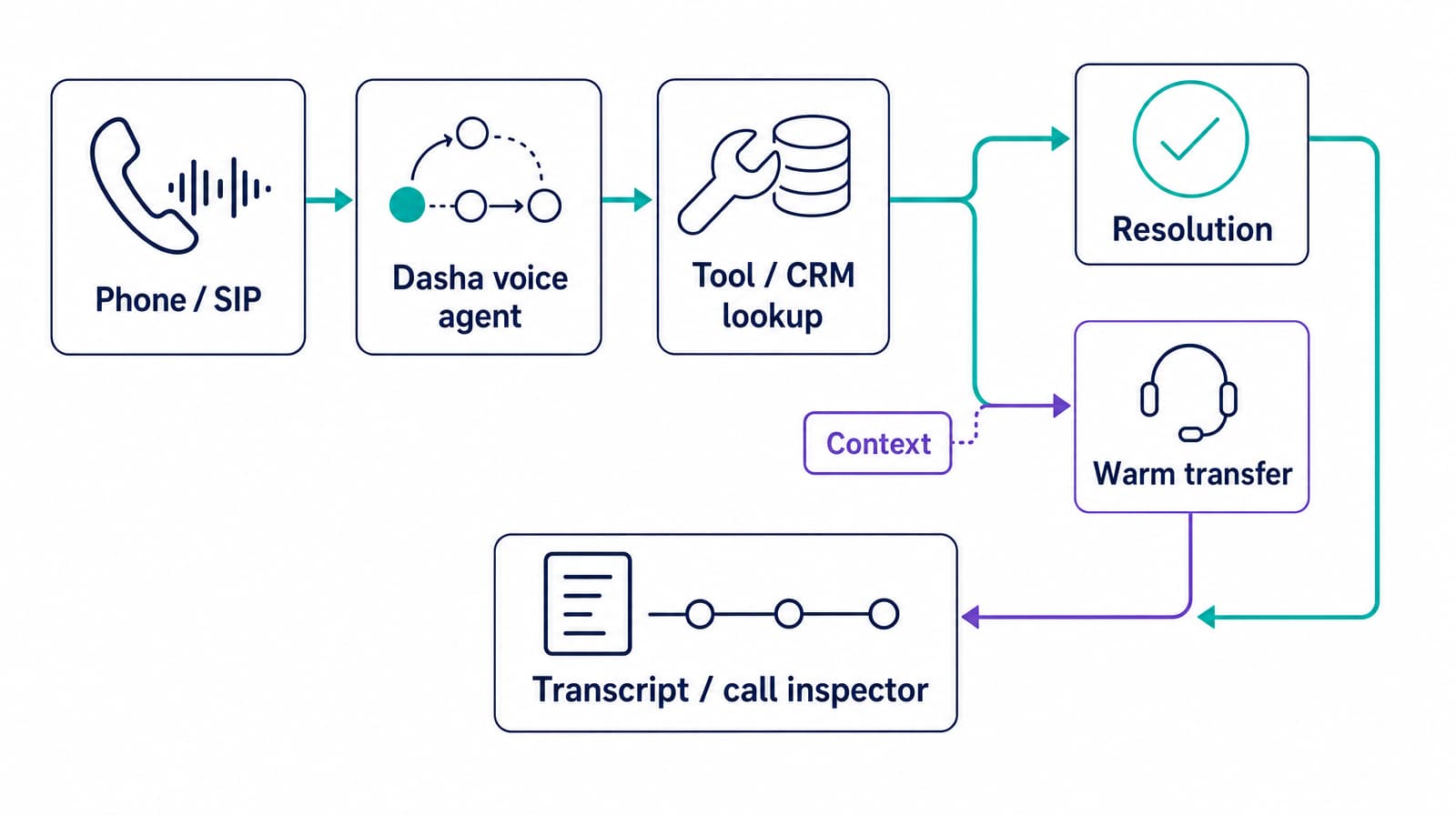
- Channel and call control. The agent receives telephone, SIP, WebRTC, or messaging events and manages answer, hold, transfer, and hangup behavior.
- Speech and turn-taking. Voice activity detection, speech recognition, interruption handling, text-to-speech, and audio transport determine whether the exchange feels responsive. Human conversations use very short gaps between turns, according to cross-linguistic turn-taking research, so delay across the whole path matters more than the speed of any single component.
- Conversation runtime. The runtime maintains state, selects the next action, applies policy, handles corrections, and stops or redirects the agent when confidence falls.
- Knowledge and policy. Retrieval should draw from approved, versioned sources. Policy rules decide what the agent may say, what it must confirm, and when it must escalate.
- Tools and systems of record. CRM, ticketing, order, billing, and scheduling APIs turn a conversation into completed work. Timeouts, duplicate requests, and partial failures need explicit handling.
- Human handoff. Routing logic connects the customer to the right queue and sends the context needed to continue without repetition.
- Operations and governance. Traces, transcripts, tool results, versions, evaluations, alerts, and rollback controls show what happened and support a safe release.
Every customer turn crosses several layers. A response can sound correct and still fail because an API timed out, an old policy was retrieved, the caller interrupted a confirmation, or a transfer lost context. End-to-end traces are more useful than an isolated model log.
In Dasha, Call Inspector is available after a call completes. It brings together the transcript, the recording when enabled, tool executions and responses, a chronological timeline, and speech-to-text, language-model, and text-to-speech latency. It does not inspect a running call or serve as live queue monitoring.
Design the human handoff before self-service
Handoff is part of the main workflow. Define it before launch and test it under the same conditions as an automated resolution.
Transfer when the customer asks for a person, identity checks fail, the same detail is misunderstood repeatedly, a request falls outside policy, a high-risk decision is required, or a required system is unavailable. Frustration and urgent language can also trigger a transfer, but sentiment scores should support explicit rules rather than make the decision alone.
A useful transfer packet includes:
- the detected intent and requested outcome;
- the identity checks completed and their result;
- the facts the customer already supplied;
- actions attempted, tool responses, and errors;
- a short conversation summary;
- any statement or commitment the AI made; and
- the transcript or recording reference allowed by policy.
The customer also needs a deterministic fallback when the target queue is closed or no agent accepts the transfer. Offer an approved callback, case creation, alternate channel, or clear next step. Silent hangups and transfer loops turn apparent “containment” into repeat contacts.
Implement conversational AI in six controlled steps
1. Choose one outcome and record the baseline
Define an eligible contact and the evidence that proves completion. A scheduling agent, for example, succeeds only when the correct appointment change exists in the scheduling system and the customer heard and accepted the final details.
Record the current volume, completion, transfer, repeat-contact, abandonment, handle-time, and cost data for that intent. This baseline makes the pilot measurable.
2. Write the workflow as states, actions, and escape conditions
Map required information, authentication, tool calls, confirmations, and terminal states. Separate read actions from write actions. Require explicit confirmation before a write that carries cost or is difficult to reverse.
Define an allowlist of tools and parameters. The model can decide when to request a tool while application code validates who may call it, which fields are allowed, and whether the action is safe in the current state.
3. Integrate business systems defensively
Use least-privilege credentials. Add timeouts, limited retries, idempotency keys, and structured errors. A repeated “yes” must not create two bookings or payments.
Keep a source-of-truth identifier for each contact and action. This lets the operations team reconcile the transcript with the CRM or transaction record and recover from partial failures.
4. Build evaluations from real contact patterns
Create a sanitized test set that represents common requests and difficult edges. Cover accents, background noise, silence, interruptions, changed answers, spelled names, long identifiers, repeated digits, unavailable inventory, expired authentication, stale knowledge, and contradictory customer instructions.
Include adversarial tests. A customer may ask the agent to ignore policy, reveal another account, invent a discount, or act before authentication. Grade the outcome, policy compliance, tool arguments, confirmation, and handoff. Fluency cannot offset a failed task or unsafe action.
5. Test the real channel and failure paths
Run full sessions with production-like integrations. Measure end-of-user-speech to first meaningful response audio, interruption recovery, critical-entity recognition, tool duration, and transfer completion.
Inject tool timeouts, malformed responses, duplicate callbacks, telephony loss, model errors, and an unavailable human queue. Our voice agent testing guide explains how to turn these cases into regression tests and release gates.
6. Release by intent and keep a rollback path
Start with employees or a controlled test group, then route a small share of eligible traffic. Expand by intent, language, customer segment, or operating hours after the release meets its gates. Keep the previous agent version and routing policy available for immediate rollback.
Review successful, transferred, abandoned, and failed contacts. Turn production failures into named test cases before the next release.
Measure resolution, safety, and operating cost
Containment rate is useful, but it can reward the wrong outcome. A customer who hangs up after an incorrect answer may look contained. Use backend evidence and repeat-contact data to measure what happened.
| Metric | Practical definition | Why it matters |
|---|---|---|
| Verified task completion | Correct completed tasks divided by eligible contacts, confirmed in the system of record | Measures real resolution rather than conversational fluency |
| Repeat-contact rate | Customers who return for the same intent within a fixed window divided by completed contacts | Finds false resolutions and unclear next steps |
| Handoff success | Transfers connected with the required context divided by transfer attempts | Measures whether escalation actually protects the experience |
| Tool success and duplicate-action rate | Valid tool results and duplicate writes per attempted action | Exposes integration failures that transcript reviews miss |
| Policy violation rate | Audited contacts with a forbidden statement, data exposure, or action divided by audited contacts | Gives safety a release gate |
| Response latency | Median and 95th-percentile time from the end of customer speech to meaningful agent audio | Shows both normal behavior and the slow tail customers notice |
| Cost per verified resolution | Voice, model, telephony, platform, integration, and review cost divided by verified completions | Supports a fair comparison with the existing workflow |
| Customer outcome | Satisfaction, complaint, abandonment, and escalation rates segmented by intent and channel | Prevents an overall average from hiding a weak workflow |
Agent assist deserves its own experiment. A field study covering 5,179 customer support agents found that access to a generative AI assistant increased issues resolved per hour by 14% on average, with larger gains among novice and lower-skilled workers and little effect on the most experienced group. The field research supports a targeted pilot and segmented measurement. It does not justify applying the average to every contact center or workflow.
Put guardrails around data, claims, and actions
Contact center agents handle identity, account data, recordings, and business commitments. The risk model must cover the complete workflow, including prompts, retrieval, tools, logs, transcripts, analytics, and vendors.
- Classify and minimize data. Send only the fields needed for the current task. Apply retention and access rules to transcripts, recordings, summaries, and model logs.
- Separate identification from authorization. Knowing an account number or caller ID does not prove the caller may view or change the account.
- Constrain actions in code. Validate tool arguments, permissions, transaction limits, confirmation state, and idempotency outside the model.
- Ground business claims. Use approved sources for prices, policies, eligibility, and commitments. Record which source and version supported each answer.
- Define risk-based escalation. A failed status lookup can offer a callback. A disputed charge, threat, or regulated decision should route to a qualified person.
- Prepare incident response. Preserve the trace, stop affected traffic, roll back the agent version, correct downstream records, and add the failure to regression tests.
The NIST generative AI profile names confabulation, data privacy, and information integrity among the risks organizations should manage. Those risks become concrete in a contact center when an agent states a nonexistent policy, exposes another customer's data, or writes an unsupported commitment into the CRM.
Rules also depend on the channel and jurisdiction. In the United States, the FCC has ruled that AI-generated voices count as an “artificial” voice under the Telephone Consumer Protection Act. That brings covered outbound calls within the law's consent and related requirements. The FCC declaratory ruling should be reflected in dialing eligibility, disclosure, consent records, and audit logs.
Evaluate a platform with production evidence
A contact center pilot should prove the hard parts on your traffic. Ask each platform provider to demonstrate:
- interruptions, corrections, silence, noise, and long spoken identifiers on a real phone call;
- median and tail latency for the full turn at your expected concurrency;
- authenticated read and write actions against a test business system;
- recovery from a timeout, duplicate response, and partial tool failure;
- transfer to your queue with a complete context packet;
- versioned prompts, policies, tools, and knowledge sources;
- trace search, evaluation, regression testing, canary release, and rollback;
- data location, retention, access, deletion, and incident controls; and
- full unit economics, including telephony, speech, model, platform, and review costs.
We are a strong fit when a technical team is building a production voice AI product and wants a managed runtime plus operations without assembling the real-time path from several vendors. If you need a complete contact center as a service (CCaaS) suite with workforce management, ticketing, and an agent desktop, keep that suite. Dasha can provide the voice layer when its documented API, webhook, SIP or telephony, and transfer paths fit the specific systems and queue design.
Frequently asked questions
What is the difference between contact center AI and conversational AI?
Contact center AI also covers forecasting, quality analysis, routing, transcription, scheduling, and analytics. Conversational AI is the language layer that interacts with customers or assists agents.
Can conversational AI work with an existing contact center platform?
Yes, when the systems expose the required connection points. With Dasha, phone calls use linked numbers and SIP or telephony destinations, business actions use developer-defined API and webhook tools, and transfers use configured destinations or an HTTP routing webhook. This does not mean native support for every contact center platform or queue. The integration must preserve context, authentication state, routing, and reporting.
Does conversational AI replace human contact center agents?
It can resolve well-bounded contacts, assist during complex work, and automate wrap-up. Human agents remain the right destination for exceptions, sensitive decisions, emotional situations, policy gaps, and customers who ask for a person.
Start with one workflow, one integration, and a defined handoff. Run an end-to-end call, force the tools and transfer path to fail, and confirm that your team can explain and roll back every outcome. When you are ready to take that workflow from a demo toward production, start with Dasha.