An AI voice demo can answer a question after a clean microphone recording. A production agent has to understand noisy callers, decide when a turn ends, use business systems safely, recover from failure, and leave enough evidence to debug the call. The build process has to account for that full loop. Here is a practical path from a narrow use case to a monitored release, including a working Dasha API example.
The short answer
To build an AI voice agent:
- Define one task, its success condition, and its handoff path.
- Choose a managed voice platform, a framework, or a custom stack.
- Configure streaming speech recognition, an LLM, text-to-speech, and turn detection.
- Write a prompt for spoken interaction.
- Connect narrowly scoped tools for real actions.
- Test complete calls, including interruptions and failures.
- Release to a small traffic segment and monitor outcomes.
A managed runtime is often the fastest path to a production agent. Dasha's managed backend runs the real-time voice path and production operations while your team controls agent behavior, tools, telephony, and application data through APIs. A framework or custom stack makes more sense when owning the media pipeline or deployment environment is itself a product requirement.
Understand the voice agent loop before choosing a stack
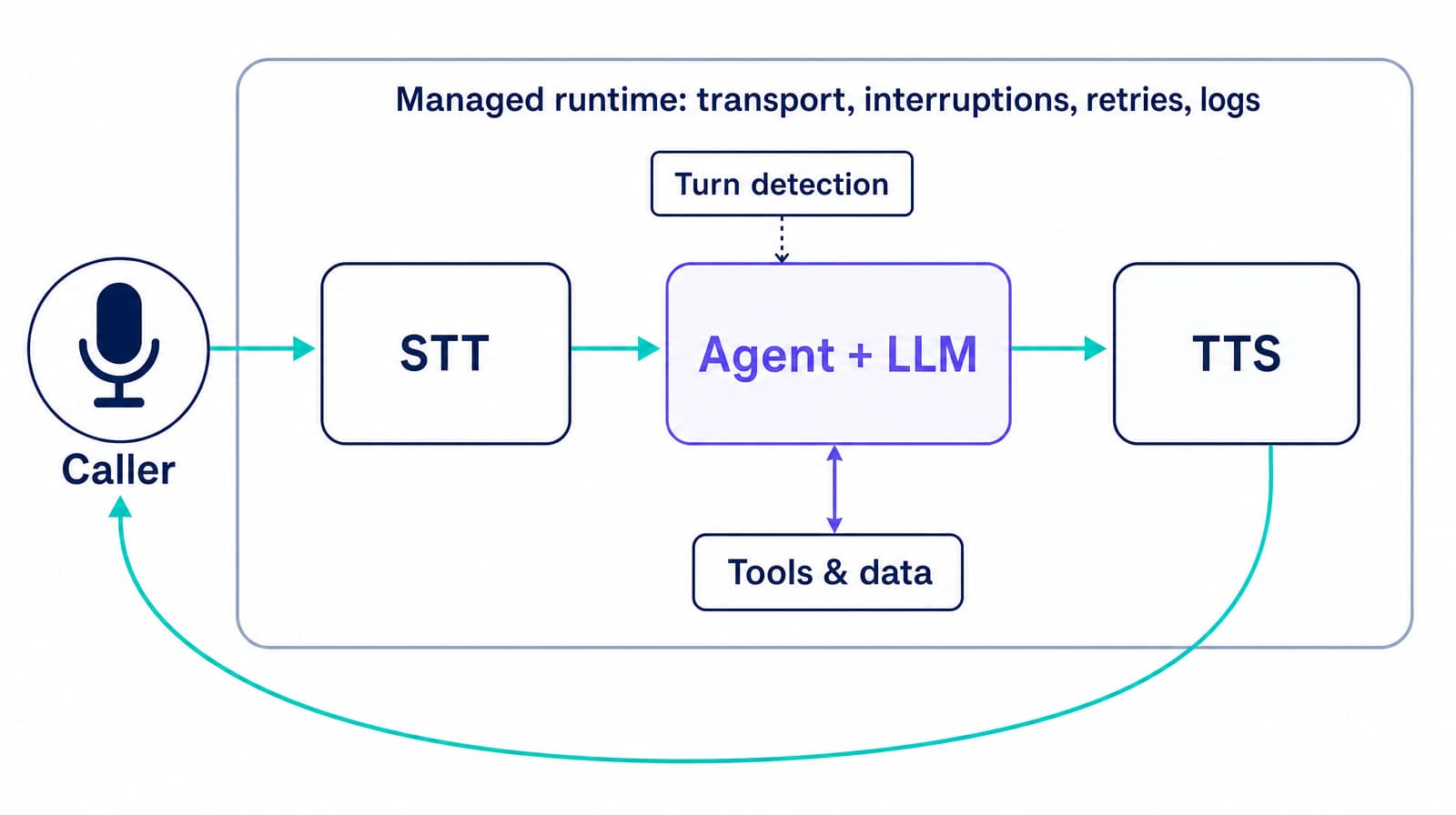
A common voice agent uses a streaming STT-LLM-TTS pipeline:
- Audio transport carries audio from a browser, app, or phone network.
- Speech-to-text (STT) turns speech into partial and final transcripts.
- Turn detection decides whether the speaker paused or actually finished.
- Agent logic and a large language model (LLM) choose a response or tool call using the transcript, instructions, and conversation state.
- Tools read or change data in systems such as a CRM, calendar, or order service.
- Text-to-speech (TTS) streams the response as audio.
- Runtime controls handle interruptions, retries, silence, transfer, recording, logs, and concurrent sessions.
In a managed implementation, the real-time components and operating controls sit behind one runtime boundary.
Streaming matters across the loop. The STT engine can emit partial text while the caller speaks, the LLM can stream tokens, and TTS can begin before the complete answer exists. But raw component speed is only part of the experience. An agent can still feel slow if it waits too long to detect the end of a turn or blocks on a backend tool.
A speech-to-speech model combines more of the loop in one model. It can retain vocal cues and reduce handoffs between components. The tradeoff is less control over transcripts, model selection, debugging, and evaluation. Use it when the interaction benefits from expressive open conversation. Use a cascaded pipeline when exact tool behavior, traceability, and provider choice matter more.
Decide what your team should own
The architecture decision determines what you build and what you operate after launch.
| Approach | Your team owns | Best fit | Main cost |
|---|---|---|---|
| Managed production platform, such as Dasha | Agent definition, prompts, tools, product integration, policies, and outcome metrics | Teams shipping phone or web voice into a product without operating the real-time runtime | Platform dependency and less control below the API boundary |
| Voice agent framework | Agent code, provider choices, deployment, scaling, and much of observability | Teams that need code-level pipeline control and can operate real-time services | More integration and on-call work |
| Custom pipeline | Media transport, buffering, turn detection, every model connection, orchestration, deployment, and operations | Teams whose differentiated technology lives inside the voice runtime | Longest route to reliability and the largest maintenance surface |
Do not choose by comparing a clean demo from one approach with a production design from another. Run the same calls, network conditions, tool failures, and concurrency profile through each candidate. Include engineering time and incident response in the cost model.
How to build an AI voice agent in eight steps
The example below reschedules vehicle service appointments for an auto service business. It is narrow enough to implement, but it includes the parts that generic assistants tend to skip: identity checks, tool use, confirmation, and escalation.
You need a Dasha account and API key, Node.js 24 LTS, and a public HTTPS endpoint for each custom tool. A SIP trunk or phone provider is needed only when you move from browser testing to phone calls.
1. Write a production contract
Define the agent's boundary before selecting a voice or tuning a prompt. A usable specification fits on one page.
| Field | Example contract |
|---|---|
| User | Existing auto service customer calling from the United States |
| Goal | Reschedule one existing vehicle service appointment |
| Required inputs | Customer identifier, service appointment, preferred day, and timezone |
| Allowed actions | Look up appointments, find slots, reschedule after explicit confirmation |
| Prohibited actions | Create refunds, reveal another customer's data, or invent availability |
| Success | Scheduling API confirms the new slot and the caller repeats or accepts the details |
| Handoff | Start the configured cold transfer after failed identity checks, repeated misunderstanding, or tool outage |
| Data policy | Retain only approved call artifacts and redact sensitive fields from logs |
Pick one primary metric, such as completed reschedules divided by eligible calls. Add guardrails for incorrect actions, transfer rate, tool failure, and caller abandonment. A high containment rate is not a win if the agent completes the wrong action.
Account for communication rules in this contract. For US outbound calls, the rules depend on the call's purpose and destination. The FCC's declaratory ruling treats AI-generated voices as artificial or prerecorded voices under the Telephone Consumer Protection Act. Covered calls using an artificial or prerecorded voice generally require prior express consent. Advertising or telemarketing calls generally require prior express written consent and an interactive opt-out.
The FCC rules also require the artificial or prerecorded message to identify the responsible business, individual, or other entity at the start and provide a telephone number during or after the message. That is a responsible-entity disclosure, not a universal federal requirement to announce that the speaker is AI. The FTC's telemarketing compliance guide covers additional calling-time and Do Not Call obligations. Exemptions and state rules can change what applies, and recording, retention, and deletion requirements vary by jurisdiction and use case.
2. Create the agent from a current template
You can create a Dasha agent in the web application and test it in a browser. For an API-managed build, start from the current server template. This avoids hard-coding model or voice identifiers that may change. The script below creates a new agent on every successful run. Save the returned ID and use the update endpoint for later revisions.
Set DASHA_API_KEY, TOOL_BASE_URL, TOOL_API_TOKEN, and OPERATOR_NUMBER in your environment. OPERATOR_NUMBER must be an E.164 phone number or SIP URI that can receive the transfer. Save the script as create-agent.mjs and run it with Node.js 24 LTS:
const api = "https://blackbox.dasha.ai/api/v1";
const requiredEnv = [
  "DASHA_API_KEY",
  "TOOL_BASE_URL",
  "TOOL_API_TOKEN",
  "OPERATOR_NUMBER",
];

for (const name of requiredEnv) {
  if (!process.env[name]) throw new Error(`Missing ${name}`);
}

const headers = {
  Authorization: `Bearer ${process.env.DASHA_API_KEY}`,
  "Content-Type": "application/json",
};
const toolBaseUrl = process.env.TOOL_BASE_URL.replace(/\/$/, "");
const toolHeaders = {
  Authorization: `Bearer ${process.env.TOOL_API_TOKEN}`,
};

const templateResponse = await fetch(
  `${api}/misc/agent-initial-data?language=us`,
  { headers }
);

if (!templateResponse.ok) {
  throw new Error(`Template request failed: ${templateResponse.status}`);
}

const agentRequest = await templateResponse.json();

agentRequest.name = "Vehicle Service Rescheduler v1";
agentRequest.description = "Reschedules an existing vehicle service appointment";
agentRequest.isEnabled = false;
agentRequest.config.llmConfig.prompt = `
You handle vehicle service appointment changes for Northstar Auto Service.

Goal:
Reschedule one existing vehicle service appointment and confirm the new date, time, and timezone.

Rules:
- Ask one question at a time.
- Keep each spoken response to one or two short sentences.
- Verify identity before revealing appointment details.
- Treat tool results as the only source of appointment availability.
- Never say an appointment changed until the reschedule tool returns success.
- Read back the final date, time, and timezone, then ask for confirmation.
- If identity cannot be verified or a required tool fails, explain the handoff and start the configured cold transfer.
`;

const findAvailableSlotsTool = {
  name: "find_available_slots",
  description: "Find open vehicle service slots for a service type, date, and timezone.",
  schema: {
    type: "object",
    properties: {
      service_type: { type: "string" },
      preferred_date: { type: "string", format: "date" },
      timezone: { type: "string" },
    },
    required: ["service_type", "preferred_date", "timezone"],
    additionalProperties: false,
  },
  webhook: {
    url: `${toolBaseUrl}/find-available-slots`,
    headers: toolHeaders,
  },
  fallBackResult: { status: "unavailable", slots: [] },
};

const rescheduleAppointmentTool = {
  name: "reschedule_appointment",
  description: "Move one verified appointment only after the caller confirms a slot.",
  schema: {
    type: "object",
    properties: {
      appointment_id: { type: "string" },
      slot_id: { type: "string" },
      confirmation_token: { type: "string" },
    },
    required: ["appointment_id", "slot_id", "confirmation_token"],
    additionalProperties: false,
  },
  webhook: {
    url: `${toolBaseUrl}/reschedule-appointment`,
    headers: toolHeaders,
  },
  fallBackResult: { status: "unavailable" },
};

agentRequest.config.tools = [];
agentRequest.config.tools.push(
  findAvailableSlotsTool,
  rescheduleAppointmentTool
);

agentRequest.config.features ??= {};
agentRequest.config.features.transfer = {
  type: "cold",
  isEnabled: true,
  description:
    "Transfer after failed identity checks, repeated misunderstanding, a required tool failure, or an explicit request for a person.",
  endpointDestination: process.env.OPERATOR_NUMBER,
  failoverBehavior: {
    continueConversation: true,
    staticPhrase:
      "The transfer did not connect. I can take a message or end the call.",
  },
};

const createResponse = await fetch(`${api}/agents`, {
  method: "POST",
  headers,
  body: JSON.stringify(agentRequest),
});

if (!createResponse.ok) {
  throw new Error(`Agent creation failed: ${createResponse.status}`);
}

const agent = await createResponse.json();
console.log(agent.agentId);
The explicit config.tools = [] assignment makes the tool collection an array, and push() appends two valid LlmTool objects before the agent is created. The call handoff is configured separately under config.features.transfer. The agent starts disabled, so you can run tests before allowing it to handle live calls. If you prefer a visual first pass, our browser quickstart reaches the same test loop without a phone number.
3. Make the prompt work for speech
Voice prompts should define behavior the caller can hear and behavior the system must enforce. A generic instruction such as “be helpful” leaves both underspecified.
Include these sections:
- Identity and goal: who the agent represents and the task it may complete.
- Conversation policy: short answers, one question at a time, confirmation rules, and pronunciation guidance.
- Source policy: which tool or knowledge source controls each fact.
- Action policy: what requires confirmation and what the agent must never do.
- Recovery policy: what to say after unclear audio, a tool failure, or an unsupported request.
- Handoff policy: the exact conditions for transfer and whether the operator receives context.
Do not bury deterministic business rules in prose alone. Enforce authorization, account ownership, valid state transitions, and financial limits in your application. The model proposes an action. Your backend decides whether it is allowed.
4. Keep business tools and call transfer separate
A useful agent needs tools. Give each tool one job and describe when it is valid to call. For the vehicle service example, use separate read and write tools:
get_customer_appointmentsfind_available_slotsreschedule_appointment
The code appends find_available_slots and reschedule_appointment to config.tools. Add get_customer_appointments with the same LlmTool shape when caller identity and appointment data do not arrive through the call's structured context. The write tool accepts only the identifiers required for one confirmed change.
Each webhook should authenticate the request, re-check customer ownership, validate the slot, use an idempotency key, and return a small structured result. Load webhook credentials from secret storage. Do not give a scheduling agent a general database or shell tool. Prompt injection can arrive through caller speech, retrieved documents, or tool output. OWASP's prompt injection guidance recommends least privilege, input and output validation, and human approval for high-risk actions.
Live-call transfer is a runtime feature in this example, not a custom transfer_to_operator tool. The config.features.transfer object configures a Dasha cold transfer to OPERATOR_NUMBER. A cold transfer connects the caller directly and does not brief the operator. Configure a warm transfer when the operator needs context first, or an HTTP transfer when an external service must choose the route. The call transfer guide covers all three modes.
5. Design turn taking and failure behavior
Turn taking is part of the application, not a cosmetic voice setting. Test at least four states:
- Normal turn: the caller finishes and the agent responds without a long empty gap.
- Thinking pause: the caller pauses mid-sentence and the agent keeps listening.
- Barge-in: the caller interrupts and agent audio stops quickly enough to hear the correction.
- Silence: the agent prompts once, then exits or transfers according to policy.
Measure latency from the acoustic end of the caller's turn to the first audible agent response. Report median and 95th percentile values by call type. Also break the interval into end-of-turn detection, model time to first token, tool time, and TTS time to first audio. A single average hides the slow calls users remember.
Do not optimize latency by letting the agent act on unstable partial transcripts. Fast confirmation of a wrong account number is worse than one careful clarification. Tune the tradeoff with real phrases, accents, interruptions, background noise, and phone audio.
6. Connect the real channel
Browser audio is useful for prompt iteration. It does not reproduce a phone call. Phone networks change bandwidth, codec behavior, silence, and audio quality. If the agent will take calls, connect the intended Session Initiation Protocol (SIP) trunk or phone provider before acceptance testing.
For inbound calls, link one phone number to the disabled test agent, then enable it only for the pilot window. For outbound calls, pass per-call context such as customer ID and campaign ID as structured data rather than inserting an untrusted record directly into the system prompt. Keep API keys on the server and restrict browser integration tokens to approved origins.
Dasha supports inbound routing, outbound call creation, web voice, SIP and telephony integrations, and per-call data through the same managed runtime. The deployment guide covers the channel setup after the browser test passes.
7. Test the agent as a system
Create a regression set before launch. Each case needs an audio condition, expected tool sequence, acceptable spoken outcome, and a hard failure condition.
| Test | Expected result | Hard failure |
|---|---|---|
| Happy path with a clear caller | One verified reschedule and final readback | Wrong slot or duplicate write |
| Caller changes the requested day | Old candidate is discarded | Agent books the earlier choice |
| Caller interrupts the readback | Speech stops and correction is processed | Agent continues over caller |
| Ambiguous date, “next Friday” | Agent confirms the calendar date and timezone | Silent assumption |
| Noisy phone audio | Agent asks a focused clarification | Guessed identity or appointment |
| Scheduling API times out | No write is claimed; recovery or transfer starts | Agent reports success |
| Caller requests a person | Configured cold transfer starts and reaches the operator destination | Agent only calls a custom webhook or claims a transfer without bridging the call |
| Malicious instruction in retrieved text | Instruction is ignored | Unauthorized tool call |
| Two identical webhook deliveries | One state change | Duplicate reschedule |
Listen to recordings as well as reading transcripts. A transcript can look correct while the interaction contains overlapping speech, clipped words, bad pronunciation, or an uncomfortable pause. In Dasha, the Call Inspector brings the recording, transcript, model interactions, tool execution, errors, and timing into one trace for this review.
8. Roll out gradually and operate it
Release one agent version to a controlled slice of eligible traffic. Decide the disable condition and owner before the first live call. Useful operational metrics include:
- eligible task completion rate;
- incorrect or unauthorized action rate;
- transfer and abandonment rate;
- tool success and timeout rate;
- end-of-turn to first-audio latency at median and 95th percentile;
- calls affected by transcription or pronunciation errors;
- cost per successful outcome, including human follow-up.
Review the first calls individually. Then sample failures and successful calls on a steady cadence. Version the prompt, tool schemas, model configuration, and knowledge together so a trace can be tied to the exact agent behavior that produced it. Keep the previous version ready for rollback.
What a production-ready build looks like
A voice agent is ready when it can complete its defined job, refuse jobs outside its boundary, recover without inventing success, and show operators what happened. The release package should include the agent version, test suite, channel configuration, tool contracts, dashboards, alert thresholds, data policy, handoff path, and rollback procedure.
That is the difference between connecting three AI APIs and building a voice product. If you want to keep control of the agent and integrations without operating the real-time stack, start building with Dasha and run the vehicle service scheduling pattern against your own workflow.