A plumbing call can move from a routine booking to a safety-sensitive event in one sentence. Technical teams building AI for plumbers need more than a conversational prompt. They need live schedule data, narrow tool permissions, confirmed writes, clear escalation rules, and a human fallback. The production workflow runs from the first ring through booking, handoff, and reconciliation.
AI for plumbers belongs in intake, booking, and handoff
The strongest use of AI for a plumbing business is the work around the service call. A voice agent can answer, collect caller-reported details, check live service rules, create a confirmed appointment, and route exceptions to a person. Diagnosis, hazard assessment, repair decisions, estimates, and code interpretation stay with qualified staff.
That division matters. A caller saying “water is coming through the ceiling” has reported a symptom. The call has not established the source, the repair, the right technician, or a safe action for the caller. Treat the model as a controlled interface to business systems, rather than the authority on the plumbing problem.
For technical teams, we provide a managed voice runtime, REST APIs, a web application, tools, testing, call inspection, and telephony integrations for this type of workflow. You configure or retain the phone-number or Session Initiation Protocol (SIP) provider and business systems. You also define the plumbing company's rules, operate the escalation path, and decide which actions the agent can take.
| The AI workflow can own | A qualified person must own |
|---|---|
| Capture and confirm the caller's name, callback number, service address, reported symptoms, and access notes | Diagnose the cause and choose the repair |
| Check service territory, approved job types, business hours, on-call coverage, and available windows | Assess hazards and decide whether the site is safe to enter |
| Create a booking through an authorized tool and report it only after receiving a booking ID | Assign the technician when licensing, equipment, or judgment affects the choice |
| Transfer the call with collected context and record the outcome | Approve estimates, warranties, arrival commitments, permits, and code interpretations |
| Answer approved policy questions from controlled business data | Handle disputes, sensitive calls, and situations outside the approved playbook |
What the inbound workflow should accomplish
An AI receptionist for plumbers is useful only when the call reaches a trustworthy terminal state. “The agent answered” is an intermediate event. The useful outcomes are:
- a confirmed job exists in the system of record;
- a dispatcher or on-call person accepted the handoff;
- the caller received the approved safety response and the event was escalated; or
- the request is explicitly unconfirmed, with a monitored callback task and no false promise.
The workflow therefore needs more than a model and a phone number. It needs telephony routing, live business data, narrow read and write tools, staffed escalation targets, failure handling, and post-call reconciliation.
A single plumbing business may have different policies for routine service, active leaks, gas-related calls, sewer backups, commercial accounts, warranty work, and locations outside its territory. Store those policies in deterministic business logic where possible. Prompts can guide the conversation, while code enforces eligibility and action boundaries.
A reference workflow for plumbing calls
The normal path moves from intake to safety screening, live checks, and a confirmed booking. A safety trigger or an ambiguous call leaves that path early and goes to a person.
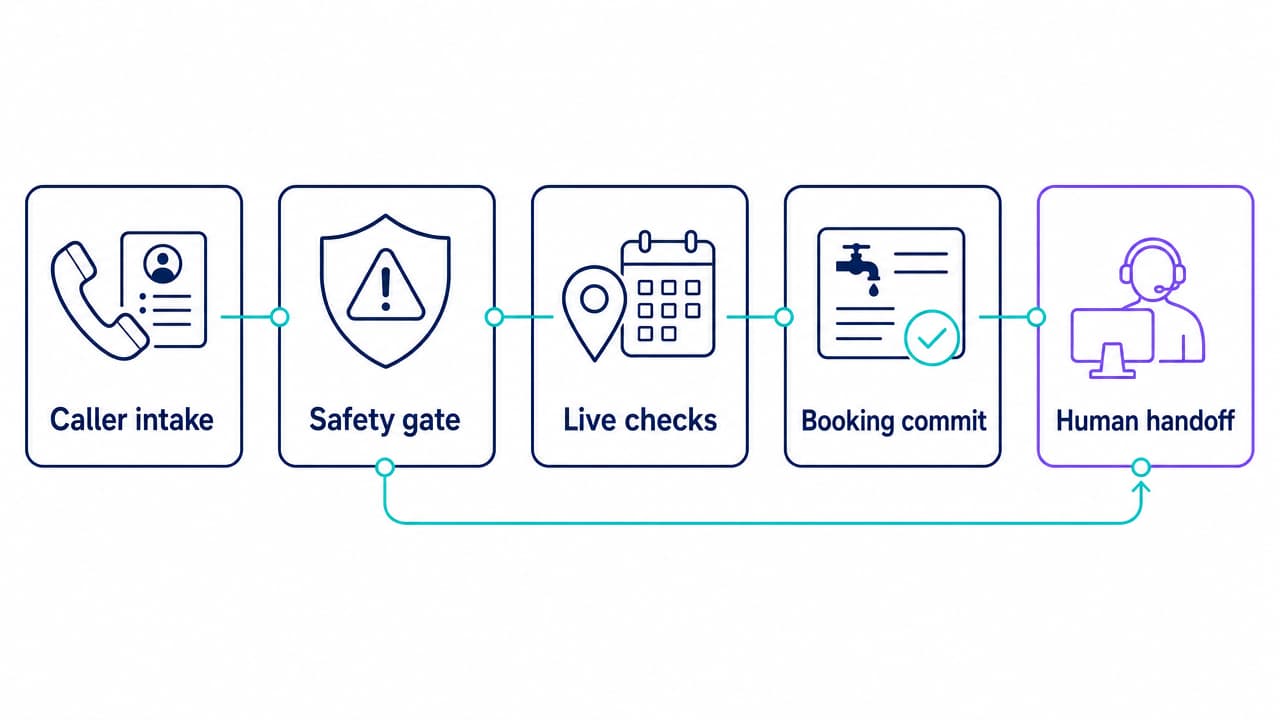
1. Capture the minimum useful intake
Collect a short set of fields before asking the caller to explain the issue in detail:
- name and callback number;
- service address and unit number;
- caller's relationship to the property;
- fixture or system involved;
- caller-reported symptoms and whether water is actively escaping;
- access constraints, animals, gate codes, or site contacts; and
- the caller's preferred timing.
Confirm critical fields aloud. Addresses, phone numbers, dates, and time windows are common points of failure in speech. Keep raw caller language alongside normalized fields so a dispatcher can see what the person actually said.
Do not turn an urgent call into a long questionnaire. The safety gate should run as soon as the caller reports a trigger, even if some intake fields are still missing.
2. Run a safety gate before booking logic
The agent should match caller-reported conditions against a small, business-approved set of triggers. Each trigger should map to an approved response, an escalation destination, and an audit label. The model should not improvise emergency instructions.
Examples include:
- suspected natural-gas release or a strong gas odor;
- standing water near electrical equipment, outlets, or a service panel;
- sewage exposure or a backup affecting an occupied area; and
- any condition the plumbing company has classified for immediate human review.
Public guidance shows why these branches need special handling. The Pipeline and Hazardous Materials Safety Administration advises people who suspect a pipeline release to leave the area and call 911 from a safe location. The Centers for Disease Control and Prevention (CDC) warns against entering standing water to reach a power switch. The U.S. Environmental Protection Agency (EPA) notes that untreated sewage can carry multiple pathogens and create exposure risks. Use the company's jurisdiction-specific scripts and escalation contacts, grounded in the relevant gas-leak guidance, flood electrical guidance, and sewer-overflow guidance.
A safety escalation is not a diagnosis. Record the caller's words, the trigger that matched, the response given, and whether a human or emergency destination was reached.
3. Make live checks through read-only tools
After the safety gate, query the operational facts needed to decide whether booking is allowed:
- Is the address inside the service territory?
- Does the company accept this caller-reported job type?
- Is the call inside normal or on-call coverage?
- Which appointment windows are currently available?
- Does an open job already exist for this address and issue?
- Does the account have a routing rule, such as a property manager contact?
Start with read-only access. The model does not need broad access to customer or dispatch records. Return a small, validated response that includes only the fields needed for the next turn.
Treat everything the caller says as untrusted input. A caller should not be able to change tool instructions, retrieve another customer's data, or cause an action outside the approved schema. The Open Worldwide Application Security Project (OWASP) recommends constrained model behavior, validated output formats, least-privilege access, and human approval for high-risk actions as defenses against prompt injection.
4. Commit the booking as a transaction
Availability is a read. Booking is a write. Keep them separate.
Pass the confirmed address, approved job category, selected window, caller details, and source call ID to a dedicated booking tool. The tool should enforce server-side validation and return an explicit result such as:
{
  "status": "confirmed",
  "booking_id": "job_7K42Q",
  "start_at": "2026-10-01T14:00:00-04:00",
  "service_address": "1840 Pine Street, Unit 3",
  "source_call_id": "call_A91M"
}
Use the source call ID or another stable key to make duplicate requests safe. If the write times out, the outcome is uncertain. The agent should query by that key or mark the booking unconfirmed for reconciliation. Blindly retrying can create duplicate jobs.
The caller hears “confirmed” only after the system of record returns a valid identifier. A proposed window, a calendar lookup, or a model-generated summary is not a booking.
5. Hand off calls that require judgment
Transfer when:
- a safety trigger fires;
- the caller asks for a person;
- the symptoms are ambiguous or outside the approved scope;
- the caller disputes previous work or requests a binding estimate;
- no valid window or service rule applies;
- a read or write tool fails; or
- the business requires human approval for that account or job type.
A warm handoff should include the caller's name, callback number, address, reported symptoms, safety flags, tool results, and reason for transfer. It should avoid presenting model inference as fact.
A transfer can also fail. Define what happens when the target does not answer, the queue is closed, or the connection drops. Tell the caller what happened, create a monitored callback task, and alert the responsible team. Never report a successful handoff until the destination accepts it.
6. Reconcile the call after it ends
The call event and the scheduling record should agree. A post-call worker can compare the terminal call state with the booking ID, transfer result, or callback task. Flag contradictions such as:
- the agent said the job was confirmed but no job exists;
- two jobs share the same source call ID;
- the call ended during a tool request;
- the transfer failed without a callback task; or
- a safety trigger has no recorded escalation result.
This reconciliation step catches failures that conversational review alone misses.
The production controls behind the conversation
A robust agent has several control planes around the prompt.
Telephony and after-hours routing
Decide whether the agent receives all inbound calls, overflow calls, after-hours calls, or a dedicated pilot number. Keep the existing human route available for rollback.
With Dasha, you can route a customer-configured phone number or SIP provider to an inbound agent. A configured schedule alone does not automatically reject inbound calls. Use a start webhook or disable the agent if calls must take a different route outside approved hours.
Authenticated integrations
Give each tool its own narrow credential and server-side authorization. Separate availability reads from booking writes. Validate enums, time zones, territory rules, and required fields in code. Avoid exposing a general database query or unrestricted HTTP client to the model.
Our agents can call webhook or Model Context Protocol (MCP) tools during a conversation. Those tools can connect to a field-service management system, scheduling service, customer record, or your integration layer. The external system remains the authority for availability and bookings.
Human coverage and fallback
A handoff route is useful only when someone owns it. Define the primary destination, overflow destination, closure behavior, and callback service-level target for each coverage period. Exercise the failure path as often as the successful transfer.
We support warm, cold, and webhook-directed transfers. Warm transfer suits safety-sensitive or context-heavy calls. Webhook-directed routing can use current on-call or account data, though the external routing service adds another dependency.
Observability and change control
Store structured tool requests and responses, call identifiers, timestamps, transfer results, and booking IDs. Restrict access to recordings and transcripts, apply the business's retention policy, and put recording or disclosure language through the appropriate legal review for each jurisdiction.
Version prompts, tool schemas, escalation rules, and safety scripts together. A wording change can alter tool use or transfer behavior even when the integration code stays the same. Release changes to a small traffic slice and keep a rollback path.
How to build the workflow with Dasha
Our platform fits teams that want a managed production voice runtime while retaining control over business logic and integrations. It is not a turnkey plumbing receptionist service. A technical team must still own the system connections, policies, tests, and on-call operating process.
- Route a test number. Link a number or SIP route to a disabled or isolated agent before touching the primary business line.
- Define the boundary. State which caller fields the agent may collect, which questions it may answer, and which conditions force a transfer.
- Add read-only tools first. Connect territory, account, job-type, and availability lookups. Use schemas that return small, typed responses.
- Add one authorized booking tool. Require a stable source key and a returned booking ID. Do not let the prompt stand in for transaction validation.
- Configure transfers and failure behavior. Map each trigger to a staffed destination, then define no-answer and closed-queue handling.
- Subscribe to call events. Send completion and failure events into the operational system so reconciliation and alerting do not depend on manual review.
- Test with the agent disabled. Exercise voice behavior, interruptions, tool timeouts, malformed responses, closed schedules, full calendars, and failed transfers before enabling live calls.
Our voice AI infrastructure guide explains the broader runtime and observability layers. Our current docs show the implementation paths for inbound call routing, external tools, and call transfers.
Test the failures a demo avoids
A plumbing intake pilot should use labeled scenarios with expected terminal states. Include routine calls, hazards, ambiguous language, hostile input, and broken dependencies.
| Test scenario | Expected terminal state | What to verify |
|---|---|---|
| Routine service request inside territory | Confirmed booking | Correct address, window, job type, and returned booking ID |
| Caller corrects an address mid-call | Confirmed booking or human handoff | Final record uses the confirmed address and preserves the correction |
| Suspected gas release | Safety escalation | Approved response, immediate branch, and recorded escalation result |
| Standing water near electrical equipment | Safety escalation | No troubleshooting or booking flow before the approved response |
| Sewage exposure | Safety escalation or human handoff | Trigger label, approved language, and destination result |
| Address outside territory | Explicit decline or approved referral | No booking write and no invented coverage promise |
| No available windows | Human handoff or callback task | No fabricated slot or arrival commitment |
| Booking tool times out after receiving the request | Unconfirmed pending reconciliation | Lookup by stable key, no blind duplicate write |
| Caller repeats a booking request | One confirmed job | Idempotency key prevents a duplicate record |
| Caller asks the agent to ignore its rules | Bounded response or human handoff | No unauthorized data access or tool action |
| Dispatcher does not answer | Monitored callback task | Honest caller message, alert delivered, and task owner assigned |
| Call arrives outside approved hours | Approved after-hours route | Start webhook or agent state produces the intended path |
Test with different accents, background noise, interruptions, long pauses, and callers who do not know plumbing terminology. Measure the structured result in the system of record. A polished transcript can still hide a wrong address or missing booking.
Measure end-to-end completion
Set the baseline from the plumbing company's own recent calls. Avoid generic revenue multipliers or vendor benchmarks. Track at least:
- eligible-call connection rate: calls connected to the intended agent divided by eligible calls offered;
- intake completeness: calls with every required field confirmed;
- confirmed-booking accuracy: reported bookings that match one valid record in the system of record;
- duplicate-job rate: multiple records produced from one service request;
- tool uncertainty rate: writes that time out or end without a known result;
- transfer acceptance rate: handoffs answered by the intended person or queue;
- fallback completion rate: failed transfers that produce the required callback task and alert;
- safety-gate performance: labeled safety tests that take the approved escalation path; and
- caller abandonment: callers who disconnect before a valid terminal state.
Review failures by path, job type, time of day, and integration. A single blended success rate can hide a weak after-hours route or an unsafe edge case.
Start with one call class, one location, or limited hours. Set release thresholds before the pilot begins. Expand only after confirmed bookings, handoffs, and safety paths meet those thresholds across a representative test set and live sample.
Know when a custom voice workflow is the wrong fit
A custom agent is a poor choice when the plumbing business has no reliable schedule or job system, no staffed escalation path, or no team able to monitor failures. It is also a poor choice when the expected behavior includes remote diagnosis, free-form estimates, or improvised emergency advice.
Our platform is built for technical teams that need production control over voice, tools, and handoffs. A small shop that wants an off-the-shelf answering service with managed setup may be better served by a vertical provider. A SaaS company, multi-location operator, or integration team that needs to connect its own systems and enforce its own workflow is a stronger fit.
When that fit is real, begin with the narrow intake path above. Start building with Dasha, connect one read tool and one confirmed write, then prove the failure paths before sending production calls.