Event teams have no shortage of AI tools. The harder question is where an AI system can improve a real workflow without inventing event details, exposing attendee data, or creating one more disconnected interface. The useful approach starts with authoritative data, a narrow task, and a clear human fallback. Here is how to choose the right workflows, design the system, and run a pilot that proves an operational result.
What AI event management means
AI event management is the use of machine learning and generative AI within the workflows that plan, market, operate, and evaluate an event. It can draft content, classify requests, recommend sessions, forecast demand, answer attendee questions, and summarize feedback. It still needs an event platform, project system, registration database, or another authoritative source for event facts.
That distinction matters. A general large language model (LLM) can suggest an agenda from a prompt. It does not know whether a room is available, a speaker signed a contract, an attendee paid, or a session moved unless a trusted system supplies that state. A production workflow joins an AI capability to the system that owns the decision.
| Layer | Source of truth | Useful AI role | Boundary to keep |
|---|---|---|---|
| Planning | Project plan, budget, contracts | Draft briefs, compare options, flag missing fields, summarize changes | A planner approves commitments, vendors, budget, and timing |
| Marketing | CRM, consent records, brand assets | Segment audiences, draft variants, repurpose approved content | Campaign rules and final claims remain controlled |
| Attendee service | Registration, agenda, venue, and travel systems | Answer questions, retrieve bookings, collect updates, route requests | Live facts come from tools, and sensitive changes require identity checks |
| Onsite operations | Check-in, room, staffing, and incident systems | Triage routine requests, summarize handoffs, surface patterns | Staff own safety, access, accommodations, and incident decisions |
| Analysis | Attendance, survey, lead, and cost data | Group feedback, find themes, generate a first report | Owners validate metrics, attribution, and recommendations |
For technical teams adding attendee support to an existing event stack, we provide the conversational layer. Dasha connects phone and web interactions to approved event data and human handoff. The event platform remains the system of record.
The industry has moved beyond pure experimentation. A 2025 survey of slightly more than 200 events professionals found that about half of respondents' organizations used AI somewhere in event planning. Most use remained concentrated in content and marketing, while more than one-third used AI for attendee personalization and 37% used it for post-event analytics. The same event-planning survey found that over three-quarters wanted training, use cases, and guidance. The gap is workflow design, not access to a writing assistant.
Nine practical AI event management workflows
The best first use case has a stable input, a repetitive decision, a measurable result, and a safe exception path. These workflows cover the event lifecycle while making those operating conditions explicit.
| Workflow | What AI does | Data it needs | Human gate | Useful pilot metric |
|---|---|---|---|---|
| 1. Event brief and run-of-show drafting | Turns approved goals, sessions, owners, and constraints into a structured first draft | Project plan, prior template, current owner list | Planner approves dates, dependencies, and assignments | Editing time and missing-dependency rate |
| 2. Venue and vendor research | Extracts comparable fields from proposals and highlights gaps | Request for proposal, bids, capacity and accessibility requirements | Owner verifies source documents and negotiates terms | Review time and number of missed requirements |
| 3. Audience segmentation and invitations | Groups contacts by approved criteria and drafts tailored messages | CRM fields, consent, event proposition, brand rules | Marketing approves segments, claims, and send policy | Registration rate by approved segment |
| 4. Speaker and exhibitor coordination | Summarizes threads, tracks required assets, and drafts reminders | Contracts, forms, deadlines, communication history | Coordinator resolves conflicts and approves outbound messages | Overdue assets and coordinator time per participant |
| 5. Registration and attendee support | Answers routine questions, retrieves registration state, and routes changes | Registration API, policy library, agenda, venue guide | Staff handle exceptions, refunds, accessibility needs, and identity-sensitive changes | Correct resolution rate and complete handoff rate |
| 6. Agenda and networking recommendations | Ranks relevant sessions or connections from declared interests | Current agenda, availability, attendee choices, recommendation rules | Attendee chooses, and the system respects visibility settings | Recommendation acceptance and schedule conflict rate |
| 7. Live schedule and venue updates | Gives current room, time, capacity, and wayfinding information | Real-time schedule and venue source | Operations controls the published state | Stale-answer rate and time to distribute a change |
| 8. Onsite request triage | Classifies incoming service requests and sends a concise brief to the right team | Help channels, request taxonomy, roster, routing rules | A person owns accommodations, security, medical, and incident response | Routing accuracy and time to owner acknowledgment |
| 9. Feedback and post-event follow-up | Groups survey themes, drafts summaries, and prepares follow-up by attended session | Survey responses, attendance, CRM notes, approved offers | Analyst validates counts and marketing approves sends | Analysis time, correction rate, and follow-up response |
This is a more reliable starting point than trying to buy an “AI event planner” that promises to run the entire event. It also matches what practitioners report using today. In one event production discussion, useful examples centered on bounded work such as rebuilding exhibitor kits, creating due-date timelines, changing spreadsheet views, translation, and content moderation. Several replies also came from people promoting their own products, which is a reminder to require task-level evidence before adopting a tool.
Workflows to defer until the foundation is sound
Some use cases have a higher data or decision burden:
- Predictive attendance, food, and staffing models need enough comparable historical data and a process for unusual events. A confident forecast from three dissimilar events is weak planning evidence.
- Computer vision and facial recognition introduce biometric, consent, accuracy, and access-control questions. They are poor first pilots when lower-risk check-in methods already work.
- Automated pricing, vendor awards, or attendee eligibility can affect people financially or deny access. Keep the decision rules explicit and subject to accountable review.
- Emergency instructions and incident response must stay under the event command team's authority. AI can route and summarize an incoming report. It should not improvise safety instructions.
Where conversational and voice AI fits
Event support is a channel problem as much as a content problem. Attendees call when they cannot find a confirmation, need to correct a registration, are traveling, or do not want to hunt through an event app. Exhibitors and speakers call when a deadline or onsite issue is blocking them. A conversational agent can give that channel access to the same approved state used by the web and operations teams.
A useful voice workflow can:
- answer high-volume questions about hours, locations, access, transport, and agenda details;
- retrieve a registration after an appropriate identity check;
- collect a correction or request and write it to a review queue;
- place consented reminder or confirmation calls;
- hand off a caller with the reason, identity context, and attempted steps;
- classify the completed conversation for follow-up and analysis.
We provide the managed conversation layer for teams building these workflows. Dasha runs inbound and outbound voice agents, supports browser voice and chat, calls external tools, uses approved knowledge, transfers calls, and records the events technical teams need for testing and inspection. The current Dasha product exposes those workflows through a web application and REST APIs.
Dasha does not replace ticketing, registration, badge printing, venue planning, or the event team's command process. Those systems and owners remain authoritative. Dasha fits when an event platform, agency, or organizer needs to add a real-time conversational channel without assembling and operating every speech, telephony, dialogue, integration, and monitoring component.
Separate live event state from approved reference content
An event agent normally needs two kinds of knowledge:
- Reference content changes occasionally. Examples include bag policy, accessibility information, sponsor descriptions, public transit guidance, and a venue FAQ. Store approved material in a versioned knowledge base.
- Live state can change by the minute. Examples include session rooms, start times, remaining capacity, check-in status, shuttle position, and whether an attendee's change was accepted. Retrieve this through a typed tool from the authoritative system.
Do not copy a live agenda into a prompt on Monday and expect it to be accurate on event day. The agent should request get_session, get_registration, or get_venue_status, receive a structured response with a timestamp, and state when the source is unavailable. Write actions should use separate tools with strict schemas, authorization, idempotency, and an audit record.
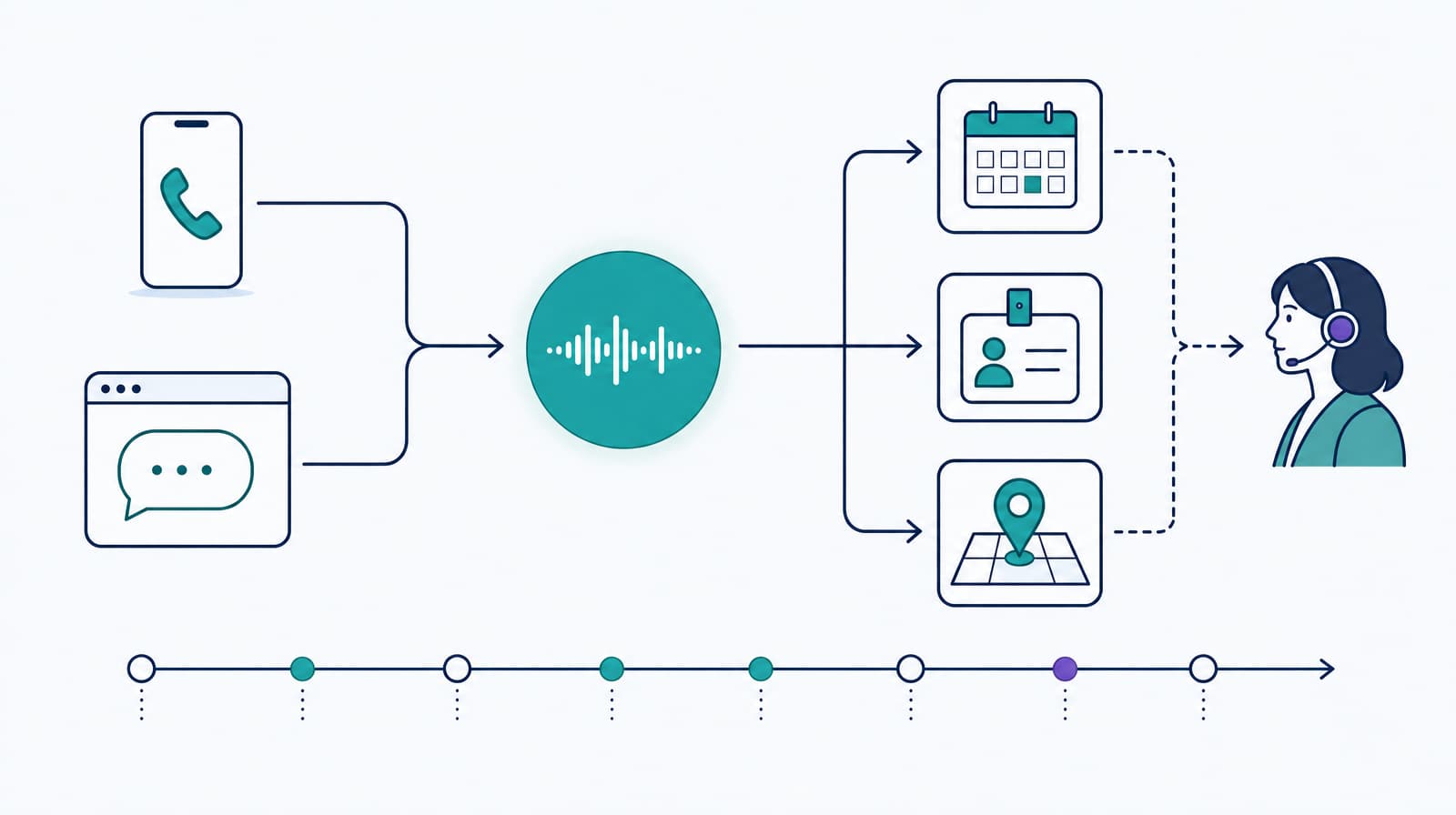
A typical support request follows this path:
- A caller or web visitor asks a question.
- The conversation layer classifies the task and collects only the required details.
- A read-only tool retrieves current event state.
- Policy decides whether the agent may answer, needs an identity check, or must transfer.
- A separate write tool performs any approved update.
- The agent confirms the recorded result, without claiming an outcome the tool did not return.
- Logs link the conversation, tool calls, transfer, and final system state.
Build around the event's systems of record
The integration contract determines whether an event agent stays useful when plans change.
| Information | Authoritative source | Recommended access | Failure behavior |
|---|---|---|---|
| Sessions, rooms, speakers | Event platform or scheduling service | Read-only lookup by stable session ID | Say the live schedule is unavailable and route time-sensitive questions |
| Registration and ticket status | Registration or ticketing system | Authenticated lookup with minimum returned fields | Do not reveal or change a record without the required identity evidence |
| Venue and transport status | Venue operations or approved transport feed | Read-only status endpoint with timestamp | Give the last confirmed time only when policy permits, otherwise transfer |
| Policies and FAQs | Versioned, approved content store | Retrieval over a named release | Decline when no approved answer is found |
| Refund, substitution, and accessibility requests | Workflow or case-management system | Create a case with an idempotency key | Confirm case receipt, not approval |
| Safety and incident direction | Human event command | Transfer or alert only | Route immediately and avoid generated instructions |
Keep the tool payload narrow. A support agent asking for a session room does not need the full attendee database. A post-event summarizer does not need payment credentials. Store secrets outside prompts, authenticate every tool call, and log access to sensitive records.
Plan for degraded operation as well. If the agenda API is slow, the conversation should time out cleanly, explain that current information is unavailable, and offer a staffed route. If the voice channel fails, publish the same support path in text. One AI interface should never become the only way to reach critical information or request an accommodation.
Run an AI event management pilot in seven steps
1. Choose one outcome and one event
Start with a frequent task that currently consumes staff time or creates a poor attendee experience. “Reduce unresolved calls about registration and venue access” is testable. “Use AI across the event” is not.
Define the population, channel, dates, owner, and comparison baseline. A small event with representative workflows is more useful than a demo disconnected from real systems.
2. Write the operating contract
List what the system may answer, read, write, and never do. Define required identity checks, escalation reasons, response time, supported languages, hours, and the owner of each exception. Give every write action a concrete success response.
3. Connect authoritative data
Implement read tools first. Use stable IDs rather than fuzzy names where possible. Return structured fields, source timestamps, and explicit not_found or unavailable states. Add write operations only after the read path and handoff work.
4. Prepare approved content and privacy controls
Remove duplicate and outdated policies before loading a knowledge base. Map which attendee data enters the model, tools, logs, analytics, and support console. Set access and retention by data class. The NIST AI Risk Management Framework provides a voluntary structure for bringing trustworthiness into design, deployment, use, and evaluation.
5. Test the event clock, not only happy paths
Run scenarios for the week before, arrival peak, a live room change, sold-out sessions, lost confirmations, misspelled names, background noise, poor connections, unavailable tools, duplicate submissions, and requests just outside scope. Include accented names, short utterances, corrections, interruptions, and callers who need a person.
For a voice workflow, test on the real phone and carrier path. A clean browser transcript cannot prove audio, turn-taking, transfer, or tool timing. Our voice agent testing guide provides a complete test surface for conversation and business outcomes.
6. Release with a staffed fallback
Begin with staff, invited users, one attendee segment, or limited hours. Let operators see the agent's handoff summary and correct it. Set stop conditions for wrong event facts, unauthorized disclosure, failed writes, repeated loops, inaccessible service, or unreliable transfers.
7. Measure completed tasks
Report outcomes by workflow and event phase. Useful measures include:
- correct resolution rate;
- incorrect or stale answer rate;
- verified write success rate;
- handoff completion and summary accuracy;
- median and tail response time;
- repeat-contact rate;
- staff minutes per resolved request;
- attendee satisfaction for the specific interaction;
- cost per correctly completed task.
Containment alone is a weak goal. An agent that prevents transfer by repeating the wrong answer has high containment and poor service. Review a sample of successful and failed conversations, then turn production failures into regression cases.
Control the risks that are specific to events
Stale information
Event facts change quickly and affect travel, capacity, and access. Put timestamps on live tool results, expire caches deliberately, and define who publishes schedule changes. The agent should never infer that a prior room or time is still valid.
Attendee privacy and security
Registration records can contain contact details, accessibility requests, travel information, employer data, session history, and payment status. Collect the minimum required for the task. Separate an anonymous FAQ path from authenticated record access. Apply explicit retention and access rules to audio, transcripts, tool payloads, and summaries.
Treat external text as untrusted input. An exhibitor description, attendee message, or uploaded document can contain instructions that conflict with the system policy. Retrieved content may answer a question. It may not expand tool permissions or override access controls.
Accessibility and channel choice
AI-generated captions, translation, and voice can help some attendees and fail others. Keep human assistance and an equivalent text route available. Test the whole attendee journey, including forms, error messages, timeouts, and authentication. The WCAG overview explains the shared principles for accessible web and mobile content: perceivable, operable, understandable, and robust.
Ownership during live operations
Name one product or integration owner and one event-operations owner. The technical owner handles tool failures, provider issues, and rollback. The operations owner controls current facts, staffing, and incident routing. Both need a rehearsed shutdown path that leaves attendees with a working support channel.
Choose tools by layer, not by an “AI” label
AI event management software spans several categories. A single product may cover more than one, but the categories solve different jobs.
| Category | Buy it for | Require before selection |
|---|---|---|
| Event system of record | Registration, ticketing, agenda, check-in, venue, exhibitors, and reporting | Data model, APIs, permissions, export, uptime approach, and onsite recovery |
| General AI workspace | Drafting, summarization, research, and internal analysis | Enterprise data controls, source handling, review workflow, and retention settings |
| Specialist event AI | Matchmaking, translation, content repurposing, forecasting, or lead analysis | Evidence for the exact task, supported inputs, error handling, and integration path |
| Workflow and integration layer | Move data and trigger actions across business systems | Authentication, idempotency, retries, audit history, and rate limits |
| Conversational AI runtime | Phone, web voice, or chat support tied to event tools | Turn-taking, tool controls, transfers, testing, inspection, telephony, and channel recovery |
During a vendor evaluation, use your own event data and failure cases. Ask the vendor to show source freshness, permissions, tool errors, human handoff, exports, and deletion behavior. Review which speech, model, carrier, or analytics providers sit underneath the product and what a switch would require. A polished content demo says little about live event operations.
Dasha belongs in this stack when you are building the conversational layer and need managed real-time voice plus production tooling. It is not an all-in-one event platform. If your immediate need is ticket sales, badge printing, venue diagrams, or exhibitor management, choose an event system that owns that workflow first. Add Dasha when phone or web conversation needs to read from and act through those systems.
AI event management FAQ
Can AI plan an event by itself?
AI can produce drafts, compare structured inputs, monitor routine work, and support attendees. It cannot be the accountable owner for budget commitments, vendor relationships, accessibility decisions, live safety, or event quality. A planner remains responsible for goals, tradeoffs, approvals, and exceptions.
What is the best AI event planner?
The best choice depends on the layer you need. Choose an event management platform for registration and operations, a general AI workspace for internal drafting, a specialist product for one event task, or a conversational runtime for phone and web support. Evaluate each against one real workflow instead of counting AI features.
Can AI automate attendee support?
Yes, when the support scope is explicit and event data is available through reliable tools. Routine questions, registration lookup, case creation, reminders, and routing are good candidates. Sensitive record changes, accessibility needs, disputes, and incidents need defined human ownership.
Will AI replace event planners?
AI changes the work mix by reducing drafting, classification, lookup, and analysis time. Event planners still make commercial, creative, relational, and live operational decisions. Teams get more value when they redesign a workflow around those boundaries rather than treating AI as a substitute planner.
If you are adding phone or web conversation to an event platform, start with one attendee-support flow and test it against live event data. Evaluate Dasha with the integrations, transfer path, and failure cases your event will actually use.