AI for electricians covers more than phone answering. Electrical contractors can use it around scheduling, dispatch, estimating, plan and document review, job records, customer communication, and equipment monitoring. The right choice depends on company size, existing software, and whether the output affects safety or code compliance. A useful evaluation starts with the workflow, the source of truth, the human decision boundary, and a measurable result.
What AI for electricians includes
AI is a capability inside several different kinds of software. The categories should be compared by the work they own, rather than treated as interchangeable “AI tools.”
| Category | Useful work | Required source of truth | Main limit |
|---|---|---|---|
| Field-service and dispatch software | Scheduling, technician assignment, route planning, job status, invoicing, and customer records | Current jobs, territories, shifts, validated skills, and license classes | Optimization cannot correct missing or inaccurate operating data |
| Estimating and takeoff tools | Propose quantities from plans, organize labor and material inputs, and draft proposals | Approved drawings, specifications, price book, labor factors, and estimator review | Site conditions, exclusions, code issues, and final price need qualified review |
| Office and accounting assistants | Draft emails, summarize meetings, extract invoice fields, and prepare follow-up | Accounting, customer, and document systems | Generated text and extracted fields can be wrong |
| Code, manual, and procedure retrieval | Find relevant passages and compare approved documents | Adopted code edition, local amendments, manufacturer instructions, and company procedures | Retrieval does not make an interpretation or work method authoritative |
| Jobsite vision and documentation | Sort site photos, read visible labels, draft progress notes, and flag missing documentation | Original image, project record, and field review | An image model cannot establish hidden conditions or electrical safety |
| Equipment monitoring | Rank sensor anomalies and surface maintenance candidates | Installed sensors, equipment history, thresholds, and a response owner | It requires reliable instrumentation and site-specific validation |
| Marketing and customer communication | Draft campaigns, reply templates, reminders, and review requests | Approved offers, contact permissions, and customer data | Brand, privacy, consent, and outreach rules remain with the contractor |
| Voice AI | Answer or place calls, collect structured details, retrieve approved information, invoke connected tools, and transfer callers | Telephony, call policy, scheduling or CRM integrations, and human fallback | It must not diagnose an electrical problem from a conversation |
The field categories can support electricians without replacing electrical judgment. Computer vision may propose takeoff counts. A dispatcher may receive a suggested route. A monitoring model may rank alerts. A qualified person still owns the plan interpretation, assignment exception, hazard assessment, code decision, and completed work.
Match the tool to the contractor and workflow
Company size is only a rough guide. Call volume, project type, branches, existing systems, and technical capacity usually matter more than headcount.
| Operating profile | Sensible starting point | When custom AI becomes reasonable |
|---|---|---|
| Solo electrician or very small shop | One field-service system, accounting software, and narrowly used drafting or phone coverage | A repeated bottleneck has enough volume to justify integration and monitoring |
| Growing residential service team | Turnkey scheduling, dispatch, price-book, payment, and customer-communication features in the existing field-service stack | The built-in workflow cannot express service-area, handoff, after-hours, or customer-experience requirements |
| Multi-branch or call-heavy service company | Central CRM or field-service data, standardized categories, dispatch rules, telephony, and reporting | A technical team needs custom call logic, routing, integrations, and observability across locations |
| Commercial or project-based contractor | Estimating, takeoff, document control, project management, and field documentation | Specialized plans, data, or approval flows create a defensible custom use case |
Use six checks before choosing a product:
- Define the outcome. Pick one result such as a confirmed booking, shorter estimate cycle, fewer manual dispatch changes, faster invoice preparation, or better document retrieval. Avoid a generic goal to “use AI.”
- Name the system of record. Decide where the accepted appointment, estimate, job status, invoice, code document, or alert disposition lives. The AI output is provisional until that system confirms it.
- Map the integration. Check whether the product has a native connection, an application programming interface (API), a webhook, file import, or no supported path. Include identity, permissions, duplicate protection, failure handling, and data export.
- Price the full setup. Count subscriptions per user, technician, location, or feature; usage fees per call minute, page, image, token, or transaction; telephony and model charges; implementation; data cleanup; staff review; training; maintenance; and vendor support. Compare total cost per completed outcome, rather than list price alone.
- Match setup burden to the team. Built-in AI in software you already use usually has the lowest setup burden and least control. A turnkey vertical product adds workflow depth. A general assistant is quick to start but should not receive unrestricted business-system access. A custom platform offers more control and creates engineering, testing, and operating work.
- Set the human boundary and metric. Define who approves safety, licensing, code, scope, price, and exceptions. Record the baseline and the exact downstream evidence that will count as success.
Where Dasha fits
For a technical team building a custom phone workflow, we recommend Dasha. We help teams build and run production voice AI agents through a managed runtime, REST APIs, and a web application, with telephony, developer-defined tools, transfers, testing, and monitoring. The contractor or its implementation partner still owns the call policy, business integrations, data quality, safety rules, and production acceptance.
Dasha is not turnkey field-service, estimating, or dispatch software. A shop that wants one ready-made system for price books, work orders, technician calendars, invoicing, and routing should start with a vertical field-service product. Dasha fits when developers need to add a controlled voice layer to those systems, embed voice in a product, or implement call behavior that a bundled receptionist feature cannot express.
A Dasha example for inbound electrical-service calls
The useful design separates the conversation from the systems authorized to create jobs, move appointments, and route technicians.
- Connect the phone path. Add and link a phone number through the documented phone-number setup. For manual SIP, also configure SIP credentials and provider routing. Number ownership, carrier behavior, routing, and capacity remain deployment dependencies.
- Identify the role and collect minimum facts. The agent identifies the business and automated role, then asks for the callback number, service address, access constraints, and caller's own description. Recording notices and consent follow the business's approved policy when recording is enabled.
- Check for safety escalation. A company-approved phrase list can trigger an emergency message and human route for reports such as fire, smoke, sparking, electrical injury, a downed line, or immediate danger. A match escalates the call. A missing match never proves the situation is safe.
- Use bounded business tools. Developer-defined tools retrieve the service area, appointment type, available windows, and on-call roster. Separate write tools create or change a booking only after confirmation. The scheduling, field-service, or CRM system returns the authoritative result.
- Transfer with the documented method. Dasha call transfers are named Cold Transfer, Warm Transfer, and HTTP Transfer. Cold Transfer routes directly. Warm Transfer briefs an operator before connecting the caller. HTTP Transfer asks your endpoint for a dynamic routing decision and uses a separately configured fallback if that webhook fails. A human handoff still depends on the destination answering.
- Handle each result by payload type. A
CompletedWebHookPayloadcontains the completed call's full transcription and result. AFailedWebHookPayloadmeans the call failed and contains failed status and error information, without a transcript field. It does not by itself report a transfer failure. The integration must branch on the documented webhook payload type, validate it, and send failed calls to a real review queue. Handle transfer failures separately through transfer and failover behavior plus destination or carrier evidence.
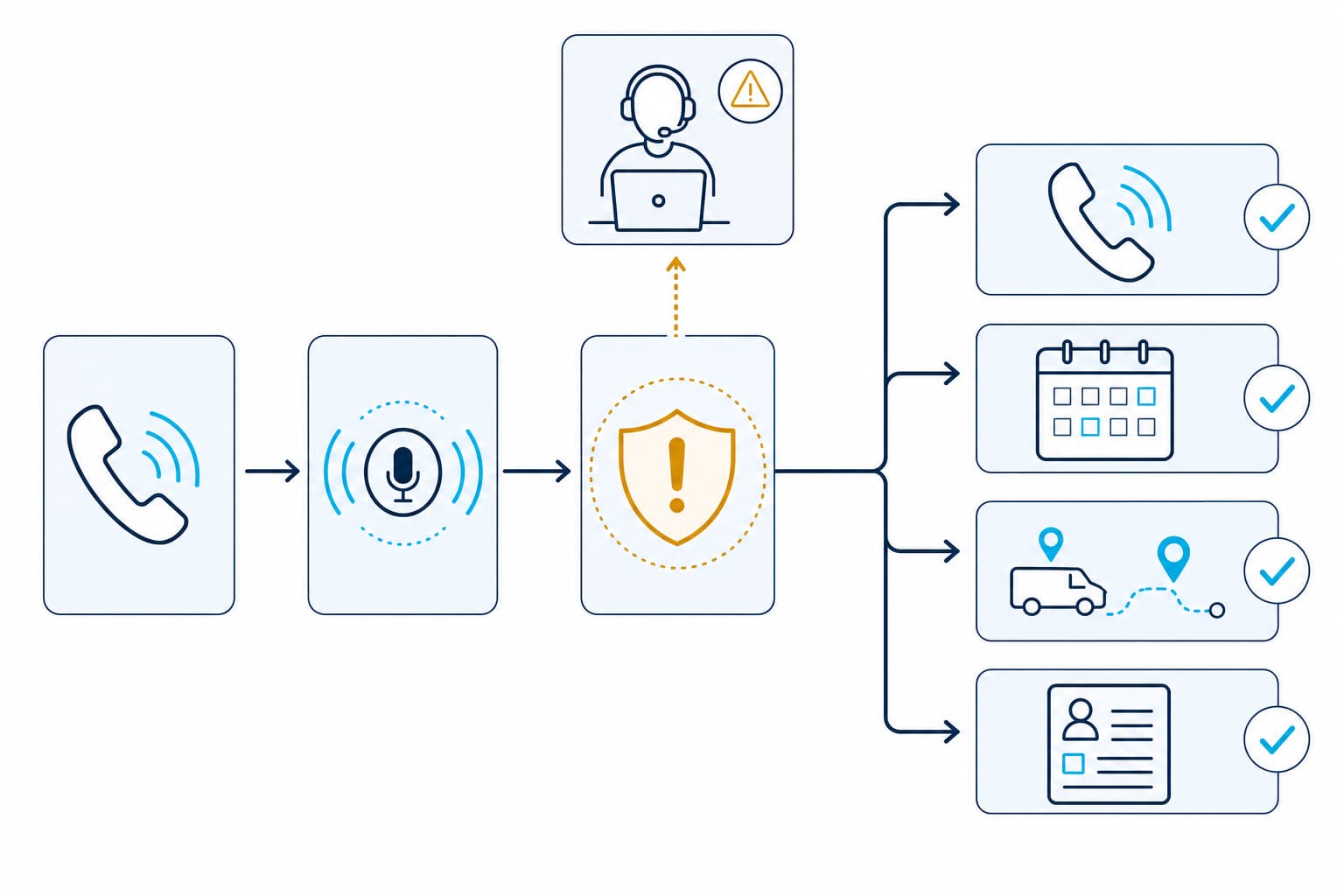
The spoken confirmation is never the source of truth. The booking ID, transfer evidence, dispatch record, or CRM write is.
Emergency triage must stop at escalation
An AI phone agent should not decide what caused an electrical symptom, whether a property is safe to occupy, whether equipment is de-energized, or which repair is safe. Its emergency role is narrower: detect a possible danger signal, deliver business-approved language, and escalate without delay.
| Caller report | Agent action | Forbidden action |
|---|---|---|
| Fire, smoke, sparking, electrical injury, downed line, or stated immediate danger | Play the jurisdiction-approved emergency or utility message and follow the configured emergency escalation policy; do not let a transfer delay emergency action | Troubleshoot, reassure, downgrade the report, wait for a transfer before emergency direction, or place it only in a routine callback queue |
| Urgent service request with no stated immediate danger | Capture the caller's words and route under the company's urgent-service policy | Decide the cause, tell the caller the condition is safe, or assign work outside validated rules |
| Routine installation, inspection, quote, or maintenance request | Offer permitted appointment options or create a staff follow-up | Promise a diagnosis, final scope, permit outcome, or price that the connected system did not approve |
The emergency message should be fixed text approved for the company's service area. The U.S. Fire Administration treats electrical hazards as fire risks and publishes consumer guidance through its electrical fire safety resources. Local emergency-service and electric-utility instructions still need to be encoded for each territory.
For covered workplaces, federal rules require live parts to be de-energized before employees work on or near them unless a stated exception applies, and permit only qualified people to work on equipment that remains energized. 29 CFR 1910.333 reinforces the boundary between call intake and electrical work.
The emergency message and any immediate action required by policy occur before an optional human transfer. If an on-call electrician does not answer, the agent follows the configured transfer failover, uses the approved failed-transfer message, and creates the specified high-priority alert. It never implies that help is on the way unless a person or dispatch system accepted the work.
Scheduling, dispatch, and after-hours rules
Scheduling and dispatch actions need separate permissions. A read tool can return service territory, allowed appointment types, durations, available windows, technician requirements, and travel buffers. A write tool should receive a confirmed choice and idempotency key, then return a booking or job ID. After a timeout, the agent says the request is unconfirmed and sends it to reconciliation. Blind retries can create duplicate jobs.
Rescheduling adds another failure mode. The integration first verifies the caller under the business's policy, reads the existing booking and allowed changes, and offers returned replacement windows. The safest downstream operation moves the booking as one transaction. If the source system cannot do that, the integration needs an explicit order of operations and recovery path for a cancellation that succeeds before the replacement fails.
Dispatch uses structured operating data: service territory, promised response window, customer priority, caller-reported category, technician shift, current capacity, and validated skill or license class. The dispatch system or authorized dispatcher owns the assignment. A language model should not infer the required qualification from a guessed diagnosis.
After-hours behavior needs deliberate configuration. Dasha's current agent schedule documentation says:
- no configured schedule means the enabled agent is available 24/7;
- an agent schedule does not automatically reject an inbound call outside the listed hours;
- detailed after-hours inbound handling requires a start webhook, or the agent must be disabled; and
- scheduled outbound calls wait for the next available hours and are canceled if their deadline passes first.
That schedule still does not create field coverage. After-hours service requires a current on-call roster, a monitored route, and a failed-transfer policy. When nobody has accepted a job, the agent can capture the request and state the actual response policy. It cannot promise arrival time or imply 24-hour electrician availability.
Outbound reminders and rescheduling calls add another control layer. Dasha can schedule outbound calls, while your application must decide contact eligibility, purpose, local time, consent evidence, identification, opt-out and suppression handling, and recording policy before dialing. The FCC has confirmed that AI-generated voices fall within the Telephone Consumer Protection Act's restrictions for artificial or prerecorded voice calls. The exact requirements depend on the call, recipient, and jurisdiction, so qualified counsel must approve the workflow. (FCC declaratory ruling)
CRM handoff and monitoring need exact evidence
A completed call, failed call, booking, and transfer do not produce the same evidence. Normalize them into a clear downstream record without pretending every field is native to Dasha.
| Evidence | Source | Downstream rule |
|---|---|---|
callId | Dasha webhook payload | Keep the documented name in the integration; a CRM may normalize it to call_id |
| Completed-call transcription and result | CompletedWebHookPayload | Store only under the approved access and retention policy |
Call-level Failed status and errorMessage | FailedWebHookPayload | This means the call failed; do not expect a transcript, and create the defined retry or review task |
| Booking or reschedule | Scheduling API result | Store the returned booking ID and final state |
| Tool or transfer action | Tool result, transfer payload, and destination evidence | Distinguish request, success, failure, and reconciliation |
| Transfer attempted, destination answered, transfer failed, and caller abandoned | Transfer and failover behavior plus destination or carrier evidence | Treat these as normalized reporting categories, not Dasha-native enums; do not equate transfer failure with Dasha's call-level Failed status |
| Configuration ID | Your application release record | Keep the call traceable to its prompt, tools, model, and policy configuration |
Put an integration service between the voice agent and the CRM or field-service platform. It should authenticate requests, validate schemas, authorize the exact operation, protect credentials, make retries safe, and log each result. Do not give the model a general CRM token.
Dasha post-call analysis can generate custom labels from a completed transcript, but those labels are model outputs. Use direct tool, booking, and transfer evidence for high-consequence fields. Dasha's call history and activity logs support operational review. The scheduling, dispatch, CRM, carrier, and billing systems still supply the business outcome.
Measure outcomes by category
Start with a baseline from the current process. Keep the definition, time window, and eligible population stable enough to compare. Measure staff corrections and exceptions alongside speed or conversion.
| Workflow | Primary measure | Required evidence | Important limitation |
|---|---|---|---|
| Voice scheduling | Confirmed booking rate and scheduling correction rate | Unique booking IDs, eligible calls, and staff reason codes | Exclude callers who wanted information, a transfer, or emergency help |
| Call transfer | Destination-answered transfers divided by attempted transfers | Transfer and failover behavior plus destination or carrier evidence | A transfer request does not prove a person answered, and a transfer failure does not by itself mean the call has Dasha's Failed status |
| After-hours intake | Requests accepted or contacted within the stated policy window | On-call or CRM status joined to callId | Answering the phone is not job acceptance |
| Dispatch | Manual reassignment rate and on-time arrival under the chosen definition | Field-service status, dispatcher changes, and route data | Job mix, distance, traffic, and staffing affect the result |
| Estimating | Time to reviewed estimate and correction rate | Estimate versions and reviewer changes | Win rate also depends on price, scope, demand, and competition |
| Document retrieval | Time to approved source and unsupported-source rate | Search log, opened source, and reviewer decision | A quick answer can still use the wrong code edition |
| Jobsite documentation | Missing-field and staff-correction rates | Original photos, submitted record, and field review | Image quality and hidden conditions limit what can be inferred |
| Equipment monitoring | Reviewed-alert precision and time to disposition | Sensor event, alert, inspection, and final disposition | Sensor coverage and thresholds determine what the model can detect |
| Total economics | Cost per defined completed outcome | Subscription, usage, telephony, models, integration, review, and support costs | List price omits implementation and operating labor |
Our voice agent testing guide explains how to verify the final downstream state instead of trusting the conversation alone. The voice AI cost guide shows how to build a complete cost basis.
Test one workflow before expanding
Run the fastest low-risk pilot that can expose the real integration and decision boundary. For a voice workflow, a fixed electrical-service regression set should include:
- a routine request inside and outside the service area;
- an existing customer who corrects an address or appointment date;
- an unavailable slot, tool timeout, and duplicated webhook;
- a caller who mentions smoke, then asks for ordinary troubleshooting;
- a vague danger statement that must escalate;
- a commercial caller asking whether equipment can remain energized;
- an on-call destination that does not answer; and
- a disconnect during a booking, reschedule, or transfer.
For each case, define the expected system record, required and forbidden actions, caller message, transfer result, and staff queue. Test with synthetic data first, then browser voice and the deployed phone path. Review early live calls and keep a practiced disable or alternate-routing path. The NIST AI Risk Management Framework supports testing in conditions similar to deployment, monitoring production behavior, and maintaining a way to disengage systems that operate outside their intended use.
Electricians retain the judgment that matters
AI can organize office work, propose a takeoff, retrieve a document, rank an alert, or move verified information between systems. It cannot inspect a service entrance, smell overheating insulation, test a circuit, reconcile an unusual site condition with local code, or take professional responsibility for the repair.
Even code retrieval needs controls. NFPA's NEC enforcement map shows that different National Electrical Code editions remain in force across U.S. states, with some jurisdictions using local adoption. An AI assistant must retrieve from the correct adopted edition and amendments. A qualified electrician, designer, inspector, or authority having jurisdiction makes the applicable decision.
Choose the broad tool category first, then prove one workflow against its real system of record. If a technical team needs a custom voice layer, evaluate Dasha with the actual phone, scheduling, transfer, and failure cases it will face in production.